Connecting Legacy Systems with AI: An FDE’s Integration Guide
Written by Emily Hilton
- What Is a Legacy System?
- What Is AI Integration and Why Does It Matter?
- How Does an FDE Connect Legacy Systems with AI?
- Legacy System Modernization: Do Businesses Need to Replace Everything?
- Legacy Modernization Case Study: Connecting AI to an Inventory System
- What Skills Does an FDE Need for Legacy AI Integration?
- How GSDC’s FDE Certification Helps Professionals?
- Conclusion
Businesses are increasingly adopting artificial intelligence (AI) to automate repetitive tasks, improve decision-making, and deliver better customer experiences. However, many organizations still depend on older software systems to manage important operations, including customer records, financial transactions, inventory, and employee information.
Replacing these systems completely can be expensive, time-consuming, and risky. The challenge is finding a way to introduce AI without disrupting the systems that already keep the business running.
This is where a Forward Deployed Engineer (FDE) plays an important role. An FDE works closely with business and technical teams to connect AI solutions with existing infrastructure, solve integration challenges, and make sure the final solution delivers measurable business value.
In this guide, we will explore how an FDE approaches legacy system integration, the technical methods involved, and how businesses can modernize their existing systems without rebuilding everything from scratch.
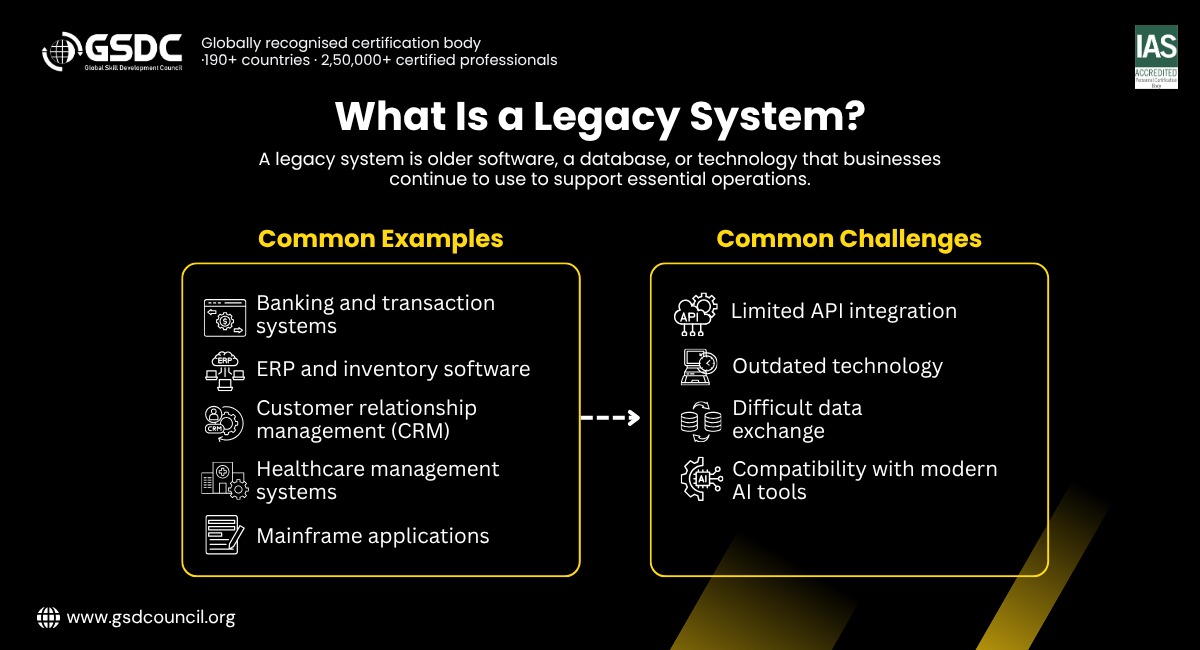
What Is a Legacy System?
To understand AI integration, it is important to first understand the technology businesses are working with.
Legacy System Meaning
The legacy system meaning refers to an older software application, database, or technology infrastructure that an organization continues to use because it supports important business operations.
A legacy system may still work reliably, but it might lack modern features, integration options, or the flexibility needed to support new technologies. Some systems also depend on outdated programming languages or infrastructure that only a limited number of developers understand.
What Is a Legacy System? Examples and Challenges
When asking what is a legacy system, think of software that continues to serve a business purpose but was not originally designed to work with today's cloud platforms, APIs, or AI applications.
Common legacy systems examples include:
- Banking applications: Older systems that process transactions and maintain account records.
- Enterprise resource planning (ERP) software: Applications that manage purchasing, inventory, accounting, and operations.
- Customer relationship management (CRM) systems: Older platforms that store customer information and sales histories.
- Healthcare management systems: Applications that maintain patient records, appointments, and billing information.
- Mainframe applications: Centralized systems that process large volumes of business transactions.
The main challenge is not necessarily that these systems are broken. Instead, they may use outdated data formats, lack modern APIs, or operate separately from newer applications.
For example, a company might have customer information stored in an older database while its AI-powered customer support tool operates in the cloud. Without a reliable connection between them, the AI tool cannot access the information it needs to provide useful answers.
What Is AI Integration and Why Does It Matter?
AI integration is the process of connecting artificial intelligence capabilities with existing software, databases, applications, and business workflows.
When businesses ask what is AI integration, the simplest explanation is that it allows AI to work with the systems and information that employees already use rather than operating as a separate tool.
For example, an AI assistant connected to an inventory system could retrieve current stock levels, identify products running low, and recommend when to reorder them.
However, connecting AI to a legacy environment requires more than adding an AI model. The solution must retrieve accurate information, respect access permissions, handle errors, and return results in a format that existing applications can understand.
Understanding AI System Integration
AI system integration involves connecting an AI model or application with the technical components that support business operations.
These components may include databases, APIs, authentication services, cloud platforms, and existing enterprise applications.
A typical integration follows this sequence:
- An employee submits a request through an application.
- The application sends the request to an integration service.
- The service retrieves the necessary information from the legacy system.
- The AI model analyzes the information and generates a response or recommendation.
- The application validates the result and displays it to the employee.
Consider an employee asking, "Which products are likely to run out this week?"
The integration service retrieves stock levels and recent sales data. An AI model analyzes the information and identifies products that may need replenishment. The result is then presented to the employee, who can review and approve the next steps.
The AI model does not need direct access to every part of the legacy database. A controlled integration layer can provide only the information and actions required for the task.
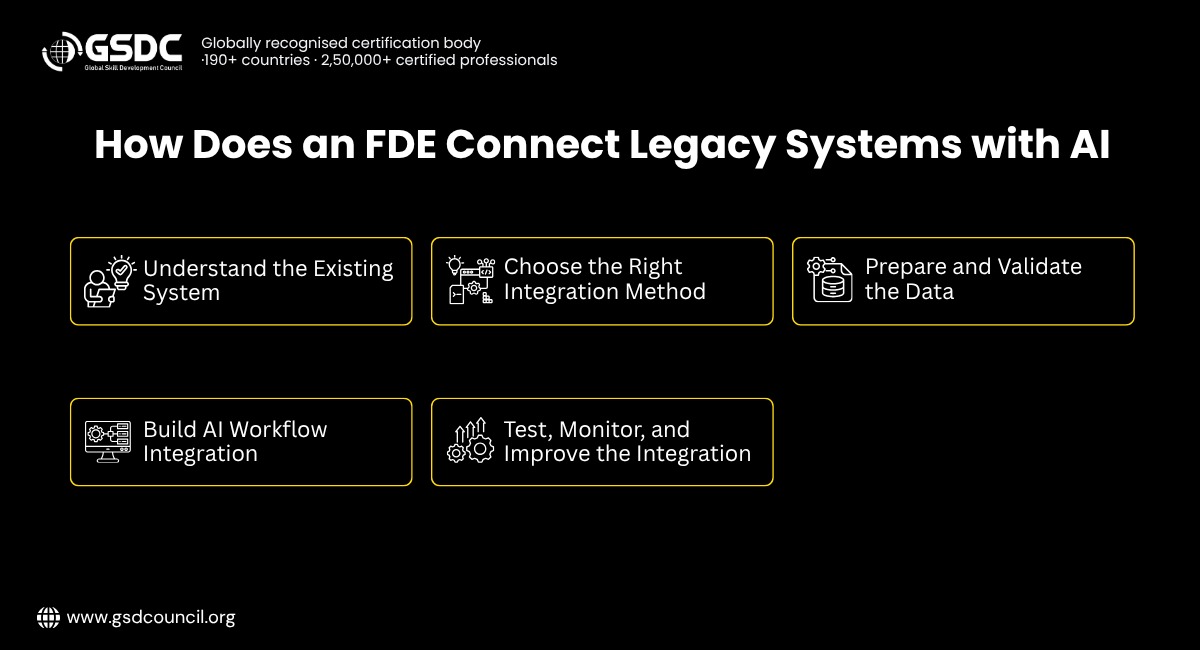
How Does an FDE Connect Legacy Systems with AI?
An AI forward deployed engineer works at the intersection of software engineering, AI implementation, and business problem-solving.
Rather than building a solution in isolation, an FDE investigates how the organization's systems work, identifies integration limitations, and develops a solution that fits the real operating environment.
Here are the key steps involved.
1. Understand the Existing System
Before writing code, the FDE studies the legacy application's architecture, data sources, business rules, and dependencies.
They investigate questions such as:
- Where is the required business data stored?
- Does the application provide APIs or database access?
- Which programming languages and data formats does it use?
- What security restrictions apply?
- Which business processes depend on the system?
For example, an older inventory application might store product information in a relational database but export daily reports as CSV files. Understanding this setup helps the FDE decide whether to use an API, a database connection, or a file-processing pipeline.
This assessment reduces the risk of introducing a solution that works technically but fails in the actual business environment.
2. Choose the Right Integration Method
Not every legacy system supports modern integration methods. An FDE selects an approach based on the available infrastructure, security requirements, and business needs.
Common approaches include:
- API integration: If the legacy system provides an API, the AI application can request information through defined endpoints. APIs provide a structured way to exchange data without requiring the AI application to understand the internal database design.
- Middleware: Middleware acts as a bridge between applications that use different technologies or data formats. It can translate requests, validate information, and manage communication between the legacy system and the AI application.
- Database integration: When appropriate, a service can retrieve information through controlled, read-only database queries. Direct database access requires careful permission management and should avoid interfering with production transactions.
- File-based integration: Some older applications exchange information through CSV, XML, or scheduled reports. An integration service can process these files, validate their contents, and make the information available to an AI application.
- Event-driven integration: When a legacy system supports events or message queues, it can publish updates when important changes occur. Other services can then process those updates without repeatedly requesting the entire dataset.
The best method depends on what the existing system supports. An FDE does not automatically replace the legacy architecture; they choose the safest and most practical way to connect it.
3. Prepare and Validate the Data
AI applications depend on reliable data. Legacy systems may contain duplicate records, inconsistent date formats, outdated customer information, or missing values.
For example, one application might store a date as 28-10-2026, while another expects 2026-10-28. Without proper conversion, the receiving application may misinterpret the date or reject the record.
An FDE creates data-processing rules to standardize formats, validate required fields, and handle incomplete information.
They may also use data mapping to connect fields across systems. For instance, a legacy field named CUST_ID might correspond to customer_id in a modern application.
These checks help ensure that the AI model receives meaningful information rather than producing recommendations based on incorrect or incomplete data.
4. Build AI Workflow Integration
AI workflow integration connects AI capabilities to the steps employees already follow to complete a business task.
Imagine a customer service team that receives hundreds of order-status questions every day.
An FDE could develop a workflow in which the AI assistant identifies the customer's request, retrieves order details from the legacy system, generates a response, and presents it for approval.
A simplified workflow might look like this:
Customer request → Request validation → Legacy system lookup → AI response generation → Human review when required → Customer response.
The workflow should include safeguards. For example, the AI assistant should not invent an order status when the legacy system is unavailable. Instead, it should report that the information could not be retrieved.
Likewise, actions such as refunds, payments, and changes to sensitive records may require explicit authorization or human approval.
This approach makes AI useful within existing operations while keeping important business decisions under appropriate control.
5. Test, Monitor, and Improve the Integration
An integration that works during development may behave differently when real employees use it with large volumes of data.
Before deployment, an FDE tests whether information is retrieved correctly, responses are accurate, permissions are enforced, and failures are handled safely.
They may also measure response time, integration errors, AI response quality, and the number of tasks completed successfully.
Monitoring continues after deployment. If the legacy system changes its data format or becomes temporarily unavailable, the integration should detect the problem and provide useful error messages rather than silently producing incorrect results.
Legacy System Modernization: Do Businesses Need to Replace Everything?
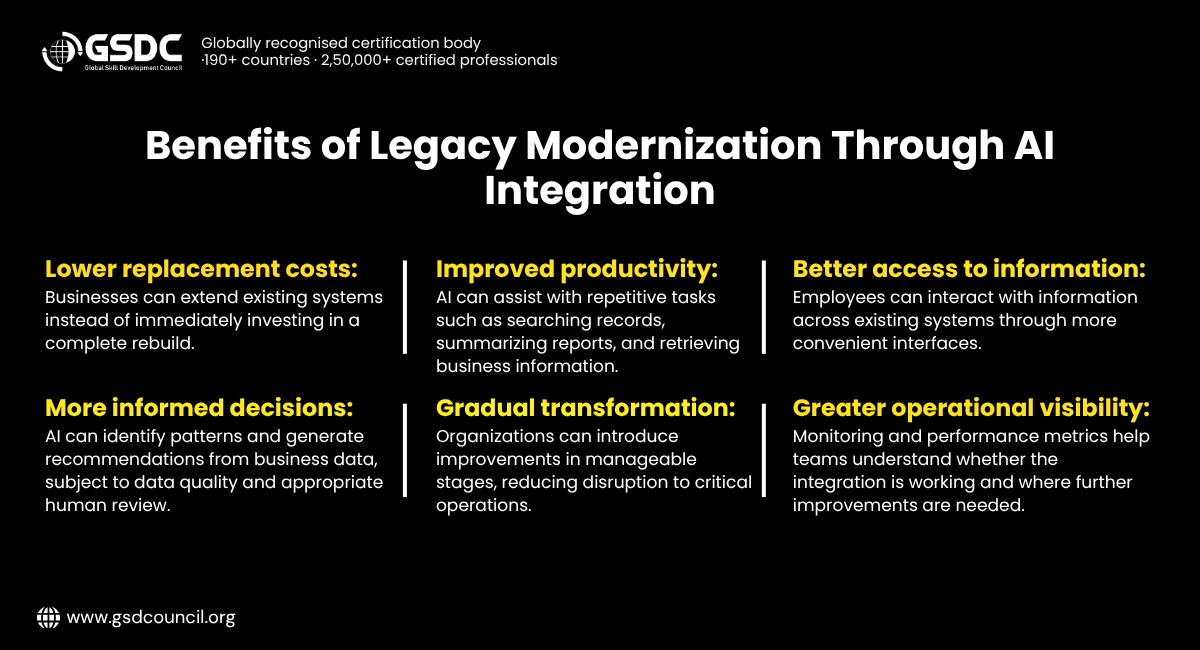
Legacy system modernization means improving older applications, infrastructure, or integration methods so they can better support current business requirements.
Modernization does not always mean rewriting the entire application. Depending on the situation, businesses can introduce API layers, move selected services to the cloud, improve data pipelines, or connect AI applications to existing systems.
Legacy system transformation takes a broader view. It may involve changing business processes, updating application architecture, improving data management, and introducing new ways of working.
For example, a business could keep its existing billing application while adding an AI assistant that retrieves invoice information and identifies unusual transactions. The billing system continues to process invoices, while the new integration adds capabilities around it.
This approach allows organizations to introduce improvements gradually instead of taking on the cost and risk of a complete replacement.
Legacy Modernization Case Study: Connecting AI to an Inventory System
Consider a fictional manufacturing company that manages inventory through an older ERP application.
The system records stock levels, product codes, and supplier details, but employees must manually review reports to identify products that may run out of stock.
The company wants to use AI to improve inventory planning without replacing its ERP system.
The Integration Approach
An FDE first examines the ERP database and identifies a safe way to retrieve inventory and sales information.
Next, they develop an integration service that extracts approved data, validates product identifiers, and converts the records into a consistent format.
An AI application then analyzes inventory levels, recent sales, and supplier lead times to flag products that may require replenishment.
The results appear in a dashboard that allows inventory managers to review recommendations. The AI system does not automatically place purchase orders; employees retain approval authority.
The FDE also adds error handling, access controls, monitoring, and testing to make sure the integration works reliably.
What Does the Business Gain?
The company can now identify potential stock shortages earlier and spend less time manually reviewing reports.
To evaluate the results, it tracks indicators such as time spent preparing inventory reports, the frequency of stockouts, recommendation accuracy, and employee adoption.
These are potential outcomes, not guaranteed results. Actual improvements depend on data quality, workflow design, supplier reliability, and how employees use the recommendations.
This legacy modernization case study demonstrates how AI can extend the capabilities of an existing application without requiring a complete system replacement.
What Skills Does an FDE Need for Legacy AI Integration?
Successful integration requires more than knowledge of AI models. The forward deployed engineer skills needed for this work combine technical knowledge with practical problem-solving.
Important skills include:
- API development and integration: Understanding HTTP requests, REST APIs, authentication, and structured data formats such as JSON.
- Database knowledge: Working with SQL, relational databases, queries, and data validation.
- AI application development: Understanding language models, retrieval-augmented generation (RAG), model evaluation, and prompt design.
- System architecture: Knowing how applications communicate and how to design reliable integration layers.
- Security awareness: Applying least-privilege access, protecting sensitive information, and managing credentials securely.
- Business communication: Understanding user needs and explaining technical decisions in practical terms.
- Testing and monitoring: Identifying errors, measuring performance, and improving the solution after deployment.
An FDE must also understand when AI is unnecessary. If a simple database query or conventional automation can solve the problem more reliably, that may be the better choice.
How GSDC’s FDE Certification Helps Professionals?
Connecting legacy systems with AI requires a combination of software integration, AI application development, and practical problem-solving skills. GSDC’s Forward Deployed Engineer (FDE) Certification helps professionals build knowledge relevant to implementing AI solutions in real business environments.
Forward Deployed Engineer (FDE) Certification supports their understanding of system integration, AI technologies, technical problem-solving, and business requirements. For professionals working with APIs, databases, legacy infrastructure, and AI-powered workflows, this certification can help strengthen their technical foundation and prepare them to contribute to AI integration and digital transformation projects.
Conclusion
Connecting legacy systems with AI requires reliable data, suitable integration methods, and well-designed workflows. A Forward Deployed Engineer helps businesses bridge existing infrastructure with AI solutions through APIs, middleware, and continuous monitoring.
Rather than replacing everything, businesses can modernize existing systems, improve efficiency, and adopt AI gradually while minimizing disruption.

Related Certifications
Stay up-to-date with the latest news, trends, and resources in GSDC
If you like this read then make sure to check out our previous blogs: Cracking Onboarding Challenges: Fresher Success Unveiled
Not sure which certification to pursue? Our advisors will help you decide!