How to Build Your First AI Agent Using Free Tools
Written by Matthew Hale
- What Is an AI Agent, Really?
- Agentic AI vs. AI Agents: Are They the Same Thing?
- Why This Skill Is Suddenly a Hiring Priority
- The Core Principles of Building AI Agents
- Common Mistakes Beginners Make
- AI Agent Frameworks and Platforms Worth Knowing
- How to Build an AI Agent: A Step-by-Step Walkthrough
- Best AI Agents and Tools to Practice With (Free Options)
- Final Thoughts
Six months ago, "AI agent" was a term reserved for AI research papers and product demos. Today, it's showing up in job descriptions, performance reviews, and Monday morning stand-ups. If you've ever typed "how to build an AI agent" into a search bar and closed the tab five minutes later, overwhelmed by SDKs and Python snippets, this walkthrough is for you.
You don't need a computer science degree or a paid API budget to build one. You need about an hour, a free account on one no-code platform, and a clear idea of what problem you want solved. That's genuinely the whole barrier to entry now - and that's exactly what's making this skill so valuable to employers.
By the end of this piece, you'll understand what an AI agent actually is, how it differs from the chatbots you already know, the core principles that separate a reliable agent from a flaky one, and - most importantly - you'll have everything you need to build your first one yourself.
What Is an AI Agent, Really?
Let's clear up the confusion first, because it matters for everything that follows.
A chatbot answers questions. An AI agent does things. That's the one-line version, but it's worth sitting with.
A system only qualifies as an agent when it independently accomplishes tasks on a person's behalf - not just generates a response, but decides what to do next, uses tools to get there, and knows when the job is finished. A customer support bot that answers FAQs from a script isn't an agent. A system that reads a support ticket, searches your documentation, checks the customer's order history, drafts a reply, and escalates to a human when it's unsure - that's an agent.
Put simply: an agent is a system that independently gets things done on your behalf, rather than just responding to a prompt.
Two things separate an agent from a plain chatbot:
- It runs a loop, not a single turn. - It uses a language model to make decisions, checks its own progress, and corrects course if something goes wrong - instead of producing one answer and stopping.
- It has tools. - It can search the web, query a database, send an email, or update a spreadsheet, and it chooses which tool to use based on the situation in front of it.
If what you're picturing doesn't do either of those things, you're picturing a chatbot with a new name.
That loop is really the whole story of how an agent operates, from the moment it receives a request to the moment it hands back an answer:
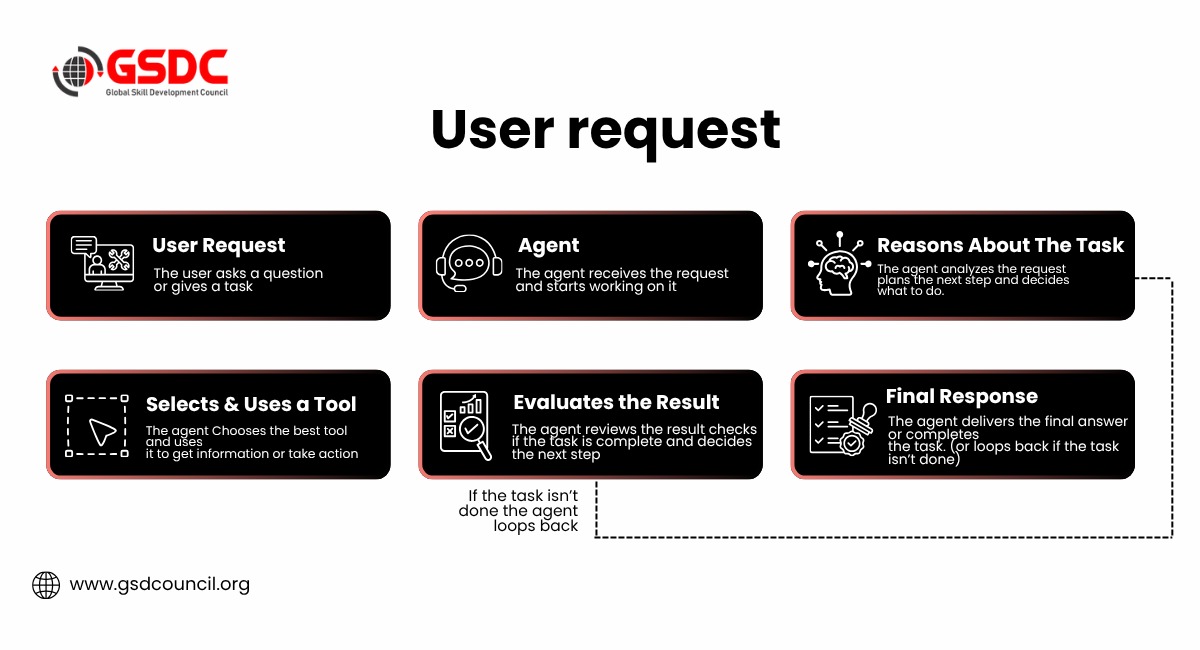
Every "agentic" behavior you'll read about - self-correction, tool use, multi-step planning - is just this loop running more than once before it hands control back to you.
Agentic AI vs. AI Agents: Are They the Same Thing?
This is one of the most searched questions in the space right now, and the honest answer is: they're related but not identical.
An AI agent is a single system built to handle a defined task - drafting emails, researching a lead, triaging a ticket. Agentic AI is the broader category: it describes any system exhibiting agent-like behavior, including setups where multiple agents work together, hand off tasks to each other, or operate under a "manager" agent that coordinates the whole workflow.
Think of it this way - one AI agent is like hiring a single specialist. Agentic AI is like building an entire team of specialists who talk to each other, delegate, and check each other's work. You'll build the former in this walkthrough. Understanding the latter is what separates someone who dabbled once from someone who can actually architect a solution at work - which is exactly why "agentic AI" is becoming its own line item on hiring manager checklists.
Why This Skill Is Suddenly a Hiring Priority
This isn't hype without substance behind it. Gartner projects that 40% of enterprise applications will be integrated with task-specific AI agents by the end of 2026 - up from less than 5% in 2025. That's roughly an eightfold jump in a single year, one of the fastest enterprise software adoption curves Gartner has tracked.
Metric | 2025 | End of 2026 (projected) |
Enterprise apps with task-specific AI agents | Under 5% | 40% |
Source: Gartner, "Gartner Predicts 40% of Enterprise Apps Will Feature Task-Specific AI Agents by 2026"
That kind of compression is exactly why "agentic AI vs AI agents," "AI agents course," and "agentic AI certification" have become some of the fastest-growing search terms among working professionals — people are trying to catch up to a shift that's already reshaping their job descriptions. Organizations like the Global Skill Development Council (GSDC) have started building certification tracks specifically around this gap, which says something about how quickly agent-building has moved from "interesting side skill" to "expected competency."
A quick scenario: Picture a mid-level marketing manager who spends four hours a week manually pulling campaign data into a report. She's not being asked to become a developer. She's being asked whether she can configure a system that pulls that data and drafts the report on its own. That's the bar now - not writing code, but knowing how to direct an agent to do the job.
The Core Principles of Building AI Agents
Before touching any tool, it helps to understand the principles of building AI agents that hold true no matter which platform you choose - free or paid, no-code or fully coded.
1. Start with the right kind of problem.
Agents aren't a fit for everything. They earn their place on tasks involving nuanced judgment, messy unstructured data, or rules that have become too complicated to maintain as rigid logic. If your task is genuinely fixed and repeatable - send this email every Monday at 9am - a simple automation (not an agent) is the right tool. Ask yourself one question before you build anything: will this task require judgment more than once?
2. An agent is only three components.
Strip away the jargon and every agent is built from an AI model (the reasoning engine), tools (what it's allowed to do), and instructions (the boundaries it operates within). Get these three right, and everything else - the interface, the integrations - is just packaging.
3. Instructions are the real engineering.
This is the part beginners underestimate most. Vague instructions produce inconsistent agents. Write instructions the way you'd brief a new hire on their first day: define the exact sequence of steps, specify tone and output format, and explicitly cover the edge cases - what happens when information is missing, or the request falls outside scope.
4. Guardrails aren't optional.
Every reliable agent needs boundaries: what it should never do, when it should hand off to a human, and how it responds when it isn't confident. Treat this as a checklist item from day one, not something to bolt on after something goes wrong.
5. Start small, then expand.
Every reliable approach to building agents converges on the same advice: begin with a single agent handling one narrow task before you consider chaining multiple agents together. Complexity should be earned, not assumed.
Common Mistakes Beginners Make
Before you touch a platform, it's worth knowing where most first attempts go wrong. These show up constantly among people learning to create AI agents for the first time:
Building an agent when a simple automation would do.
If the task never requires judgment - same trigger, same steps, every time - you don't need an agent. You need a workflow. Reach for an agent only when the path forward genuinely depends on context.
Writing vague instructions.
"Help the user with their question" isn't an instruction, it's a wish. Agents perform in proportion to how specific their brief is.
Adding too many tools too early.
Giving an agent access to ten overlapping tools before it's proven reliable with one or two usually makes it less accurate, not more capable. Tool overload confuses tool selection.
Skipping testing before calling it done.
Running one prompt and declaring success is the single most common reason agents fail quietly in the real world. Test with varied inputs, including ones designed to break it.
Expecting full autonomy on day one.
A first agent should have a narrow scope and clear escalation points, not free rein over a whole workflow. Trust is earned through observed performance, not assumed.
Keep this list nearby while you build — most of the debugging you'll do later traces back to one of these five. It's also worth noting that most structured generative AI professional certificate programs are built specifically to correct these exact mistakes early, rather than letting you learn them the slow way through trial and error.
AI Agent Frameworks and Platforms Worth Knowing
If you search "AI agent frameworks," you'll hit a wall of unfamiliar names fast. Here's the landscape simplified into three tiers, based on how much technical skill each requires.
Approach | Examples | Best For | Coding Required |
No-code platforms | Dust, Gumloop, Zapier AI | Business users, first-time builders | None |
Developer frameworks | OpenAI Agents SDK, LangChain, CrewAI | Teams wanting fine-grained control | Yes (Python/JS) |
Custom-built from APIs | Direct OpenAI, Anthropic, or Gemini API calls | Specialized commercial products | Extensive |
For this walkthrough, we're staying firmly in the first tier. No-code agent builders - Dust is a solid free example - let you define an agent's role, connect it to data sources, and choose which tools it can use, all through a visual interface and plain-language instructions. You're not writing "if user message contains X, then search database" - you're writing "when someone asks a support question, search our documentation and provide the most relevant answer, citing your source."
That's the entire technical leap: from code to conversation.
How to Build an AI Agent: A Step-by-Step Walkthrough
Here's how to create an AI agent from scratch using nothing but free tools, following the same five-stage framework that no-code platforms are built around.
Step 1: Scope the Problem Narrowly
Resist the urge to build something that "does everything." Pick one repeatable task with a clear success condition. Good first projects include:
- A research assistant that summarizes news on a topic you follow
- An agent that drafts replies to common email questions
- A study companion that quizzes you on a topic using your own notes
For this walkthrough, let's build a research briefing agent - one that takes a topic, searches for current information, and returns a structured summary.
Step 2: Choose Your Free Platform
Sign up for a no-code agent builder. You don't need a credit card or a company email - a personal account is enough to experiment. A few solid free starting points, depending on what you're optimizing for:
Tool | Best For |
Dust | Agents that need to work with real business context and tools |
Gumloop | Visual, drag-and-drop workflow building |
Zapier AI | Teams already living inside Zapier's app ecosystem |
n8n | Open-source, self-hostable automation with more technical control |
None of these require code to get started. Pick one and stick with it for this exercise - switching platforms mid-build costs more time than it saves.
Step 3: Write Instructions Like You're Briefing a Colleague
This is the step people rush, and it's the one that determines whether your agent actually works. Open a plain-language instructions box and write something structured, such as:
Step 1: Take the topic the user provides.
Step 2: Search the web for information published in the last 30 days.
Step 3: Summarize the three most important developments in plain language.
Step 4: List your sources at the end.
Step 5: If you can't find recent information, say so directly instead of guessing.
Notice what this does: it removes ambiguity at every decision point. That last line matters more than it looks - it's a guardrail preventing the agent from fabricating an answer when it doesn't have one.
Step 4: Connect a Tool
Give the agent access to web search (most free platforms include this as a built-in tool with no setup required). This is what upgrades your agent from "text generator" to "agent" - it can now go get information instead of relying on what it already knows.
Step 5: Test, Then Tighten
Run your agent with three or four different topics before calling it finished. Watch specifically for:
- Does it follow the instructed structure every time?
- Does it correctly say "I don't know" when it should?
- Is the tone consistent with what you asked for?
Every gap you find gets fixed by tightening the instructions, not by adding more tools. This iterate-and-tighten cycle is, frankly, 80% of what building good agents actually looks like - far less exciting than the demos suggest, and far more valuable to master.
Expect to revise your instructions several times before your agent behaves consistently. Iteration isn't a sign of failure - it's part of the design process.
Best AI Agents and Tools to Practice With (Free Options)
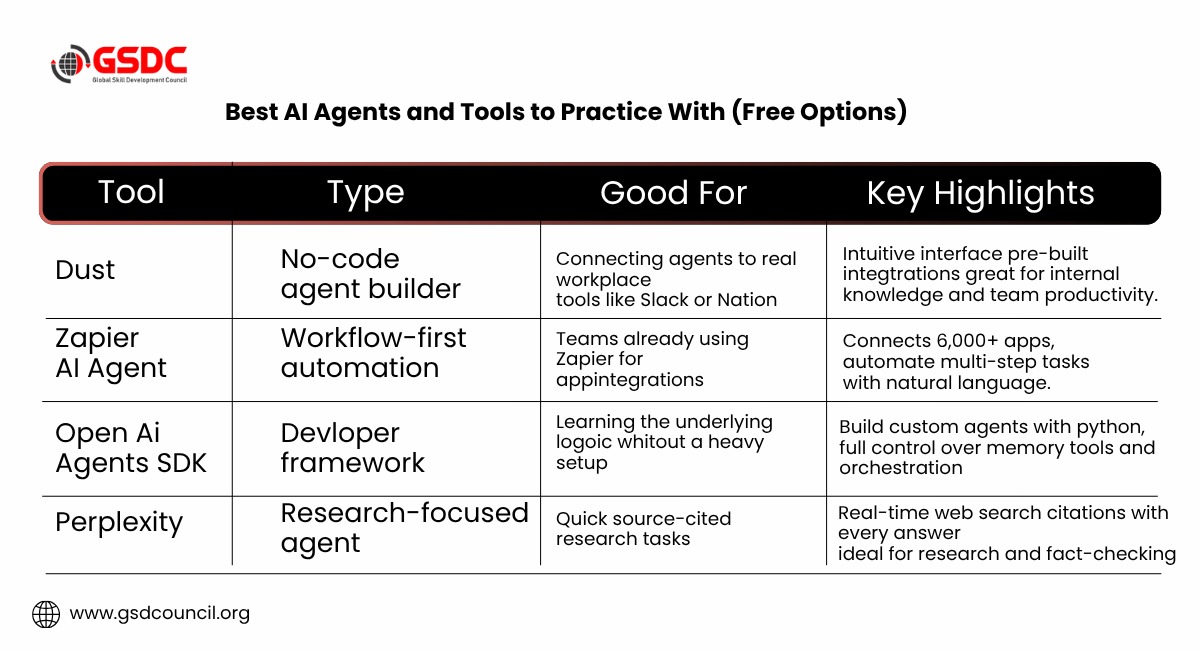
If you want to see finished examples before or after building your own, these are worth exploring - all offer free tiers or free trials:
Explore two or three of these rather than all of them at once. The goal at this stage is pattern recognition - noticing that every platform, regardless of interface, asks you to define the same three things: a model, tools, and instructions.
Turning This Into a Career Skill
Building one agent is a weekend project. Being able to reliably design, test, and troubleshoot agents for real business workflows is a hireable skill - and it's exactly the gap most structured AI agents courses and agentic AI certification programs are now built to close.
Want the checklist version of everything above? Grab the AI Agent Builder Toolkit - a one-page rundown of the five build steps, the common mistakes list, and a testing checklist you can run through before calling any agent "done." Keep it open in a tab the next time you build.
If you want to go further than a single weekend project, GSDC's Certified Generative AI Professional credential is built around this exact progression - from understanding agent principles to designing multi-step, tool-using systems for real workplace problems.

Final Thoughts
You don't need to wait for a "developer track" to start building agents - the tools have already caught up to the people who want to learn. Start with one narrow, well-scoped problem, write instructions like you're training a new colleague, and resist the urge to add complexity before you've proven the simple version works.
Before moving on to more advanced agent frameworks, build one useful agent that saves you time every week. That's when the concepts in this guide become real skills.

Related Certifications
Frequently Asked Questions
An AI agent is a system that uses a language model to independently accomplish tasks on a person's behalf - not just answering questions, but deciding what to do next, using tools to gather information or take action, and recognizing when the task is complete.
You can create an AI agent using a no-code platform like Dust, Gumloop, or Zapier AI. These tools let you write instructions in plain language, connect data sources or tools through a visual interface, and test the agent - no programming required.
An AI agent is a single system built for one defined task. Agentic AI is the broader category, covering systems where multiple agents coordinate, hand off work to each other, or operate under a manager agent to handle more complex, multi-step workflows.
No-code platforms (Dust, Gumloop, Zapier AI) suit beginners and business users. Developer frameworks like the OpenAI Agents SDK, LangChain, and CrewAI give more control but require coding. Custom builds using LLM APIs directly offer full flexibility for specialized products.
Reliable agents follow five principles: pick tasks that genuinely require judgment, keep the model-tools-instructions setup simple, write specific step-by-step instructions, build in guardrails from the start, and expand complexity only after a single agent proves stable.
A narrowly scoped first agent - like a research assistant or an email-reply drafter - can typically be built and tested on a free no-code platform in under an hour, though most people revise their instructions several times before the agent behaves consistently.
Dust, Zapier AI Agents, the OpenAI Agents SDK, and Perplexity all offer free tiers worth exploring. Trying two or three is usually enough to notice that every platform asks you to define the same three things: a model, tools, and instructions.
No. No-code platforms handle the technical infrastructure, letting you define an agent's role, connect tools, and write instructions in plain language. Coding becomes relevant only if you move into developer frameworks like LangChain or the OpenAI Agents SDK for more control.
If you want to move beyond single-agent experiments into designing multi-agent systems for real business workflows, a structured course helps formalize the skill. It's most valuable for people aiming to apply this at work rather than as a one-off personal project.
Agentic AI certification validates that you can design, deploy, and troubleshoot agent-based systems for professional use - not just build a single agent, but architect workflows involving multiple tools and decision points. It's aimed at professionals looking to formalize this as a hireable skill, such as GSDC's Certified Generative AI Professional credential.
Stay up-to-date with the latest news, trends, and resources in GSDC
If you like this read then make sure to check out our previous blogs: Cracking Onboarding Challenges: Fresher Success Unveiled
Not sure which certification to pursue? Our advisors will help you decide!