Building Intelligent Agents with Azure AI Foundry: A Practical Overview
Written by Matthew Hale
- What is Azure AI Foundry? A short orientation
- Azure AI Foundry overview: the platform in a single page
- Key Azure AI Foundry features highlighted
- Azure generative AI and agents: when to use which capability
- Building an agent: a practical pattern
- Deployment and governance: production lessons from the demo
- Cost and scaling: practical pointers
- Who should use Azure AI Foundry and when
- Final takeaways and next steps
This article is based on one of our GSDC AI Tools Challenge 2025 events. The presenter has shown how to create smart, production-ready agents with Azure AI Foundry, including architecture patterns, connectors, governance, and deployment lessons.
Continue reading to have a practical introduction to what the Azure AI Foundry is, a brief overview of what the Azure AI Foundry is, and the major features of the teams that should be employed when transitioning prototypes to trusted agent deployments.
What is Azure AI Foundry? A short orientation
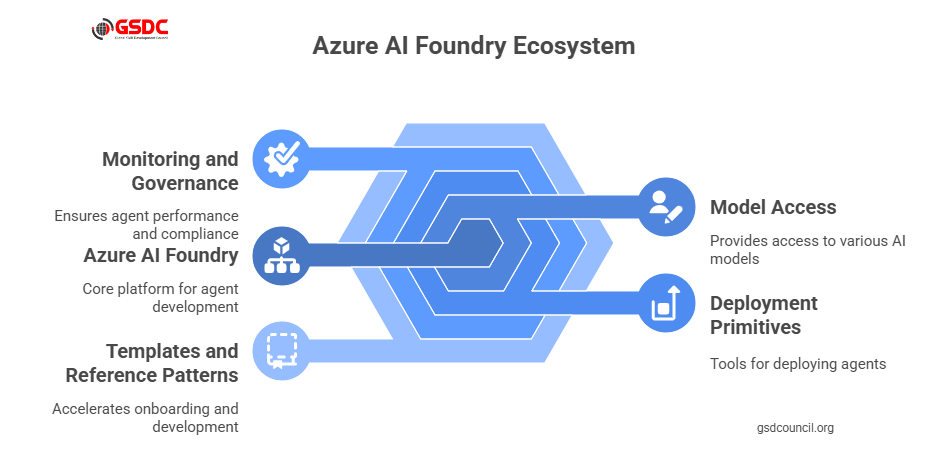
If the question is what Azure AI Foundry is, the answer from the session is straightforward: it’s a platform designed to help teams compose, test, and operate intelligent agents at scale.
The speaker framed Azure AI Foundry as a bridge between raw models and production workflows, linking prompts and model choices to connectors, state management, and observability.
For anyone asking what Azure AI Foundry is, the platform’s role is to remove plumbing friction so developers and product teams can focus on agent behavior rather than infrastructure.
In short: what is Azure AI Foundry? It is a managed environment for building agentic applications that integrates model access, deployment primitives, and tooling for monitoring and governance.
The platform also accelerates onboarding by providing templates and reference patterns, which the demo used to show how quickly a proof-of-concept can become useful to business users.
Additionally, the GSDC offers a wide range of valuable resources that can help teams at every stage of building and deploying intelligent agents, providing practical tools and expert guidance to navigate challenges effectively.Azure AI Foundry overview: the platform in a single page
The session provided an Azure AI Foundry overview that emphasized three pillars:
- Model orchestration selects and routes requests to different models (including Azure generative AI endpoints).
- Agent logic and memory long-running state, retrieval from knowledge stores, and managed context windows for multi-step reasoning.
- Operational controls include observability, rate limiting, human-in-the-loop gates, and audit logs.
This Azure AI foundry overview made it clear that the platform is meant to be the backbone for agentic applications where orchestration, not just raw prompts, determines reliability.
The overview also highlighted developer ergonomics: CLI tools, SDKs, and a visual authoring surface to speed iteration and collaboration between engineers and product owners.
Key Azure AI Foundry features highlighted
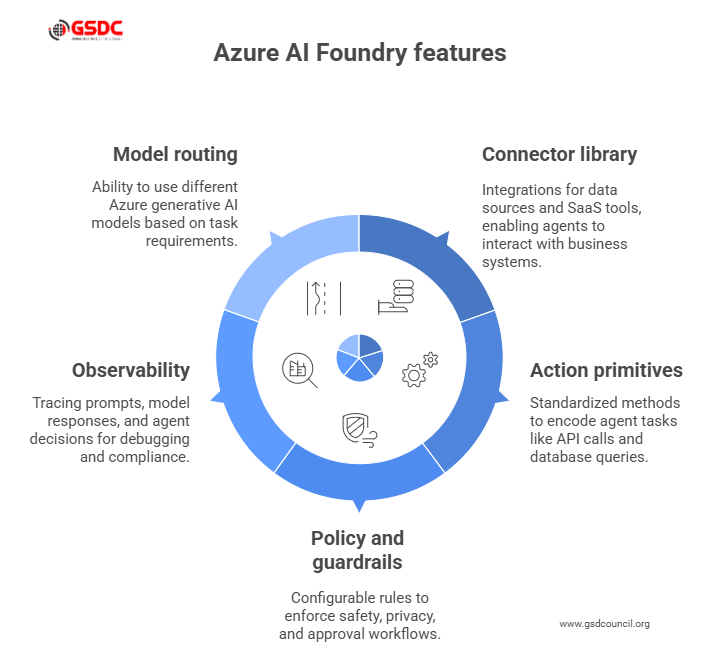
During the demonstration, several Azure AI Foundry features stood out. These Azure AI Foundry features are what make agent development repeatable and auditable:
- Connector library: built-in integrations for common data sources and SaaS tools so agents can read and write to business systems.
- Action primitives: standardized ways to encode agent tasks such as API calls, database queries, and message sends.
- Policy and guardrails: configurable rules that enforce safety, privacy, and approval workflows before an agent takes impactful actions.
- Observability: tracing of prompts, model responses, and agent decisions to support debugging and compliance.
- Model routing: ability to use Azure generative AI when creative generation is needed, and fallback to smaller, cheaper models for routine tasks.
These Azure AI Foundry features are exactly the building blocks the speaker used to assemble the live agent examples.
The demo also noted how these features reduce maintenance overhead. Centralized policies and connectors mean fewer brittle integrations when underlying APIs change.
Azure generative AI and agents: when to use which capability
A recurring theme was how Azure generative AI fits into agent architecture. The speaker recommended using Azure generative AI for open-ended generation summaries, creative responses, and text synthesis while reserving deterministic logic and retrieval-augmented calls for precision tasks.
Key guidance for Azure generative AI usage:
- Use generative endpoints when the agent needs to synthesize multi-document context into a human-friendly summary.
- Combine Azure generative AI with retrieval layers so responses are grounded in company data.
- Control costs by routing high-volume, low-risk tasks to smaller models and keeping heavier generative calls for high-value steps.
The session’s demos showed how Azure generative AI and the Foundry’s orchestration work together to balance capability and cost.
In addition, the speaker emphasized prompt templates and reuse patterns to improve output consistency when repeatedly calling generative endpoints.
Building an agent: a practical pattern
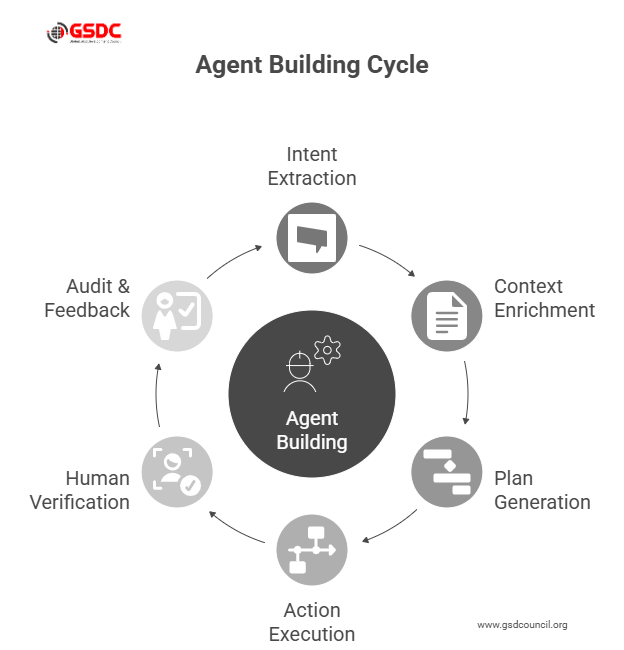
The speaker walked through a repeatable agent pattern that teams can adopt:
- Intent extraction uses a lightweight model to classify user intent.
- Context enrichment pulls documents from knowledge stores, CRM, or internal wikis.
- Plan generation asks a generative model to propose a multi-step plan.
- Action execution translates the plan into action primitives using Foundry connectors.
- Human verification routes risky actions to an approver via built-in policy checks.
- Audit & feedback log outcomes and use them to retrain or re-tune prompt templates.
This pattern was implemented live in the demo and underscored why the Azure AI foundry overview emphasizes connectors and policy as first-class concerns.
The walkthrough also included tips for test harnesses and simulated environments so teams can validate agent behavior before any live customer-facing interactions.
Deployment and governance: production lessons from the demo
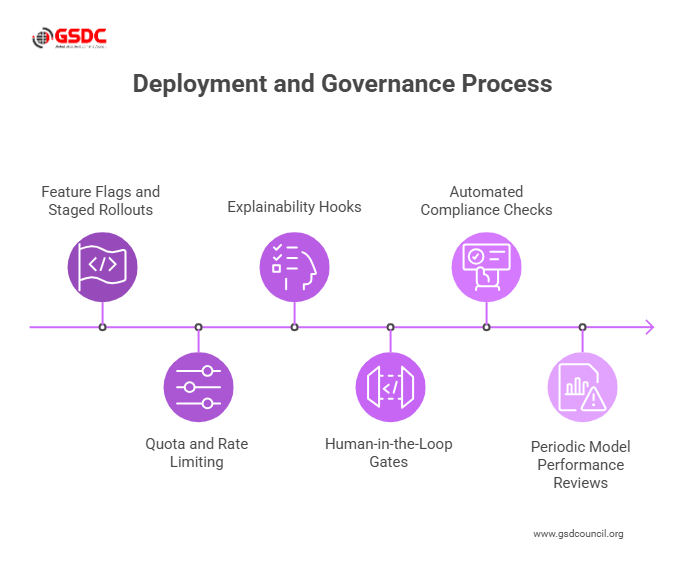
The session was clear about governance. Shipping agents without controls risk data leaks, unwanted actions, and regulatory exposure.
The speaker recommended these operational steps:
- Feature flags and staged rollouts release agents to a small user set, observe logs, and expand.
- Quota and rate limiting prevent runaway costs from excessive use of Azure generative AI.
- Explainability hooks capture the prompt, retrieved context, and chosen action in logs so every decision can be audited.
- Human-in-the-loop gates require approvals for actions that create or move money, or that trigger sensitive communications.
Those practices map directly to the Azure AI Foundry features shown in the demo. The presenter also stressed the importance of automated compliance checks and periodic model performance reviews to detect drift or unintended behavior as the agent operates in production.
Cost and scaling: practical pointers
Scaling agents involves trade-offs between responsiveness, accuracy, and cost. The speaker flagged model routing and caching as effective lever points: use cached retrieval for repeated queries, route creative steps to Azure generative AI, and prefer smaller models for routing and intent classification.
The result: predictable costs and better user experience without sacrificing the capabilities that make agents useful.
The session also recommended monitoring cost signals in real time and implementing alerts when per-request spend or latency deviates from expected thresholds.
Who should use Azure AI Foundry and when
For product teams asking Azure AI Foundry what it is good for, the speaker outlined clear fit cases:
- Customer support automation where agents can handle multi-step resolutions with CRM access.
- Internal knowledge assistants that synthesize documents and update tickets.
- Process automation where agents orchestrate services across HR, finance, and IT.
In short, Azure AI Foundry is aimed at teams that need reliable, auditable agent behavior, not just prototypes.
The session also suggested using Foundry for cross-team centers of excellence to reduce duplicated effort and centralize best practices.
To further enhance your expertise, be sure to check out our GSDC AI Tool Expert Certification, designed to equip you with in-depth knowledge and hands-on experience in AI tool development.

Final takeaways and next steps
Azure AI Foundry: The layer that implements models as reliable, audited agencies. Begin with a small pilot, which models routing, a real connector, and a human-in-the-loop policy to prove controls early.
An additional technique is controlling costs, which directs heavy work to Azure generative only when necessary and stores common query caches.
Assign a cross-functional owner to operate fast, and guardrails can be achieved through capture prompts, retrieved context, and decision logs to provide explainability.
Record results (time-to-resolution, error rate, cost per interaction), make that work, and scale up step by step with the Azure AI Foundry capabilities.

Related Certifications
Stay up-to-date with the latest news, trends, and resources in GSDC
If you like this read then make sure to check out our previous blogs: Cracking Onboarding Challenges: Fresher Success Unveiled
Not sure which certification to pursue? Our advisors will help you decide!