Top 12 Generative AI Tools List Employers Expect in 2026
Written by Matthew Hale
- What Are AI Skills, Really?
- Why This List, and Why Now
- Conversational AI and Productivity Tools
- Best AI Image Generation Tools 2026
- Quick Reference: What to Learn First, By Role
- Generative AI Tools for Software Development
- Video, Research, and Model Tools
- Worth Watching: Marketing-Specific AI Tools
- Generative AI Tools List: Quick Comparison
- How to Learn These AI Tools in 30 Days
- How to Actually List These on Your Resume
- Turning This List Into Something You Can Prove
- The Bigger Picture
A few years ago, "I know how to use ChatGPT" was a nice line to drop in an interview. It isn't anymore - hiring managers assume it, the same way they assume you can use email. What actually stands out in 2026 is knowing which generative AI tools matter for your specific role and being able to talk through how you've used one to get real work done, not just that you've "played around" with AI.
That shift is measurable. According to SHRM's 2025 Talent Trends research, 43% of organizations now use AI in some part of their HR process, up from 26% the year before - recruiters are screening resumes and shortlisting candidates with AI-assisted tools, and they're reading applications with an eye for whether you can keep up. LinkedIn's own hiring data backs this up from the other side: job posts that list specific skills in the requirements section see an 11% higher view-to-apply rate than posts that don't. Vague claims like "familiar with AI" don't move the needle. Specific tool names, backed by a real example, do.
So here's exactly that: 12 generative AI tools, grouped by what they're actually good for, with plain-language explanations of why each one shows up on hiring managers' radar this year - plus how to talk about them so it doesn't sound like you copied a listicle.
What Are AI Skills, Really?
"AI skills" doesn't mean you can define a neural network. In a hiring context, it's practical and outcome-focused: can you write a prompt that gets a usable first draft out of an LLM? Can you use an AI coding assistant to ship features faster without introducing bugs? Can you tell when AI-generated output needs a human hand before it goes out the door? Employers care less about theory and more about judgment - knowing which tool fits which job, and knowing where the tool's output stops being good enough on its own.
Why This List, and Why Now
Generative AI tools aren't one category anymore. In 2025 the conversation was mostly ChatGPT. In 2026, the market has split into distinct lanes - conversational AI, image generation, code assistants, video tools, and enterprise productivity suites - and hiring managers increasingly expect candidates to know the right lane for their job function. A marketer fluent in Midjourney but unaware of an AI image tool's licensing implications isn't expected to be a developer. But a marketer who can't name a single generative AI tool for work in 2026 is going to look behind the curve.
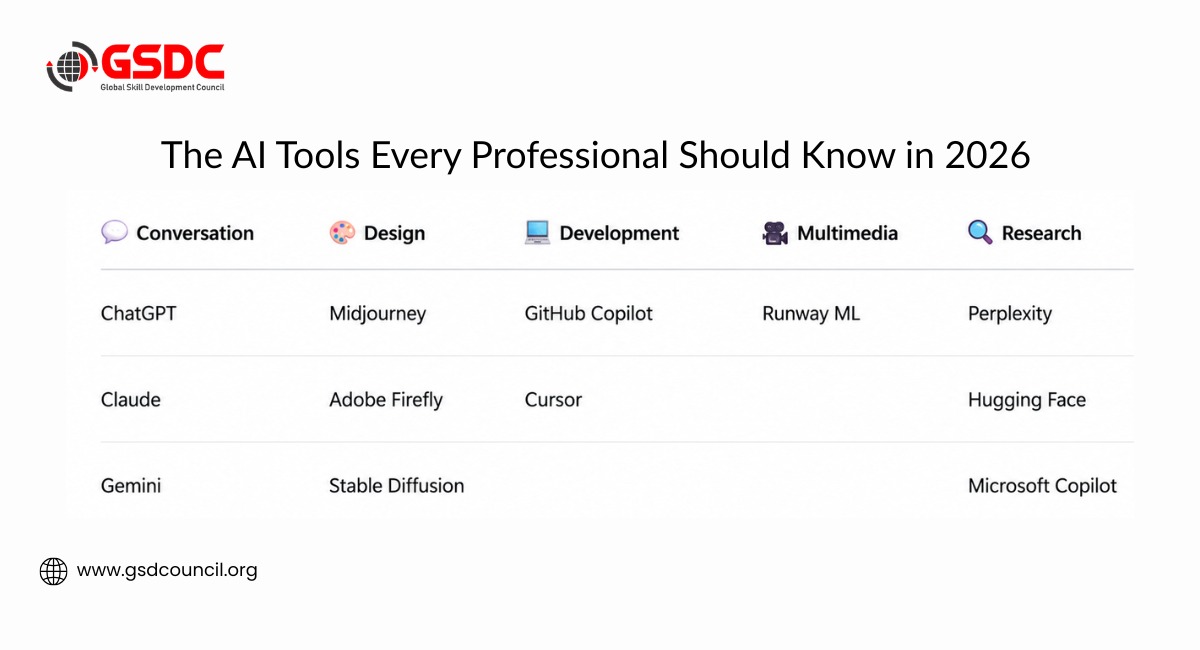
Conversational AI and Productivity Tools
1. ChatGPT
ChatGPT remains the default entry point into generative AI tools, and for good reason - it's what most hiring managers assume you've at least tried. Built by OpenAI, it handles everything from first-draft emails to research summaries to brainstorming, and its strength lies in how naturally it responds to plain-language instructions.
What actually matters on your resume isn't "I use ChatGPT" - everyone does. It's prompt engineering: writing clear, specific instructions, then refining the output through follow-up questions rather than accepting the first answer.
Real workplace example: a marketing manager drafts five campaign concepts in ChatGPT, refines the strongest one through a few rounds of follow-up prompts, and cuts brainstorming time from half a day to under an hour.
Resume bullet example: "Used ChatGPT to draft and iterate on client proposals, cutting first-draft turnaround from two days to same-day."
Best for: writers, marketers, students, customer support, and anyone producing text-based work regularly.
2. Claude
Claude, built by Anthropic, has built a strong reputation among the best generative AI tools for tasks that require reading, reasoning through, or summarizing long, complex material. Its large context window lets it process lengthy documents, contracts, or codebases in a single pass without losing track of earlier details.
Hiring managers in research-heavy, legal-adjacent, or analysis-heavy roles increasingly look for candidates who know when to reach for Claude over a general chatbot.
Real workplace example: an operations analyst uploads a 40-page vendor contract and asks Claude to flag every clause with a financial penalty - a task that would take an hour manually, done in minutes with a second human pass to confirm accuracy.
Best for: analysts, researchers, legal and compliance teams, and anyone working with long documents.
3. Google Gemini
Gemini's advantage is integration. Because it's built into Google Workspace, it shows up inside Docs, Sheets, and Gmail rather than requiring you to switch tabs. It's also natively multimodal, meaning it can reason across text, images, and data in the same conversation.
For roles built around the Google ecosystem - which is most office jobs - familiarity with Gemini signals you can fold AI into your existing workflow instead of treating it as a separate app you open occasionally.
Worth saying plainly: the right tool here depends less on popularity and more on which ecosystem your organization already runs on. Gemini makes sense on Google Workspace; Microsoft Copilot, below, makes the same case for the other half of the corporate world.
Best for: business professionals, project managers, and anyone working inside Google Workspace daily.
4. Microsoft Copilot
Copilot is Microsoft's answer to the same problem, embedded across Word, Excel, Outlook, and Teams. For enterprise employers still running on the Microsoft stack - a large share of mid-size and large companies - Copilot fluency is often a more directly relevant skill than a standalone chatbot, because it shows you can use AI inside the tools your future employer already runs on.
Resume bullet example: "Used Microsoft Copilot in Excel to build and audit a quarterly budget model, reducing manual formula-checking time by roughly a third."
Best for: finance, operations, HR, and any role inside a Microsoft-based enterprise environment.
Best AI Image Generation Tools 2026
If you're searching for the best AI image generation tools 2026 has to offer, this is where hiring managers in creative, marketing, and product roles are paying closest attention.
5. Midjourney
Midjourney is still the benchmark for visual quality among generative AI tools. It uses diffusion models - starting from random noise and gradually shaping it into an image based on your text prompt - and produces results that designers and art directors consistently rate as the most polished on the market. It runs through Discord rather than a standalone app, which trips up some new users but also makes collaborative feedback easy.
Best for: graphic designers, marketers, concept artists, and product designers.
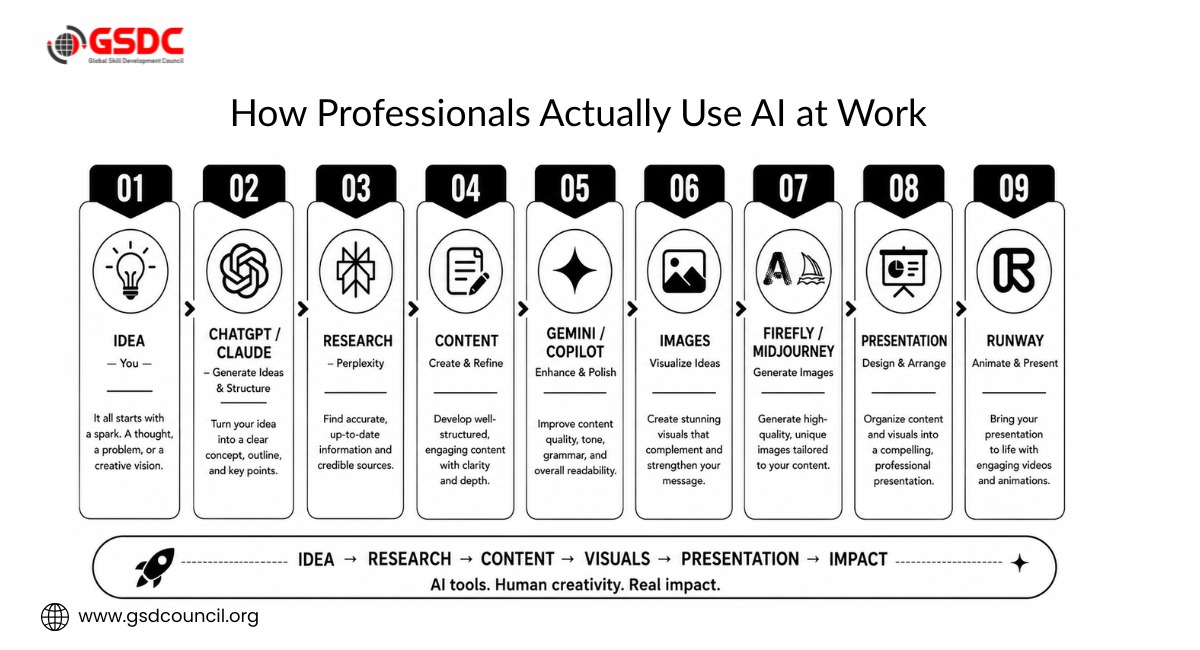
6. Adobe Firefly
Firefly's selling point isn't raw creative flair - it's that the images it generates are trained on licensed and public-domain content, making the output commercially safer to use than tools trained on scraped web data. For any hiring manager in a brand-sensitive or legally cautious industry, that distinction matters a lot. Because it's built directly into Photoshop and the rest of the Adobe suite, it's also the path of least resistance for designers who already live in those tools.
Real workplace example: a brand designer generates a dozen campaign concept visuals in Firefly overnight, narrows to three with the creative director by morning, and skips the usual back-and-forth with an external illustrator entirely.
Best for: in-house designers, brand teams, and agencies working with commercial clients.
7. Stable Diffusion
Stable Diffusion is the open-source alternative, and that openness is the whole point. You can run it locally, fine-tune it on your own image sets, and control the output down to the latent-space level if you know what you're doing. It's less plug-and-play than Midjourney or Firefly, but it rewards technical users with a level of customization the closed platforms don't offer.
Best for: technical artists, AI researchers, and teams that need custom or fine-tuned visual models.
Quick Reference: What to Learn First, By Role
With 12 tools on the table, it helps to know where to actually start based on what you do. Here's a rough starting point by function:
Role | Learn First |
Marketing | ChatGPT, Adobe Firefly, Midjourney |
Developer | GitHub Copilot, Cursor |
Analyst / Consultant | Claude, Perplexity AI |
HR / Operations | Microsoft Copilot, ChatGPT |
Designer | Midjourney, Adobe Firefly, Stable Diffusion |
Generative AI Tools for Software Development
8. GitHub Copilot
Copilot is close to table stakes for developer roles now. It works as an autocomplete for code - suggesting whole functions, not just single lines - directly inside the editors developers already use. It supports most major programming languages and has become a standard line item on software development job postings.
The skill hiring managers actually assess isn't "have you used Copilot" but whether you can review and correct its suggestions rather than accepting AI-generated code blindly.
Resume bullet example: "Used GitHub Copilot to accelerate unit test generation, reducing test-writing time on a backend migration by approximately 25%."
Best for: software developers, engineering teams, and technical students building a portfolio.
9. Cursor
Cursor is a code editor built around AI from the ground up, rather than an AI feature bolted onto an existing editor. It can read your entire codebase for context, make multi-file edits based on a plain-language instruction, and explain unfamiliar code - which is why it's shown up fast in developer job descriptions over the past year, often alongside or instead of Copilot.
For engineers, naming Cursor specifically (and being able to explain what it does differently from Copilot) signals you're tracking the developer-tools landscape rather than repeating the first name that comes to mind.
Best for: software engineers, especially those working across larger or unfamiliar codebases.
Video, Research, and Model Tools
10. Runway ML
Runway ML brought professional-grade video editing capabilities to a much wider audience - text-to-video generation, style transfer, and object removal that used to require specialized editing software. Filmmakers, social media teams, and content creators use it to produce short-form video content in a fraction of the time traditional editing would take.
Real workplace example: a social media coordinator turns a static product shoot into three short promotional video variants in an afternoon, without booking a videographer.
Best for: video editors, content creators, and social media marketing teams.
11. Hugging Face
Hugging Face functions as the central hub of the open-source AI world - a place to find, share, and deploy pre-trained models for almost any generative AI task. Rather than building a model from scratch, developers and data scientists use its library to find a model close to what they need and adapt it.
For technical roles, Hugging Face fluency demonstrates you understand the broader AI model ecosystem, not just a single branded product - a meaningfully deeper signal than knowing how to use a consumer chatbot.
Best for: AI/ML engineers, data scientists, and NLP-focused developers.
12. Perplexity AI
Perplexity blends conversational AI with real-time web search, answering questions with cited, current sources instead of relying purely on training data. For research-heavy work - market analysis, competitive research, fact-checking - that citation-backed approach solves a real trust problem general chatbots have struggled with.
It's increasingly common among the best AI tools for work and the best AI tools for business specifically because it shortens research cycles: instead of ten browser tabs, you get a synthesized, sourced answer in one place.
Resume bullet example: "Used Perplexity AI to run competitive research for quarterly market reports, cutting research time roughly in half."
Best for: analysts, consultants, researchers, and business professionals who need current, sourced information fast.
Worth Watching: Marketing-Specific AI Tools
Marketing teams have their own fast-moving corner of this market that didn't quite make the core 12 but is worth naming if you're in the field. Canva AI has become a go-to for teams that need on-brand social graphics and presentations without a design team on standby. Copy.ai and similar tools remain common for scaled ad copy and email sequences. If content production is part of your role, being able to name one AI software tool in this lane - and what you used it for - is a reasonable addition to a marketing resume
Generative AI Tools List: Quick Comparison
Tool | Category | Best For |
ChatGPT | Conversational AI | Writers, marketers, general professionals |
Claude | Conversational AI / Reasoning | Analysts, researchers, long-document work |
Google Gemini | Productivity / Workspace | Google Workspace users, project managers |
Microsoft Copilot | Enterprise Productivity | Finance, operations, Microsoft-stack roles |
Midjourney | Image Generation | Designers, artists, marketers |
Adobe Firefly | Image Generation | Brand teams, commercial design |
Stable Diffusion | Image Generation | Technical artists, AI researchers |
GitHub Copilot | Code Generation | Software developers, engineers |
Cursor | AI Code Editor | Engineers working across large codebases |
Runway ML | Video Generation | Video editors, content creators |
Hugging Face | Model Hub | AI/ML engineers, data scientists |
Perplexity AI | AI Research | Analysts, consultants, business teams |
How to Learn These AI Tools in 30 Days
You don't need to learn all 12 at once - and trying to will show. A more realistic path:
Week 1 - Core conversational AI: Spend real time in ChatGPT and Claude. Practice writing multi-step prompts and refining outputs through follow-up questions, not just single-shot requests.
Week 2 - Research and productivity: Add Perplexity for sourced research and Gemini (or Microsoft Copilot, depending on your employer's stack) for in-workflow productivity tasks.
Week 3 - Visual or technical depth, depending on your field: Designers and marketers spend the week in Midjourney and Firefly; developers spend it in GitHub Copilot and Cursor.
Week 4 - One tool specific to your profession, done deeply: Pick the single tool most relevant to your actual job and build one real, presentable project with it - a campaign mockup, a small automated script, a research report. This is the thing you'll actually talk about in an interview. If you'd rather not build this week solo, organizations like GSDC run structured programs that walk you through the same process with feedback built in, instead of leaving you to figure out week four on your own.
How to Actually List These on Your Resume
- Name the tool, then name the outcome. "Used GitHub Copilot to cut test-writing time by 25%" beats "familiar with AI coding tools" every time.
- Match the tool to the role. Listing all 12 tools regardless of the job you're applying for reads as padding, not skill. A marketing resume doesn't need Cursor; a backend developer resume doesn't need Midjourney.
- Be ready to demonstrate, not just describe. Given that skill-specific postings already see meaningfully higher engagement, expect a follow-up question like "walk me through a prompt you wrote."
- Don't overclaim. Hiring managers screening AI-fluency claims can usually tell within two follow-up questions whether someone has genuinely used a tool or just read about it.
Turning This List Into Something You Can Prove
Reading through twelve tools is one thing. Having something to point to when a hiring manager asks "prove it" is another. That gap - between having opened a tool and being able to demonstrate real, structured skill with it - is exactly where a lot of candidates lose ground without realizing it.
This is where a recognized credential earns its place on a resume rather than just padding it. The Global Skill Development Council (GSDC) offers a Certified Generative AI Professional program built around this exact problem: it doesn't just teach you what these tools do, it walks you through applying them to real workflows - prompt design, tool selection, and using AI output responsibly in a business context - so you walk away with something more concrete than "I've used ChatGPT a few times." For professionals who want their AI fluency to hold up under a follow-up question, it's a reasonable next step after working through a list like this one.

The Bigger Picture
Zoom out from any single tool and the pattern is clear: the best AI tools for business in 2026 aren't judged by novelty anymore - they're judged by how well they fit into existing workflows and how measurably they improve output. That's exactly why hiring managers have shifted from asking "do you use AI?" to asking "which tools, and what did you build with them?"
Employers aren't looking for candidates who experimented with AI once. They're looking for professionals who can demonstrate practical AI workflows and explain the business value those workflows created. Building that kind of fluency - through real projects, a portfolio of examples, or recognized skills training - is what actually separates saying you know AI from proving it.
In 2026, AI literacy isn't measured by how many tools you've opened - it's measured by the problems you can solve with them.

Related Certifications
Frequently Asked Questions
It depends on your job, honestly - there's no single "best" list that fits everyone. But if you want a safe starting point, ChatGPT and Claude cover most text-based work, Midjourney and Adobe Firefly cover image generation, and GitHub Copilot covers code. Pick from this generative AI tools list based on what you actually do at work, not what's trending on LinkedIn.
Yes, and this trips people up. AI skills aren't about coding - they're about knowing how to prompt a tool well, judge its output, and fix what it gets wrong. A recruiter, a project manager, and a graphic designer all need AI skills now; they just look different depending on the role.
Plenty. Claude and Google Gemini for text and reasoning, Midjourney and Stable Diffusion for images, GitHub Copilot and Cursor for code, Runway ML for video, and Perplexity for research with sources attached. These examples of generative AI tools span very different jobs, which is exactly why "just use ChatGPT" isn't really career advice anymore.
Most of the tools on this list have a usable free tier - ChatGPT, Claude, Gemini, and Perplexity all let you get real practice in without paying anything. Stable Diffusion is free if you're comfortable running it yourself. So if budget's the concern, that's not really a reason to wait before building these skills.
Midjourney still wins on pure visual quality, Adobe Firefly wins on commercial safety since it's trained on licensed content, and Stable Diffusion wins on flexibility if you want to fine-tune your own models. Which one's "best" really comes down to whether you need polish, legal safety, or control.
For day-to-day productivity, most people land on some mix of ChatGPT or Claude for writing and thinking things through, Gemini or Microsoft Copilot depending on whether you're on Google or Microsoft, and Perplexity when you need a fast, sourced answer instead of ten open tabs.
Enterprise teams are leaning toward Microsoft Copilot and Google Gemini for company-wide productivity, Perplexity for research and competitive analysis, and Claude for anything involving long documents or contracts. The pattern across the best AI tools for business in 2026 is integration - tools that slot into work you're already doing beat flashy standalone apps.
GitHub Copilot first, since it's close to expected at this point, then Cursor if you're working across large or unfamiliar codebases. Hugging Face is worth knowing too if you're anywhere near ML work, even if it's more of a resource hub than a tool you use daily.
ChatGPT for copy and brainstorming, Midjourney or Adobe Firefly for visuals, and Canva AI if your role covers quick social or presentation graphics. Marketing teams that lean on generative AI tools for marketing tend to care less about a single "best" tool and more about a workflow that covers copy, visuals, and speed all at once.
They check, more often than people expect. It usually shows up as a simple follow-up question - "walk me through how you used that" - and it's obvious pretty fast whether someone's actually used a tool or just added it to sound current. That's really the whole point of this list: know a few tools well enough to talk about them, rather than naming all twelve and hoping nobody asks.
Stay up-to-date with the latest news, trends, and resources in GSDC
If you like this read then make sure to check out our previous blogs: Cracking Onboarding Challenges: Fresher Success Unveiled
Not sure which certification to pursue? Our advisors will help you decide!