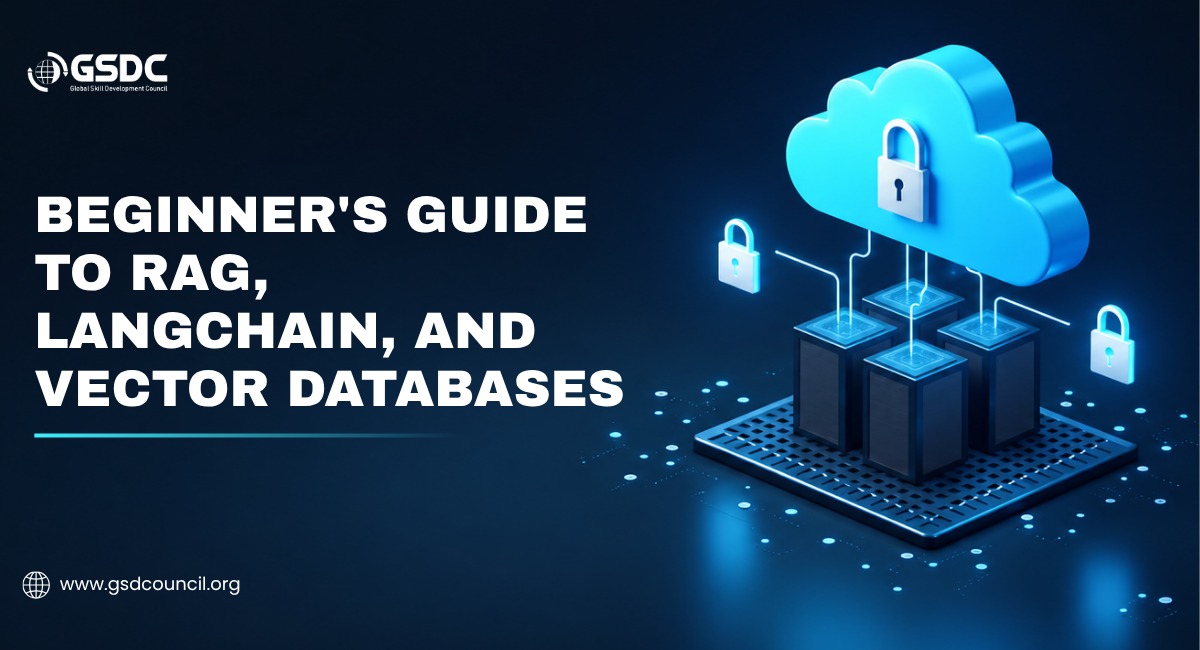
Beginner's Guide to RAG, LangChain, and Vector Databases
Written by Matthew Hale
- What Is RAG? (Retrieval Augmented Generation, Explained Simply)
- RAG vs LLM: What's Actually the Difference?
- What Does a RAG Chatbot Actually Look Like?
- What Is LangChain, and How Do You Use It?
- What Is a Vector Database, and Why Does RAG Need One?
- Best Vector Database Options for Beginners
- Why Should You Care? Because Enterprise AI Is Investing Heavily Here
- Putting the Three Pieces Together
- Getting Started as a GenAI Beginner
- Want to Go Beyond the Basics? Get Certified
- Final Thoughts
If you've spent any time around AI teams lately, you've probably heard three terms thrown around like everyone already knows what they mean: RAG, LangChain, and vector database. Someone mentions "we built a RAG chatbot" in a meeting, nods happen around the table, and nobody asks the obvious follow-up question - what does that actually mean?
Here's the good news. None of these ideas is as complicated as the jargon suggests.
Once you see how the pieces fit together, modern AI applications start to feel less like magic and more like a logical AI retrieval pipeline with three moving parts. That's what this blog is for - a plain-English walkthrough for GenAI beginners who want to understand what's happening under the hood without needing a machine learning degree to follow along.
By the end, you'll know what RAG is, how it's different from a plain LLM, what LangChain actually does, what a vector database is for, and how to start thinking about which vector database might suit a real project.
What Is RAG? (Retrieval Augmented Generation, Explained Simply)
RAG stands for Retrieval Augmented Generation. The concept was introduced in a 2020 research paper, "Retrieval-Augmented Generation for Knowledge-Intensive NLP Tasks," presented at NeurIPS 2020 by Patrick Lewis and eleven co-authors at Facebook AI Research (the lab now known as Meta AI). The core idea behind it hasn't really changed since: pair a retrieval system with a generative model so the model can look things up instead of relying only on what it memorized during training.
Think about how most people actually answer hard questions. You don't just recite facts from memory - you pull up a document, search a knowledge base, or check a reference before you respond.
RAG gives an AI model that same habit. Instead of answering purely from what it learned months or years ago during training, it retrieves relevant information first and then uses that information to write its answer.
That single change solves one of the biggest headaches in applied AI: hallucination. A large language model that answers purely from memory has no way to know about your company's latest pricing sheet, last week's product update, or a document that was never part of its training data. A RAG system can pull that exact information at the moment someone asks the question, then generate a grounded answer - one backed by real, retrievable source text. It's this exact skill - building systems that retrieve and reason over real data instead of guessing - that programs like the Certified Generative AI Professional are designed to teach.
At a basic level, a RAG architecture runs through four steps every time a question comes in:
- The user's question gets converted into a numerical representation called an embedding.
- The system searches an AI knowledge base for chunks of text with a similar meaning to that embedding - this is the semantic search step.
- Those chunks get inserted into the prompt as supporting context.
- The language model reads the context and writes an answer based on it, ideally citing where the information came from.
It's often described as giving the model an open-book exam instead of a closed-book one. The model doesn't have to memorize everything - it just has to reason well over whatever it's handed at the moment.
RAG vs LLM: What's Actually the Difference?
This is where a lot of beginners get confused, so it's worth being direct about it. An LLM (large language model) and a RAG system are not competing technologies - a RAG system is built on top of an LLM.
Here's the distinction in plain terms:
- A standalone LLM answers using only what it learned during training. Its knowledge has a cutoff date, it can't see your private documents, and if it doesn't know something, it may generate a plausible-sounding but incorrect answer.
- A RAG in AI setup keeps the same underlying LLM but adds a retrieval step before generation. The model still does the writing, but it's now answering with a stack of relevant, up-to-date documents in front of it.
So the "RAG vs LLM" framing is a bit misleading - it's really "LLM alone vs LLM plus retrieval."
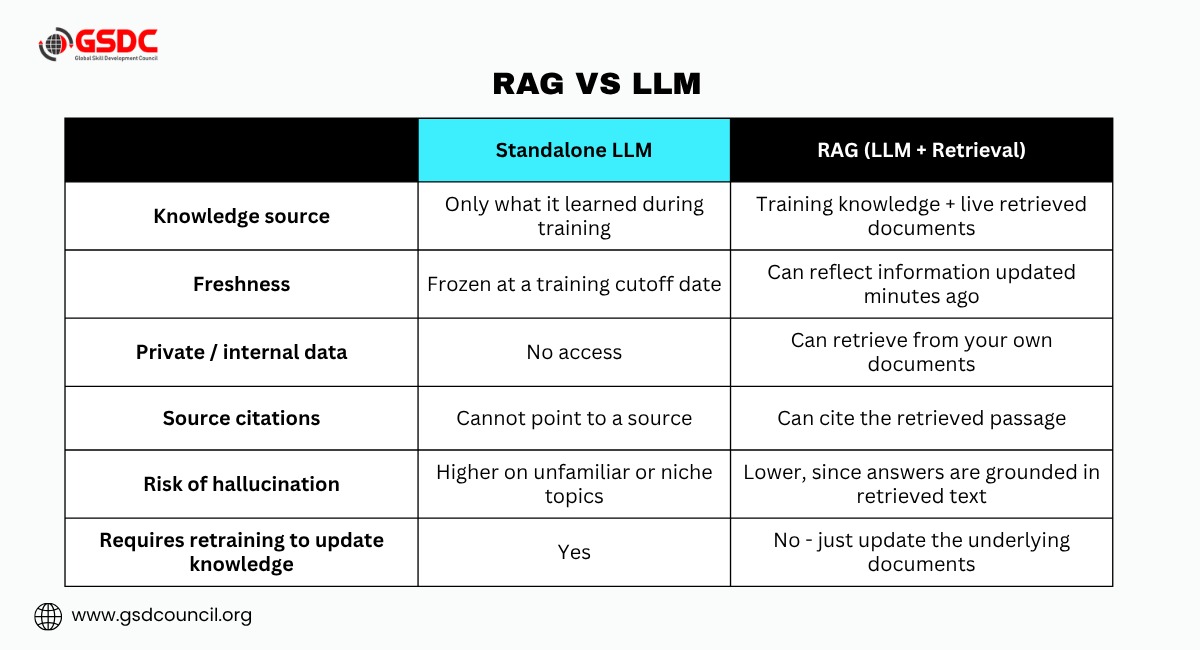
The practical difference shows up in three places: accuracy on domain-specific questions, freshness of information, and the ability to cite a source. None of those require retraining the model itself, which is a big part of why RAG became the default architecture for enterprise AI so quickly.
What Does a RAG Chatbot Actually Look Like?
A rag chatbot is probably the most common real-world application of this pattern, and it's a useful way to see the theory turn into something tangible.
Say a company has 8,000 internal documents scattered across HR policies, onboarding guides, and benefits handbooks. An employee asks a chatbot: "How many work-from-home days do I get after maternity leave?"
A plain LLM would guess because that policy was never part of its training data. A RAG chatbot does something different. It searches the actual HR handbook, retrieves the most recent version of the relevant policy section, and generates an answer built directly from that text - often with a link back to the source document so the employee can verify it themselves.
That's the whole value of RAG in one example: instead of a confident-sounding guess, you get an answer grounded in a real, current document.
This is why RAG chatbots have become the standard architecture for internal knowledge assistants, customer support bots, legal research tools, and technical document retrieval - anywhere accuracy and traceability matter more than pure creativity.
What Is LangChain, and How Do You Use It?
If RAG is the concept, LangChain is one of the most popular frameworks for actually building it.
LangChain is an open-source framework that provides pre-built building blocks for connecting large language models to external data sources, tools, and multi-step workflows. Instead of writing custom integration code every time you want to connect an LLM to a document loader, an embedding model, and a database, LangChain gives you components that already know how to talk to each other.
Imagine you're building that same HR chatbot from the last example. Here's what's actually happening behind the scenes, step by step:
- Load your documents. - LangChain has document loaders for PDFs, web pages, spreadsheets, and dozens of other formats, so you don't have to write custom parsers for the HR handbook.
- Split the text into chunks. - Long policy documents get broken into smaller, manageable pieces - commonly a few hundred tokens each - so they fit neatly into the model's context window later.
- Generate embeddings. - Each chunk is converted into a vector using an embedding model, capturing what that chunk means, not just the words it contains.
- Store the vectors. - Those embeddings get saved in a vector database for fast searching.
- Build a retriever. - LangChain wraps the vector database in a retriever object that fetches the most relevant chunks for any given query - like the maternity-leave policy section, out of thousands of documents.
- Chain it to the LLM. - The retrieved chunks and the employee's question get assembled into a prompt, which is sent to the language model to generate the final answer.
For someone just starting, this is genuinely one of the fastest ways to go from an idea to a working prototype. What once required hundreds of lines of custom integration code can often be built in just a few dozen. That's the entire appeal of LangChain for GenAI beginners: it hides the plumbing so you can focus on the logic of your application.
Worth knowing as you go further: LangChain is a framework for prototyping fast, not a guarantee of a production-ready system. As projects scale, teams often trade some of LangChain's abstractions for more direct control over retrieval quality, latency, and AI orchestration. That's a "later" problem, though - for learning the fundamentals, LangChain remains one of the most beginner-friendly entry points into the GenAI tool stack.
What Is a Vector Database, and Why Does RAG Need One?
A vector database is a specialized database built to store and search embeddings - the numerical representations that machine learning models create out of text, images, or other data.
Traditional databases search for exact matches. Vector databases search for similar meaning, even when the wording is different. That's done through a process called approximate nearest neighbor search, which ranks stored vectors by how close they sit to the query vector in mathematical space.
This is exactly the capability a RAG chatbot needs. When the HR chatbot gets asked about maternity leave, it isn't doing a keyword search for the word "maternity" - it's finding the chunks whose meaning is closest to the question, which surfaces the right policy even if the employee phrased it differently than the document does.
Best Vector Database Options for Beginners
There's no single best vector database - the right choice depends on your scale, budget, and whether you want to self-host. Here's a simple comparison to start with:
Vector Database | Type | Good For | Watch Out For |
Chroma | Open-source, local-first | Learning, prototypes, small projects | Not built for large-scale production |
Pinecone | Fully managed cloud | Fast setup, no infrastructure to manage | Ongoing cost as your data grows |
Weaviate | Open-source, self-host or managed | Hybrid search (keyword + vector) | More setup than a fully managed option |
Qdrant | Open-source, self-host or managed | High performance, larger workloads | Smaller community than some alternatives |
pgvector | PostgreSQL extension | Teams already using Postgres | Slower at very large scale (millions of vectors) |
Milvus | Open-source, distributed | Enterprise-scale, billions of vectors | Notable operational complexity |
For most people learning the GenAI tool stack for the first time, starting with Chroma or Pinecone is the path of least resistance - both are designed to get a working prototype running in an afternoon rather than a week.
Why Should You Care? Because Enterprise AI Is Investing Heavily Here
Understanding retrieval pipelines isn't just an academic exercise - companies are putting real money behind this stack, and that's worth knowing if you're deciding where to spend your learning time.
The exact size of the vector database market depends a lot on who's measuring it. Different research firms scope it differently - some count only standalone vector databases, others include vector search features bolted onto existing databases - so estimates vary.
A 2026 report from Research and Markets puts the market at roughly $3.73 billion in 2026, growing to about $8.71 billion by 2030 at a compound annual growth rate near 23.6%. Other analyst firms publish different absolute numbers for the same period, with 2026 estimates ranging from roughly $1 billion to $3.7 billion and forecasts for the early 2030s landing anywhere between about $8 billion and $18 billion.
But nearly every report agrees on one thing: sustained annual growth in the low-to-mid 20% range, driven by enterprise adoption of generative AI and document retrieval systems like RAG.
Source | 2026 Estimate | Later-Year Projection | CAGR |
~$3.73B | ~$8.71B by 2030 | ~23.6% | |
~$2.55B (2025) | - | ~22.3% (2026–2034) | |
~$3.2B | ~$17.91B by 2034 | ~24% | |
~$2.65B (2025) | ~$8.95B by 2030 | ~27.5% |
Figures are analyst projections, not audited financial data - treat them as directional evidence of fast growth rather than precise numbers.
That kind of growth curve, even accounting for the spread between estimates, is a strong signal for anyone weighing whether to invest time in learning this stack. The skills involved - retrieval pipelines, embeddings, and AI orchestration - are quickly becoming a baseline expectation for AI, data, and software roles rather than a specialized niche, which is exactly the gap GSDC's GenAI programs are designed to close.
Putting the Three Pieces Together
It helps to picture the full pipeline as one continuous flow rather than three separate technologies:
Offline (setup phase): Documents are loaded → split into chunks → converted into embeddings → stored in a vector database.
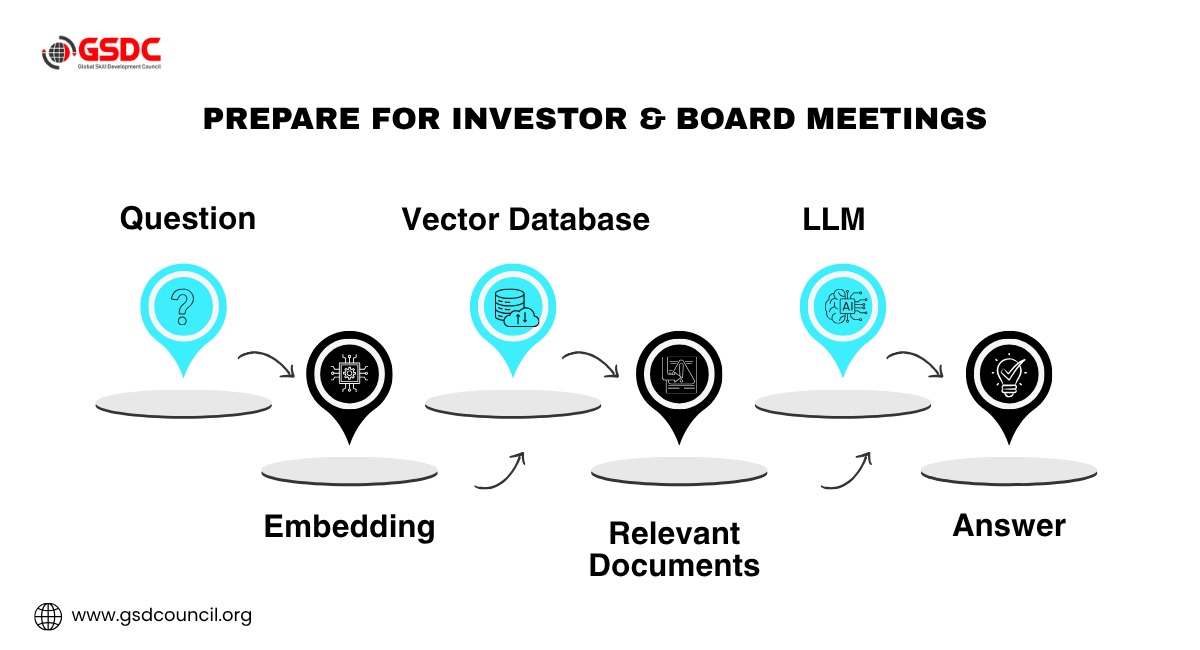
A user asks a question → the question is embedded → the vector database returns the most relevant chunks → LangChain (or a similar framework) assembles those chunks into a prompt → the LLM generates a grounded answer.
RAG is the strategy. LangChain is one of the most common frameworks for implementing that strategy. The vector database is the memory system that makes fast, meaning-based retrieval possible.
None of the three does much on its own - the value shows up when they work together as a single AI retrieval pipeline. Think of RAG as the strategy, LangChain as the workflow engine, and the vector database as the memory layer. Together, they form the foundation of most modern enterprise AI applications.
Getting Started as a GenAI Beginner
If this is your first real look at the GenAI tool stack, here's a sensible order to learn it in:
- Start by understanding embeddings conceptually - they're the foundation everything else is built on.
- Build a tiny RAG chatbot using LangChain and a free local vector database like Chroma, working with a handful of your own documents.
- Once that works, experiment with a managed vector database like Pinecone to see how the hosted experience differs from self-hosting.
- Learn to evaluate your results - check whether the retrieved chunks were actually relevant and whether the final answer stayed grounded in them, rather than judging quality by eye alone.
None of this requires a background in deep learning. It requires curiosity, a willingness to break a few things, and a decent starting explanation of what each piece is actually doing - which, hopefully, this guide has given you.
Want to Go Beyond the Basics? Get Certified
Reading about RAG, LangChain, and vector databases is a solid start, but employers increasingly want proof you can apply these concepts, not just explain them.
The Global Skill Development Council (GSDC)'s Certified Generative AI Professional program is built around that exact GenAI tool stack - RAG, orchestration frameworks like LangChain, embeddings, and vector databases - with hands-on project work and an industry-recognized credential to back it up.
If this guide made these concepts click, it's a natural next step for turning that understanding into a credential employers recognize.

Final Thoughts
Five years ago, learning prompt engineering was enough to impress employers. Today, understanding how RAG, vector databases, and orchestration frameworks work together is quickly becoming the new baseline.
RAG, LangChain, and vector databases aren't three unrelated buzzwords competing for attention in your feed - they're three parts of one increasingly standard architecture for building trustworthy, up-to-date AI applications. Understanding how they connect is quickly becoming one of the more practical, employable skills in the current AI job market, whether you're aiming for a role in AI engineering, data science, or product development.
If you'd like to go deeper than a blog post can take you, the best next step is to actually build something small - a single-document RAG chatbot is a weekend project, not a months-long undertaking, and it's the fastest way to turn this explanation into real, hands-on understanding.

Related Certifications
Frequently Asked Questions
RAG (Retrieval Augmented Generation) is a technique that lets an AI model search external documents for relevant information before generating an answer, instead of relying only on what it learned during training. This makes responses more accurate, current, and traceable to a source.
Retrieval augmented generation is used anywhere an AI needs to answer questions using specific, up-to-date, or private information - customer support, internal knowledge assistants, legal research, technical documentation search, and enterprise chatbots are the most common applications.
A vector database is a specialized database designed to store and search embeddings - numerical representations of text, images, or other data. Instead of matching exact keywords, it finds content with a similar meaning, which is essential for RAG-based semantic search.
LangChain is an open-source framework that provides pre-built components for connecting large language models to external data sources, tools, and multi-step workflows. It's one of the most widely used frameworks for building RAG pipelines without writing custom integration code from scratch.
To use LangChain, you typically load your documents, split them into chunks, generate embeddings, store them in a vector database, build a retriever, and chain that retriever to an LLM. LangChain provides ready-made components for each of these steps.
An LLM answers only from what it learned during training, with a fixed knowledge cutoff. A RAG system uses that same LLM but adds a retrieval step, pulling in current, relevant documents before generating an answer - improving accuracy, freshness, and the ability to cite a source.
A RAG chatbot is a chatbot built on the retrieval augmented generation pattern. Instead of answering purely from memory, it searches a knowledge base - like a company's help center or HR handbook - and generates answers grounded in the retrieved content.
There's no single best vector database - it depends on scale and setup preference. Chroma is a strong choice for learning and small local projects, while Pinecone offers a fully managed cloud option that requires no infrastructure setup.
A GenAI tool stack refers to the combination of technologies used to build generative AI applications - typically an LLM, a retrieval method like RAG, an orchestration framework like LangChain, and a vector database for storing and searching embeddings.
GenAI beginners should start by understanding embeddings conceptually, then build a small RAG chatbot using LangChain and a free vector database like Chroma. From there, a structured credential like the Certified Generative AI Professional can help formalize and validate those skills.
Stay up-to-date with the latest news, trends, and resources in GSDC
If you like this read then make sure to check out our previous blogs: Cracking Onboarding Challenges: Fresher Success Unveiled
Not sure which certification to pursue? Our advisors will help you decide!