Deploying AI in Your Organization: Leveraging Claude, ChatGPT, Copilot, and Gemini
Written by Matthew Hale
AI has the potential to transform your organization by taking slow, manual processes and accelerating the decision cycles and increasing their scale, but only when you implement it strategically.
This guide extracts practical playbooks and demos out of the current GSDC AI Tools Challenge and demonstrates how to use AI in business with Claude, ChatGPT, Copilot, and Gemini.
You will receive a roadmap to deploying step by step, clear platform comparisons, and tangible governance and cost guidance to ensure that pilots will deliver value.
Below, you will find action plans in the form of checklists, sample rollout plans, and a measurement plan, which can help you demonstrate ROI.
Why deploy AI: the tangible upside
AI isn’t just a technology experiment. When applied to repeatable work, generative AI and assistant tools commonly deliver measurable efficiency gains.
Conservative, real-world estimates are in the 15–25% range for many tasks when you start with straightforward use cases; with additional automations, those gains compound.
For smaller firms, the benefits often mean growth without proportional increases in headcount; for larger firms, they translate into faster throughput and higher customer satisfaction.
If you’re thinking about how to implement AI in business, start by defining the metric you want to improve: time-to-first-response, report production time, number of tickets resolved without escalation, or similar. A clear metric keeps pilots honest and shows ROI.
Governance first: policy, licenses, and data safety
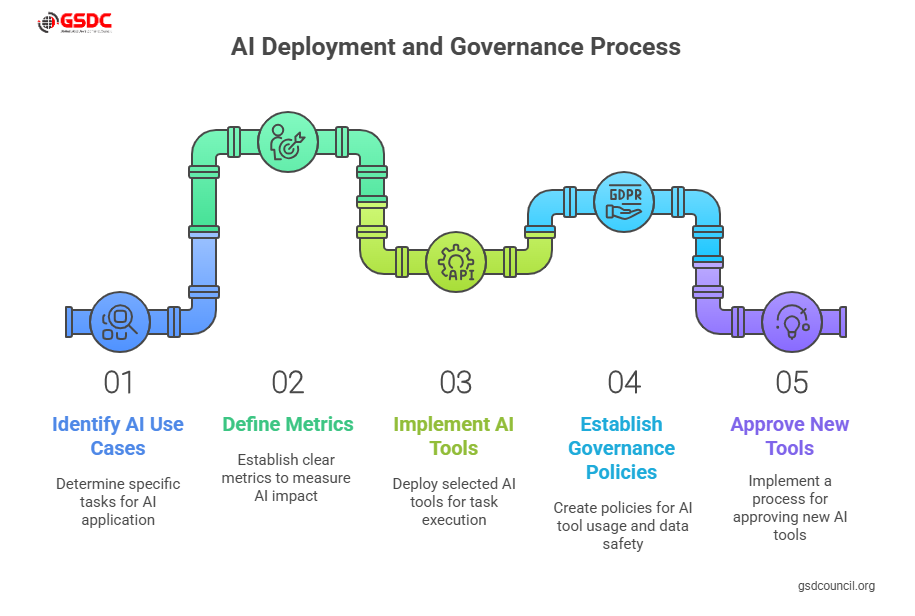
One of the biggest early mistakes is to skip policy. Without a company policy, employees will use personal ChatGPT, Gemini, or Copilot accounts and risk leaking confidential data. Build simple, pragmatic rules that cover:
- Approved platforms and team licenses (so prompts, tools, and templates are shareable).
- Data handling rules and redaction for PII or sensitive records.
- A request/approval process for new tools, so innovation is allowed but controlled.
The session recommended a recommended approach: pick a preferred enterprise tool (for many firms, that’s Copilot for Microsoft-centric workflows, ChatGPT for flexible API work, Claude AI for conservative or regulated domains, and Gemini AI for deep research) and allow exceptions only through a defined approval flow.
That balance avoids the “wild west” of ungoverned experimentation while preventing the “fortress” effect where AI is banned and opportunity is lost.
Quick platform primer: strengths and practical fit
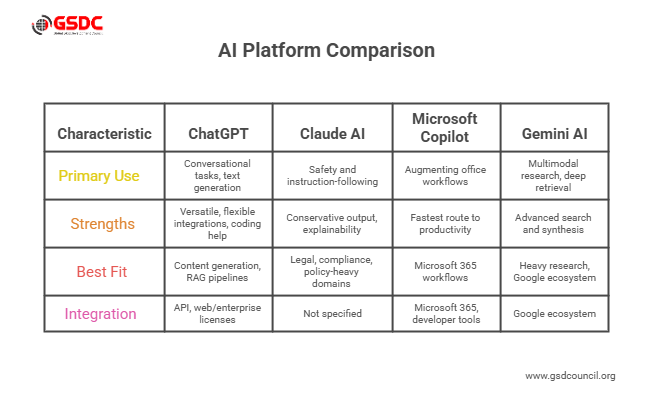
When leaders ask which AI platform to use, map the platform to the need. High-level guidance:
- What is ChatGPT? ChatGPT is a versatile large language model tuned for conversational tasks and broad text generation. Use it for flexible integrations, content generation, coding help, and RAG (retrieval-augmented generation) pipelines. If you’re asking what ChatGPT is internally, describe it as a general-purpose text assistant you can call via API or use in web/enterprise licenses.
- Claude AI: Claude AI emphasizes safety and instruction-following. It’s a strong choice where conservative output and explainability matter in legal, compliance, or policy-heavy domains.
- Microsoft Copilot: Copilot is built into Microsoft 365 and developer tools. It’s the fastest route to augmenting office workflows (Word, Excel, Outlook) because it appears where people already work.
- Gemini AI: Gemini is designed for multimodal research and deep retrieval. If your workflows require advanced search and synthesis or heavy Google ecosystem integration, evaluate Gemini compatibility and test Gemini deep research scenarios.
Rather than pick one platform for everything, many teams adopt a best-of-breed approach: Copilot for in-app productivity, ChatGPT for API-driven assistants, Claude AI for high-safety flows, and Gemini AI for heavy research needs.
Selecting use cases that succeed
Start with use cases that are bounded, valuable, and low-risk:
- Meeting summarization and action-item extraction
- First-pass customer support triage using RAG for grounding
- Drafting and editing routine documents (reports, proposals)
- Sales pre-call research and personalized outreach templates
These projects answer “how to implement AI in business” with measurable savings and limited exposure. Avoid automating irreversible actions (payments, contract changes) until you have robust safety gates.
A practical playbook: from pilot to scale
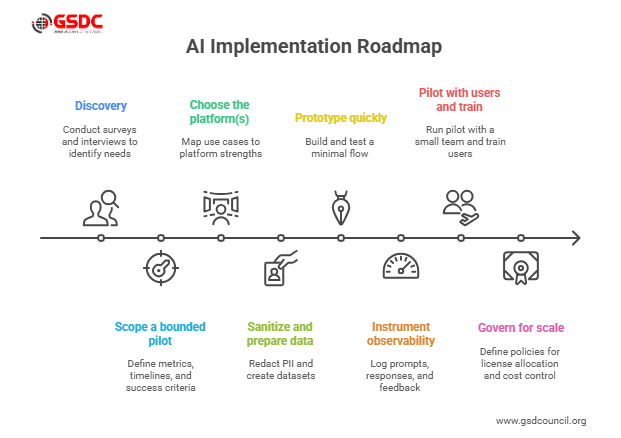
Follow this eight-step roadmap when you implement AI in business:
- Discovery: Run an employee readiness survey and interview leaders to find high-impact workflows and skills gaps. The session recommends surveying department leads to map needs and confidence with AI tools.
- Scope a bounded pilot: Define the metric, timeline (30/60/90 days), success criteria, and budget.
- Choose the platform(s): Map use cases to platform strengths, ask “which AI platform to use for this workflow?” and document tradeoffs.
- Sanitize and prepare data: Redact PII, create scoped datasets, and choose where embeddings and documents live.
- Prototype quickly: Build a minimal flow (input → retrieval → model → output) and test on historical data.
- Instrument observability: Log prompts, responses, sources, confidence scores, and user feedback.
- Pilot with users and train: Run with a small team, teach “how to use ChatGPT” and Copilot prompt patterns, and iterate.
- Govern for scale: Define license allocation policy, incident response, model refresh cadence, and cost controls.
The playbook blends technical steps with the organizational changes needed to actually adopt AI at scale.
Licensing, repeatability, and templates
Shared GPTs/Gems/Projects and company-level licenses are potent.
It was explained in the session with the help of team licenses and so-called GPTs (repeatable, shareable prompt templates) in such a way that the knowledge of the organization is stored and data leakage is reduced.
A common GPT can standardize a converter of Jira requests, an analyzer of sales calls, or a QBR prep assistant, and then be improved and audited in a central place.
Adoption failure modes and how to avoid them
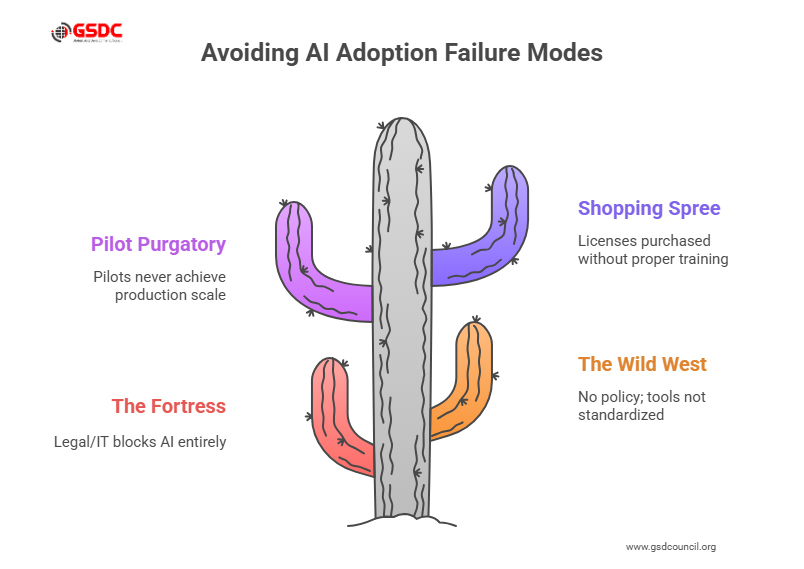
The speaker laid out several common failure models and remedies:
- The Fortress: Legal/IT blocks AI entirely. Remedy: offer secure, approved options and a clear path for exceptions.
- The Wild West: No policy; everyone uses different tools. Remedy: pick preferred tools, enforce minimal governance, and allow controlled experimentation.
- Pilot Purgatory: Pilots never scale because they lack dedicated resources. Remedy: Assign at least one FTE per ~150 employees to lead AI adoption.
- Shopping Spree: Buying thousands of licenses without training. Remedy: train first, then issue licenses based on demonstrated usage.
Most organizations sit in the “deer-in-the-headlights” stage; they know AI matters, but don’t know where to start. External facilitation or an internal AI council can get you unstuck.
Architecture patterns and agents
Common architectural patterns include:
- RAG (Retrieval-Augmented Generation): Store chunks in a vector DB, retrieve by relevance, and feed the model to ground answers. RAG is key to reducing hallucinations.
- Agent/Workflow orchestration: Combine intent detection, RAG, model generation, and actions (e.g., tickets, calendar entries) with human approval gates. The session noted that agents exist but are still narrow and warrant strong safety controls.
You can connect GPTs to automation tools (Make, Zapier, n8n) to build simple workflows, but avoid fully autonomous agents for high-risk actions until you’ve proven safety.
Cost and vendor landscape
People ask How much does AI cost? And how many AI companies are there? Expect a range:
- Pilot costs: a few hundred to a few thousand dollars per month (model calls, embeddings, vector DB).
- Production: costs scale with query volume, model size, retrieval complexity, and human-in-the-loop staffing mid-five-figure to six-figure monthly spend is possible for high-traffic deployments.
- Vendor market: there are thousands of AI companies and rapidly growing vendor ecosystems, which increases choice but also procurement complexity.
Modeling expected token usage and storage needs gives you a baseline. Optimize cost with smaller models for routine tasks, caching, and batched embeddings.
People, training, and what is AI in the workplace
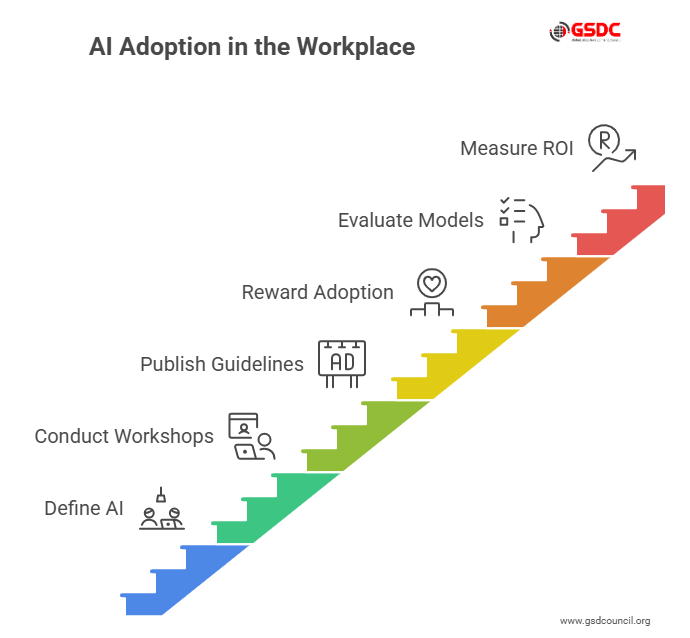
Adoption is a people problem. Define what AI is in the workplace for your staff: AI is an assistant and productivity multiplier, not a replacement. Practical steps:
- Run hands-on workshops that teach how to use ChatGPT and Copilot for daily workflows.
- Publish prompt recipes and safety guidelines.
- Reward adoption with measurable KPIs.
The session emphasized ongoing training; a single workshop isn’t enough. Reinforcement and an in-house resource or partner will make adoption stick.
Choosing models: evaluation criteria
When evaluating Claude AI, ChatGPT, Copilot, and Gemini AI, measure:
- Accuracy on domain tasks and hallucination rate.
- Latency and concurrency under load.
- Security, compliance, and data residency.
- Cost per successful transaction.
- Integration and Gemini compatibility if you need Google Cloud or multimodal capabilities.
- Gemini deep research performance when your use case requires synthesis across large corpora.
Run side-by-side tests with real prompts and score outputs on relevance, faithfulness, and safety.
Metrics and ROI
Define outcome metrics up front: time saved, error reduction, conversion uplift, or cost per resolution. Use A/B tests to quantify impact. Track ongoing operational metrics model drift, hallucination incidents, and user satisfaction, and tie them to business KPIs.
Final checklist: deploy responsibly
Treat this final checklist as your go/no-go gate before wider rollout. It collects the practical controls, telemetry, and governance items that stop small failures from becoming big ones.
Run these checks in your sandbox, repeat them during a small pilot, and verify results against the success metrics you defined at the start. If anything looks off, pause, fix, and rerun the checklist rather than pushing a risky change into production.
- Define one measurable pilot.
- Approve a preferred platform and policy.
- Provision team licenses and shared GPTs/Gems.
- Sanitize data and set redaction rules.
- Instrument observability and logging.
- Train users and assign ownership (1 FTE per ~150 employees recommended).
- Pilot, iterate, and scale with governance.
Ready to turn this playbook into career-ready skills? Earn the GSDC AI Tool Expert certification to get hands-on practice with deployment, governance, and real-world AI operations.

Conclusion
The deployment of AI is a strategic initiative that involves the integration of product thinking, engineering, policy, and people.
The next steps are straightforward when you want to know how to apply AI to business: begin with small steps, select the appropriate platform to address a specific issue, focus on governance, and invest in training and observability.
Regardless of which AI you use (safety, Claude, generalist generation (ChatGPT), inside-app productivity (Copilot), or deep research and multimodal missions (Gemini), align platform capabilities with actual business issues, quantify results, and go large with controls.

Related Certifications
Stay up-to-date with the latest news, trends, and resources in GSDC
If you like this read then make sure to check out our previous blogs: Cracking Onboarding Challenges: Fresher Success Unveiled
Not sure which certification to pursue? Our advisors will help you decide!