How Security Teams Can Use LLMs to Analyse Security Logs and Investigate Threats
Written by Matthew Hale
- How LLMs Help Analyse Security Logs
- How an LLM Analyses Security Logs
- How Security Teams Use LLMs to Investigate Different Threats
- Practical Example: Using an LLM to Investigate a Suspicious Login
- Limitations of Using LLMs for Security Log Analysis
- Develop Your Generative AI Cybersecurity Knowledge with GSDC Certification
- Conclusion
Security teams handle large volumes of logs generated by firewalls, endpoints, servers, cloud platforms, applications, and identity systems. These logs contain information about authentication attempts, network connections, user activity, system changes, and potential security incidents. Reviewing this data manually can take considerable time, especially when an investigation involves multiple systems.
Large Language Models (LLMs) can help security teams process log data, summarise events, identify suspicious activity, and support threat investigations. When connected to Security Information and Event Management (SIEM) platforms, they can help analysts understand complex events, generate investigation queries, and connect related activities across different systems.
However, LLMs should support existing detection systems and security analysts rather than replace them. Their findings must be checked against original logs and other security evidence.
This blog explains how security teams can use LLMs for security log analysis, investigate suspicious activity, correlate events, and identify potential threats.
How LLMs Help Analyse Security Logs
Security logs contain structured and unstructured information, including timestamps, IP addresses, usernames, event IDs, process names, and activity descriptions.
An LLM can interpret this information and convert technical records into summaries that analysts can understand. It can also help identify unusual event sequences and suggest which records require further investigation.
Security teams can use LLMs for:
- Log summarisation: Convert large sets of log entries into concise summaries of important activities.
- Suspicious activity analysis: Highlight unusual login attempts, privilege changes, unexpected processes, and network connections.
- Event correlation: Help connect related events across endpoint, network, identity, and cloud logs.
- Query generation: Create draft SIEM queries to investigate specific users, IP addresses, or event types.
- Event explanation: Explain unfamiliar security events and their possible implications.
- Investigation documentation: Organise findings into timelines and incident reports.
How an LLM Analyses Security Logs
An effective LLM-based log analysis process involves collecting relevant records, preparing the data, providing investigation context, and validating the model's findings.
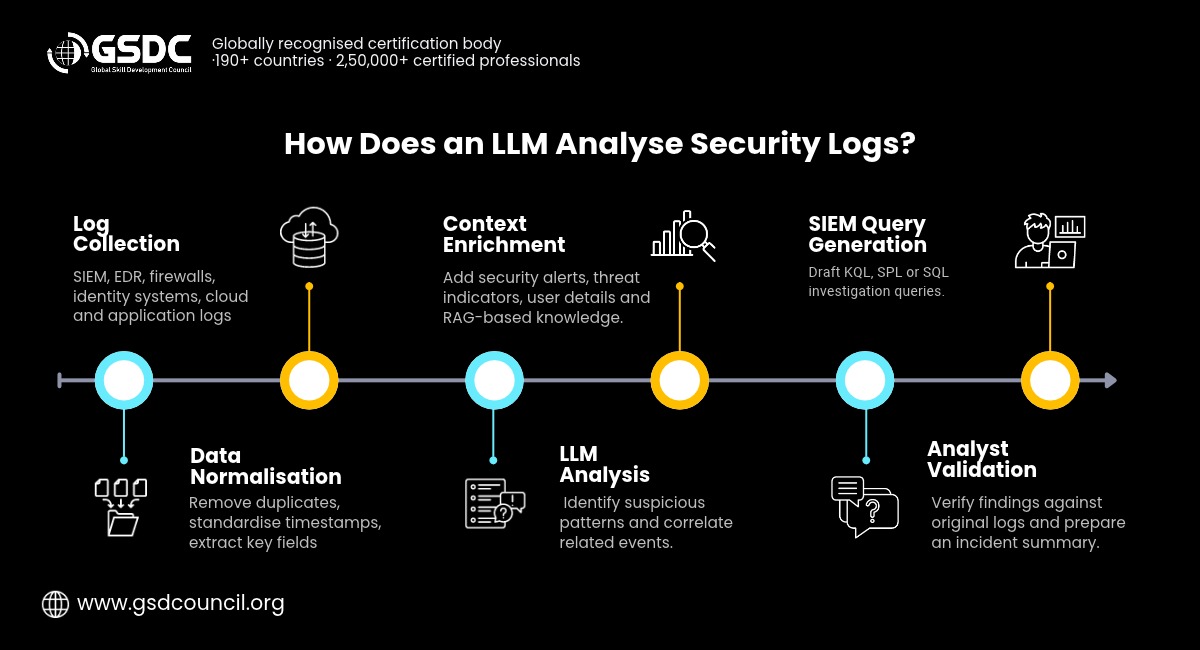
Step 1: Collect Logs from Security Sources
The first step is to collect logs from the systems involved in an investigation. These may include:
- SIEM platforms such as Microsoft Sentinel, Splunk, and IBM QRadar.
- Endpoint Detection and Response (EDR) tools.
- Firewalls and intrusion detection systems.
- Identity providers and authentication services.
- Cloud platforms and application audit logs.
Security teams should identify the relevant log sources based on the alert or activity being investigated instead of sending every available record to the model.
Step 2: Filter and Normalise Log Data
Raw logs may contain duplicate events, irrelevant records, inconsistent timestamps, and different data formats. These issues can affect the quality of analysis.
Before processing logs with an LLM, teams should:
- Remove duplicate and irrelevant records.
- Standardise timestamps and event formats.
- Extract fields such as usernames, IP addresses, event IDs, and process names.
- Mask sensitive information where required.
- Group related events by user, device, or time range.
This preparation helps the model interpret the events with the correct context.
Step 3: Provide Context to the LLM
A single security event may not be enough to identify a threat. An unfamiliar login, for example, may be legitimate if the employee is travelling.
Security teams should provide relevant context, such as:
- The original security alert.
- Related logs and timestamps.
- User and device information.
- Known threat indicators.
- Previous investigation findings.
Retrieval-Augmented Generation (RAG) can also help an LLM retrieve relevant information from approved security documentation, incident records, and threat intelligence sources.
Step 4: Analyse Events and Identify Suspicious Patterns
Once the relevant data is available, an LLM can examine event sequences and highlight activity that needs attention.
Examples include:
- Repeated failed login attempts followed by a successful login.
- Unexpected privilege escalation.
- Unusual PowerShell or command-line execution.
- Connections to unfamiliar external IP addresses.
- Access to sensitive files outside normal working hours.
The model can explain why these events may be suspicious and suggest additional logs to review. Analysts must validate these observations before treating them as evidence of an attack.
Step 5: Generate SIEM Queries for Further Investigation
Security analysts often need to search additional logs to determine whether an alert is connected to other suspicious activities.
LLMs can convert investigation requirements into draft queries using languages such as:
- Kusto Query Language (KQL): Used in Microsoft Sentinel.
- Search Processing Language (SPL): Used in Splunk.
- SQL: Used to query supported security datasets.
For example, an analyst could ask:
"Find all authentication events associated with this user over the last 24 hours, including failed logins, successful logins, and account permission changes."
The LLM can generate a query based on the platform and available log schema. The analyst should review it before execution to ensure it retrieves the intended information.
Step 6: Prepare an Investigation Summary
After reviewing the relevant events, an LLM can organise the findings into a structured investigation summary.
The summary may include:
- Incident overview.
- Timeline of suspicious events.
- Affected users and systems.
- Relevant IP addresses and event IDs.
- Evidence supporting the suspected activity.
- Recommended next investigation steps.
The analyst should verify the information against original logs before using the report to make incident decisions.
How Security Teams Use LLMs to Investigate Different Threats
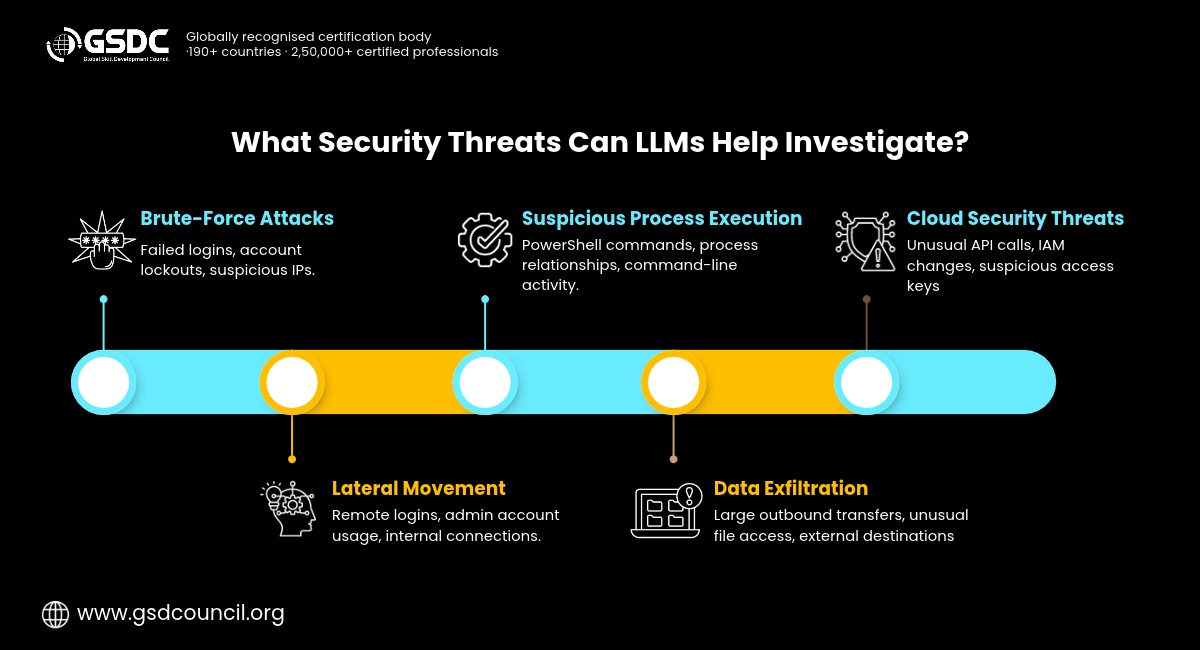
LLMs can support investigations involving authentication, endpoint activity, network connections, and cloud access. The following examples show how they can help analysts examine different attack patterns.
A. Investigating Brute-Force and Credential Attacks
Brute-force attacks involve repeated attempts to guess account passwords, while password spraying uses a small number of common passwords against multiple accounts.
An LLM can analyse authentication logs to identify:
- Repeated failed login attempts across multiple accounts.
- Login attempts from the same suspicious IP address.
- Successful authentication after multiple failures.
- Unusual login times or locations.
- Account lockouts and unexpected password resets.
It can also help correlate these events with identity provider logs and endpoint activity to determine whether an account may have been compromised.
B. Detecting Lateral Movement
Lateral movement occurs when an attacker uses access to one compromised system to reach other systems within an organisation's network.
LLMs can help examine endpoint, authentication, and network logs for:
- Remote login attempts between internal systems.
- Unusual use of administrative accounts.
- Unexpected access to shared folders.
- Remote service execution.
- Connections between workstations and servers that require investigation.
The model can organise these events into a timeline, helping analysts understand how an account or device interacted with other systems.
C. Analysing Suspicious Process Execution
Endpoint logs contain information about running processes, command-line arguments, parent-child process relationships, and file activity.
An LLM can explain unfamiliar commands and highlight execution patterns that may require investigation.
For example, a PowerShell event containing encoded commands and an unexpected external connection may need closer examination.
The model can explain the command's possible purpose and suggest related endpoint events to review. Analysts must verify the execution context before classifying the activity as malicious.
D. Investigating Data Exfiltration
Data exfiltration involves the unauthorised transfer of information outside an organisation.
LLMs can help analyse network, cloud, and file access logs to identify:
- Large outbound data transfers.
- Unusual access to sensitive files.
- Repeated downloads from cloud storage.
- Connections to unfamiliar external destinations.
- Data transfers outside normal business hours.
By connecting these events, the model can help analysts identify potentially affected accounts, systems, and data repositories.
E. Analysing Cloud Security Events
Cloud environments generate logs from identity services, storage systems, virtual machines, APIs, and administrative activities.
LLMs can help investigate:
- Unusual API calls.
- Changes to IAM roles and permissions.
- Unexpected public access to cloud storage.
- Suspicious access key usage.
- Unusual creation of cloud resources.
- Access to cloud services from unfamiliar locations.
The model can summarise related cloud audit events and suggest which permissions, accounts, or resources require further review.
Practical Example: Using an LLM to Investigate a Suspicious Login
Consider an organisation that receives a SIEM alert about unusual login activity involving an employee account.
The security team retrieves authentication records and finds the following sequence:
Time | Security event |
| 09:10 | Multiple failed login attempts for an employee account. |
| 09:14 | Successful login from an unfamiliar IP address. |
| 09:18 | Access to an internal application. |
| 09:23 | Attempt to access a restricted resource. |
| 09:27 | An account permission change. |
The analyst provides these records and the related alert details to an LLM.
The model can support the investigation in five ways:
- Build an event timeline: Arrange authentication and access events in chronological order.
- Highlight suspicious activity: Identify the unusual login followed by access to restricted resources.
- Correlate related events: Suggest checking identity provider, endpoint, and application logs for the same account.
- Generate investigation queries: Draft SIEM queries to find other login attempts and permission changes.
- Summarise findings: Prepare a report showing the event sequence and evidence requiring validation.
The analyst then checks the original logs, verifies whether the login was legitimate, and decides whether the account needs to be secured.
This example demonstrates how an LLM can help reduce the effort involved in understanding an alert while keeping the final investigation decision with the analyst.
Limitations of Using LLMs for Security Log Analysis
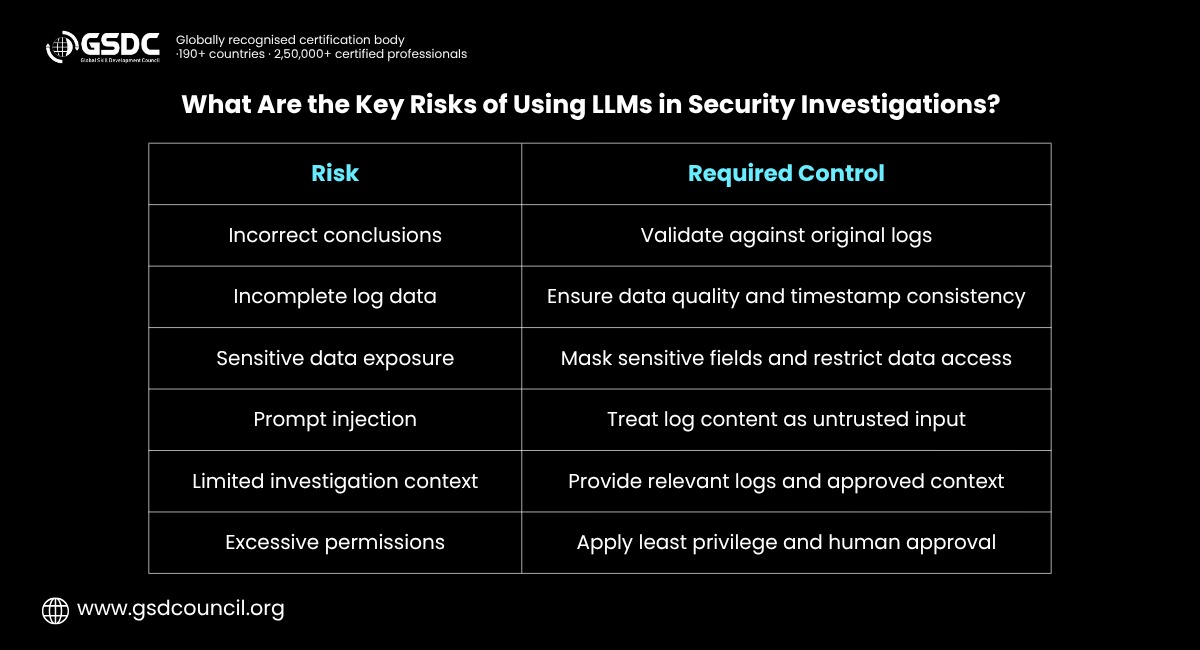
LLMs can support log analysis, but their output depends on the quality of the data and context provided. Security teams should account for the following limitations:
- Incorrect conclusions: An LLM may misinterpret events or identify relationships that are not supported by evidence.
- Incomplete log data: Missing records or inconsistent timestamps can affect the accuracy of an investigation.
- Sensitive information exposure: Logs may contain personal information, session identifiers, and internal system details. These must be protected through appropriate data handling controls.
- Prompt injection: Malicious instructions embedded in log content may influence model behaviour if the input is not handled securely.
- Limited investigation context: An LLM cannot reliably assess activity across systems to which it has no access.
- Excessive permissions: Integrations with SIEM and EDR platforms should follow least-privilege access, with human approval for high-impact actions.
Security teams should treat model-generated findings as investigation assistance, not confirmed evidence of a threat.
Develop Your Generative AI Cybersecurity Knowledge with GSDC Certification
As organisations explore LLMs for security log analysis and threat investigation, cybersecurity professionals need to understand how generative AI can be applied in security environments and the risks associated with its use.
The GSDC Generative AI in Cybersecurity Certification is designed for professionals who want to develop knowledge of generative AI applications and their cybersecurity implications.

Through this certification, professionals can develop an understanding of:
- Generative AI applications and their use in cybersecurity.
- AI-driven security threats and emerging attack techniques.
- Security risks and vulnerabilities associated with generative AI systems.
- Risk assessment, security controls, and responsible AI implementation.
Explore the GSDC Generative AI in Cybersecurity Certification to build your knowledge of generative AI applications and modern cybersecurity challenges.
Conclusion
LLMs can help security teams analyse large volumes of security logs, understand suspicious event sequences, generate SIEM queries, and prepare investigation summaries. They are particularly useful when analysts need to connect activity across identity, endpoint, network, and cloud systems.
However, reliable threat investigation still depends on accurate log collection, proper context, and evidence validation. By combining LLM capabilities with existing SIEM tools and analyst expertise, organisations can make security log analysis more efficient without compromising investigation quality.

Related Certifications
Frequently Asked Questions
LLMs can summarise log entries, explain suspicious events, identify patterns, correlate related activity, and generate SIEM queries. They help analysts understand large volumes of technical data more efficiently.
LLMs can help identify suspicious patterns and explain potential threats, but they should not be treated as standalone detection systems. Their findings need to be validated using security analytics, detection rules, and supporting evidence.
LLMs can summarise SIEM alerts, explain event sequences, generate investigation queries, and prepare incident reports. They work alongside existing SIEM detection rules and security analytics.
An AI SOC analyst is an AI-powered assistant that supports Security Operations Centre activities such as alert triage, log analysis, and threat investigation. It operates within defined permissions and human oversight.
Major risks include sensitive data exposure, prompt injection, inaccurate analysis, hallucinations, excessive tool permissions, and incomplete log data. Appropriate security controls and human validation are essential.
Stay up-to-date with the latest news, trends, and resources in GSDC
If you like this read then make sure to check out our previous blogs: Cracking Onboarding Challenges: Fresher Success Unveiled
Not sure which certification to pursue? Our advisors will help you decide!