Microsoft 365 Copilot - Risk Review & Risk Summary Generation
Written by Trevor Wiseman
Artificial Intelligence is no longer a futuristic concept it is an integral part of modern enterprise productivity. Among the most transformative tools in this space is Microsoft 365 Copilot, a sophisticated AI assistant integrated into Microsoft 365 applications such as Teams, Word, Excel, Outlook, and PowerPoint. Copilot leverages large language models and Microsoft Graph data to enhance workflows, summarize information, and automate repetitive tasks. However, this powerful integration also amplifies potential risks, particularly around data security, compliance, and governance.
The recent webinar, Microsoft 365 Copilot – Risk Review & Risk Summary Generation, led by Trevor Weisman, VP of Technology and AI Governance, provided a practical roadmap for organizations to deploy Copilot securely, aligned with regulatory standards like the EU AI Act and globally recognized frameworks such as NIST’s AI Risk Management Framework (AIRMF). This blog delves into the critical takeaways from the webinar, offering a step-by-step guide for enterprises to manage Copilot risks effectively.
What is Microsoft 365 Copilot?
Microsoft 365 Copilot functions as an embedded AI assistant across multiple Microsoft 365 applications, which include Word, Excel, Teams, Outlook, and PowerPoint. The system employs large language models together with Microsoft Graph data to assist users in creating content and performing data analysis, extracting important information from conversations and executing automated tasks, and achieving secure productivity advancements.
Microsoft 365 Copilot functions as an integrated solution that transforms employee work activities into practical business insights through its direct implementation within existing employee software tools. The Microsoft 365 Copilot system enables users to create reports that extract essential information from emails and meetings while developing presentations and optimizing operational processes.
Microsoft Copilot 365 provides advanced security features together with compliance and governance controls to safeguard sensitive corporate information. Organizations that want to understand Microsoft 365 Copilot need to know about the benefits it delivers through its capacity to boost operational efficiency while minimizing work requirements and supporting advanced decision-making across various teams.
Why Risk Assessment for Microsoft 365 Copilot Matters?
Copilot’s integration into Microsoft 365 means it continuously interacts with enterprise data from emails and documents to chats and meeting transcriptions. While this connectivity drives efficiency, it also introduces risks such as:
- Data Leakage: Improper permissions or misconfigured roles can expose sensitive company information.
- Prompt Injection Attacks: Cybercriminals can manipulate prompts to extract unauthorized data. Microsoft reports that up to 70% of permission misconfigurations in Copilot deployments can create vulnerabilities.
- Compliance Violations: With regulations like the EU AI Act coming into effect, failing to assess high-risk AI applications can result in fines and reputational damage.
Given these challenges, structured risk assessment is no longer optional it is a business-critical activity. Proper governance ensures that AI tools like Copilot enhance productivity without compromising security or compliance.
Microsoft’s Four-Step Risk Assessment Framework
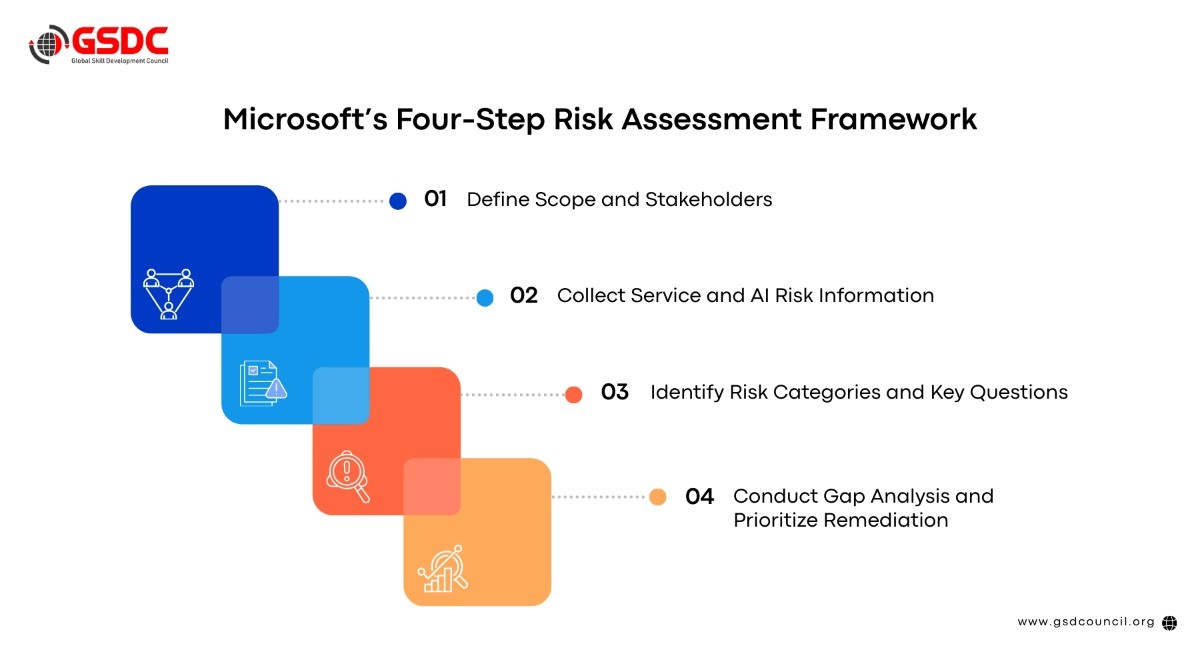
Trevor Weisman outlined a four-step framework for Copilot risk management, designed to provide a systematic approach to secure deployment.
Step 1: Define Scope and Stakeholders
Before diving into risk analysis, organizations must clarify what will be assessed and who will be responsible. Key activities include:
- Scope Definition: Determine which Microsoft 365 applications will integrate Copilot. Teams is often the starting point due to its extensive use in video conferencing, messaging, and document collaboration.
- Stakeholder Alignment: Identify critical participants, including IT leads, SISO/security officers, data protection officers, compliance managers, and business owners. Their accountability ensures that security, privacy, and operational objectives are balanced.
- Charter Creation: Document decisions in a concise, one-page charter outlining RACI (Responsible, Accountable, Consulted, Informed) assignments and success criteria. This prevents assessment creep and maintains actionable outcomes.
A focused, well-defined scope accelerates subsequent assessment phases and ensures alignment between technology, business strategy, and governance requirements.
Step 2: Collect Service and AI Risk Information
Effective risk management relies on comprehensive data collection. For Copilot, this involves gathering intelligence from multiple sources:
- Microsoft 365 Admin Center: Export audit logs, permissions reports, and activity histories.
- Data Loss Prevention (DLP) Policies: Review existing DLP enforcement scopes and sensitivity label configurations.
- Third-Party Integrations: Catalog custom agents, plugins, and applications interacting with Copilot.
- Automation Tools: Use PowerShell scripts to streamline log extraction and continuous monitoring.
The goal is to build a structured intelligence baseline that informs later risk evaluation. This systematic approach ensures nothing is overlooked, from over-permissive access to unmonitored custom agents.
Step 3: Identify Risk Categories and Key Questions
Once data is collected, the next step is to classify risks into five core categories:
- Permissions and Access Control: Are users accessing data beyond their role? Are Graph API permissions aligned with least-privilege principles?
- Data Protection and Privacy: Are sensitivity labels and encryption policies consistently enforced? Do data residency requirements comply with regulatory standards?
- Prompt Safety: Are prompt injection and jailbreak attacks mitigated through custom classifiers and monitoring?
- Content Filtering: Are harmful content, bias, and inappropriate messaging blocked according to organizational values?
- Compliance: Are audit logs complete? Are sector-specific regulations, such as the EU AI Act or GDPR addressed?
Each category is assessed against specific evaluation criteria, helping organizations identify high-risk areas requiring immediate remediation.
Step 4: Conduct Gap Analysis and Prioritize Remediation
The final step involves evaluating current controls against identified risks and prioritizing remediation actions. Trevor emphasized a five-point risk rating scale:
- 5 – Critical: No controls in place; immediate action required.
- 4 – High: Minimal controls; significant gaps exist.
- 3 – Medium: Some controls; notable weaknesses.
- 2 – Low: Good controls; minor improvements needed.
- 1 – Minimal: Strong controls; negligible risk.
A color-coded heat map Red (>3), Amber (2–3), Green (<2) visualizes risk severity and guides prioritization. High-risk issues, such as over-permissive Graph API access or incomplete audit logs, should be addressed immediately before enterprise-wide deployment.
Risk Summary Generation
The culmination of this assessment process is a risk summary an executive-ready document that translates technical findings into actionable business strategy. Key components include:
- Aggregated Scores: Combine individual risk ratings into a comprehensive heat map showing concentration and severity.
- Prioritized Actions: Distinguish quick wins (e.g., permission fixes) from strategic initiatives (e.g., EU AI Act compliance).
- Executive Brief: Provide a concise, one-page summary with recommendations, accountability assignments, and target dates.
This approach ensures risk management is not just a technical exercise but a strategic tool that informs resource allocation and business decision-making.
Compliance Considerations
2026 is expected to be the year of AI governance. Organizations must pay particular attention to:
- EU AI Act: Mandates formal risk assessments for high-risk AI applications, enforceable this year. Noncompliance may result in fines and legal exposure.
- NIST AI Risk Management Framework (AIRMF): Provides globally recognized guidance for structured AI risk management.
- Internal Controls: Continuous monitoring, prompt safety checks, and DLP enforcement remain critical to avoid breaches and maintain trust.
Trevor stressed that compliance is not a one-time exercise; governance must evolve alongside technology and regulatory requirements.
How AI Tool Expert Certification Help You?
The GSDC AI Tool Expert Certification offers professionals an internationally recognized credential that proves their advanced artificial intelligence and Generative AI skills.
The certification enables professionals to build trust with others while showing their ability to implement AI technology in actual business settings.
The AI Tool Expert Certification program teaches you how to use AI tools effectively through its real-world implementation and practical use case training.
Conclusion
Microsoft 365 Copilot represents a major leap in enterprise productivity, but its power comes with responsibility. Organizations must adopt structured risk assessment frameworks, align with compliance requirements, and continuously monitor AI deployment.
Trevor Weisman’s four-step framework defining scope and stakeholders, collects risk data, identifies risk categories, and conducts gap analysis, provides a practical methodology for deploying Copilot securely. Combined with clear accountability, executive-ready risk summaries, and ongoing governance, enterprises can harness AI’s potential while minimizing exposure to breaches, regulatory violations, and operational disruptions.
By starting risk assessment today, whether for new or existing Copilot deployments, organizations lay the foundation for secure AI transformation tomorrow.

Related Certifications
Stay up-to-date with the latest news, trends, and resources in GSDC
If you like this read then make sure to check out our previous blogs: Cracking Onboarding Challenges: Fresher Success Unveiled
Not sure which certification to pursue? Our advisors will help you decide!