The Best Instructional Design Tools for 2026: A Complete Guide
Written by Matthew Hale
- What Is Instructional Design - and Why It Matters More Than Ever
- Top Instructional Design Tools in 2026
- Best AI Tools for Instructional Design
- eLearning Authoring Tools & LMS Platforms
- What Are Instructional Design Strategies? A Practical Overview
- The Future of Instructional Design: Trends Reshaping the Field
- Instructional Designer Certification: Building Professional Credibility
- Conclusion
From AI-powered authoring platforms to industry-leading eLearning authoring tools, instructional designers today have access to a powerful instructional design toolkit. These tools are transforming how learning experiences are created making them more interactive, personalized, and scalable than ever before.
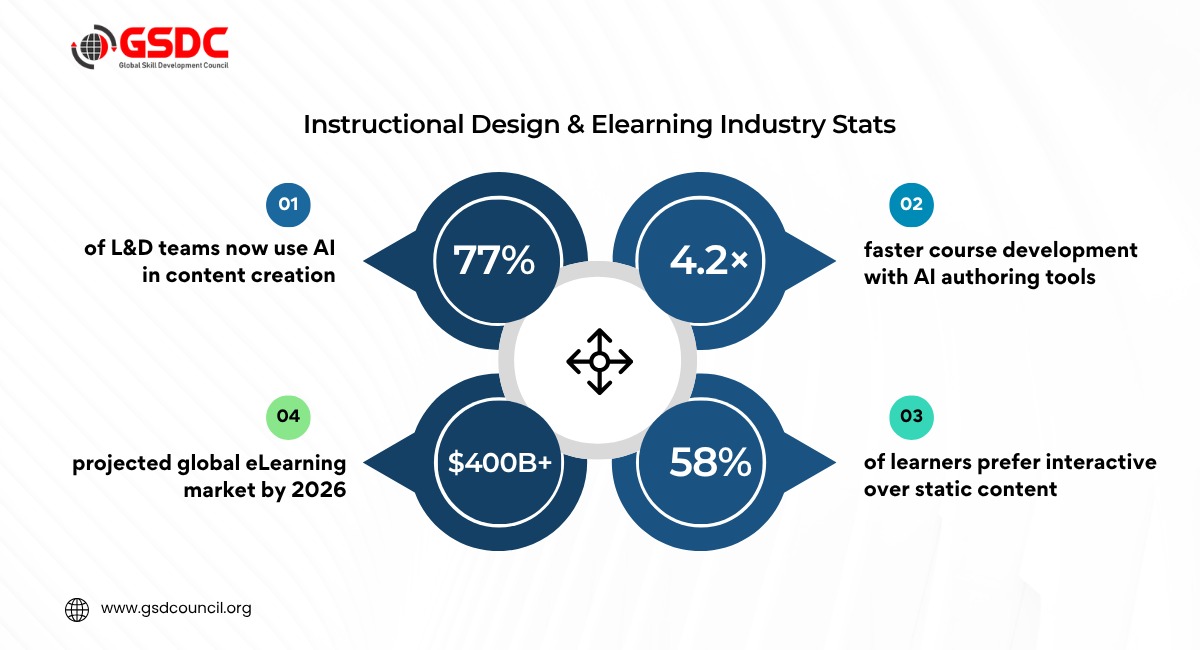
In fact, recent industry data shows that over 80% of L&D teams now use AI in content creation, highlighting how rapidly instructional design tools are evolving.
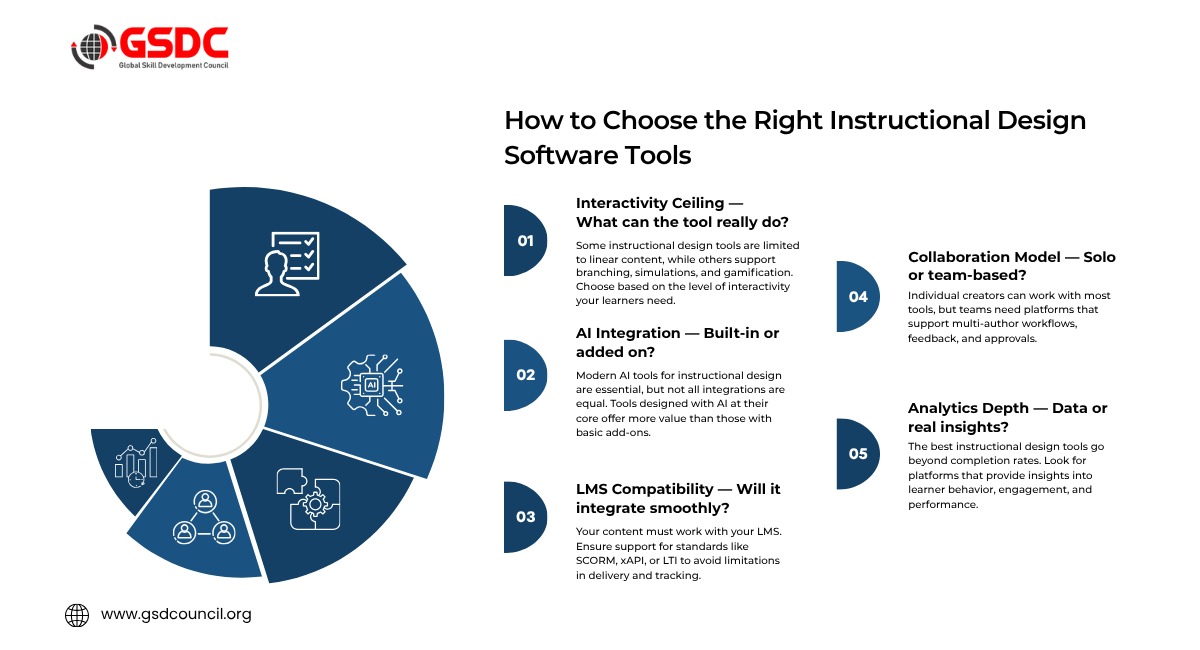
But with so many options available, choosing the right instructional design tools can be overwhelming. From AI-driven content creation and automation to advanced instructional design software tools for collaboration, analytics, and delivery, the modern learning ecosystem is changing fast.
This guide explores the top instructional design tools shaping how learning is designed, delivered, and measured. Whether you're exploring what tools do instructional designers use or looking to upgrade your stack, this breakdown will help you navigate the landscape with clarity and confidence.
What Is Instructional Design - and Why It Matters More Than Ever
Instructional design refers to the process involved in designing instruction such that it can be engaging and effective. This involves applying technology, principles of pedagogy, and psychology to ensure that the learners not only receive the information, but understand and apply it.
The most fundamental thing to ask here is – “How do you help someone learn effectively?” While there are several models available for instructional design, the success depends on the right implementation using the correct instructional design tools.
In today’s world, learning has become faster and more artificial intelligence-enabled than ever before, with a stronger emphasis on interactivity. However, while organizations are pouring money into their learning initiatives, the success of these efforts hinges on how effectively learning is designed.
The effectiveness of learning design requires the proper approach and a robust instructional design toolkit. It is therefore critical to know what instructional designers use when it comes to software for developing effective courses.
Top Instructional Design Tools in 2026
Instructional design tools that are currently being used range from corporate-level applications to agile artificial intelligence-led options designed for efficiency. All of them make up an impressive instructional design toolset for developing contemporary learning designs.
For individuals who wish to develop their knowledge about these tools, one can opt for the Certified Instructional Designer certification.
Interactive Authoring Platforms
In terms of instructional design tools for eLearning, interactive authoring platforms are what matters. This is because such authoring tools transform concepts into interactive and engaging material.
1. Genially
This is the platform used when creating content that is visual and interactive. Using genially, you can create gamified interactions, branching scenarios, and micro-learning modules without needing any coding skills. This is among the most versatile instructional design software tools around.
Best for: Interactivity & Gamification
2. Articulate 360
A leading choice for enterprise teams. Storyline enables complex simulations, while Rise offers fast, responsive course creation. Built-in AI features make it one of the top instructional design tools today.
Best for: Enterprise Training
3. Easygenerator
Intended to be simple and straightforward, enabling subject matter experts to develop courses easily. Use AI to convert documents into engaging content, and translate it into multiple languages.
Best for: Employee-Generated Learning
4. Elucidat
A collaborative platform designed for big teams. Several people can work together in creating the course using the workflows included in this software.
Best for: Big Team Collaboration
5. Adobe Captivate
A simulation and technical training software that can create a fully responsive environment, including virtual reality training options.
Best for: Simulations & VR Training
6. iSpring Suite
Created inside PowerPoint, making it suitable for newbies. Turn your slides into courses, record videos, and publish them anywhere.
Best for: PowerPoint-Based Teams
Best AI Tools for Instructional Design
AI technology is one of the critical components of modern instructional design tools. The best AI tools for instructional design do not eliminate the role of professionals but rather make their work more productive by managing monotonous tasks, which allow experts to engage in strategic and creative activities.
As stated in recent industry news and activities organized by the Global Skill Development Council (GSDC), AI does not take over instructional designers’ jobs but rather makes them more efficient by freeing them from boring tasks.
Top AI Tools for Instructional Design
1. ChatGPT / Claude
Tools for creating conversational AI in instructional design which are key components of content creation today. These tools enable you to create learning goals based on Bloom's taxonomy, write case studies, design branching scenarios, and create tests within a few minutes.
Best For: Content Creation and Brainstorming
2. Synthesia
A tool used to create videos via artificial intelligence. This platform lets you create professional learning videos without having to go through the entire production process because of its AI-powered avatars in multiple languages.
Useful For: AI Video Creation
3. Coursebox AI
It is an online course development application that transforms documents, videos, or links into courses and includes assessments within the courses. It works well for creating courses fast while maintaining high-quality instruction.
Best For: Fast Course Creation
4. ElevenLabs
A high-quality text-to-speech platform that produces natural-sounding voiceovers. It enables scalable audio narration for eLearning, reducing the need for studio recording.
Best for: AI Narration & Audio
eLearning Authoring Tools & LMS Platforms
eLearning authoring tools are used to create content, while Learning Management Systems (LMS) deliver, manage, and track it. Understanding how these layers work together is essential for building effective learning experiences.
For modern professionals, combining the right platforms is a key part of using instructional design tools effectively. The right setup ensures content reaches learners in a structured, scalable, and measurable way.
Learning Management Systems
Learning Management Systems constitute an essential aspect of the available instructional design software tools nowadays and can help businesses to learn and assess learning in a professional way.
1. Moodle
An LMS software tool that has been extensively applied around the world for educational purposes and is open source and customizable with thousands of plugins. Although some technical installation will be needed, Moodle is free of charge.
Best suited for: Educational institutions
2. Canvas
Another LMS tool that is widely used in education and business settings; it is compatible with Zoom, Google Drive, and Microsoft Teams.
Best for: Higher Education & Corporate
3. 360Learning
A collaborative LMS which allows employees to contribute to and share learning material. Peer-learning is the main focus here, with the platform using analytics to demonstrate how specific materials improve performance.
Best for: Collaborative L&D
4. Docebo
An AI-powered LMS designed for enterprise use. It supports personalized learning paths, automates content curation, and integrates with HR and CRM systems to align learning with business outcomes.
Best for: AI-Driven Enterprise L&D
What Are Instructional Design Strategies? A Practical Overview
The use of instructional design tools depends entirely on the strategies implemented to utilize them effectively. The real key lies in using these strategies to deliver effective learning experiences.
Following are some of the best instructional design strategies being used right now:
1. Spaced Repetition
Learning reinforcement enhances retention. Today’s instructional design technology solutions and LMS platforms provide the means for this through automated reminders and reassessments.
2. Scenario-Based Learning
Immersing oneself in real-life situations improves the process of making decisions and implementing them. Most eLearning authoring systems offer scenario-based learning with branching scenarios.
3. Microlearning
Microlearning refers to shorter content that improves learning effectiveness and supports timely learning. Microlearning templates are found in most instructional design software for eLearning.
4. Gamification
Gamification refers to elements like points, badges, and progress tracking.
5. Adaptive Learning Pathways
The use of AI to personalize content according to learner performance is common in modern AI software used for instructional design and learning management systems.
6. Social & Collaborative Learning
Social and collaborative learning increases engagement and improves information retention. It is commonly integrated into many platforms in instructional design.
The Future of Instructional Design: Trends Reshaping the Field
The future of instructional design is moving swiftly towards new trends and advancements. People who know about these trends will find designing instructions much easier with technological innovations.
Here are the key trends shaping the field:
1. Hyper-Personalization at Scale
Artificial intelligence is now creating personalized learning environments for learners based on their preferences and behavior.
2. Immersive Learning Environments
Virtual and augmented reality can be used effectively for creating a training environment.
3. AI as a Co-Creator
AI technologies used by instructional designers today are producing content at unprecedented speeds, enabling designers to concentrate on more strategic and creative aspects of their work.
4. Predictive Learning Analytics
Using predictive learning analytics, one can detect students who struggle and offer interventions before problems worsen.
5. Continuous Learning Ecosystems
Learning will move away from traditional courses and toward continuous learning ecosystems, with learning embedded within everyday workflow systems such as collaboration and mobile applications.
6. Next-Generation Gamification
Gamification will advance from simple point-and-badge programs to more complex gaming systems based on storylines.
Instructional Designer Certification: Building Professional Credibility
In order to make use of these strategies efficiently, many people opt for getting certified as instructional designers or earning an instructional design certificate. An organized instructional design certificate course will develop basic competencies, whereas a certification will ensure expertise.
Recognized Certification Pathways
1. Certified Instructional Designer Certification (GSDC)
An international certification centered around the contemporary tools and techniques of instructional design.
2. University Programs
Organized academic courses offering instructional design certificates with practical projects included.
3. Online Certifications
Online courses provide instructional design certificates, mainly emphasizing tool-based competencies.
4. Portfolio First
Developing a portfolio reflecting the use of tools by instructional designers is as important.
Career Guidance
When deciding between pursuing a certification in instructional design and becoming a certified instructional designer, you need to consider your level of experience. If you have years of experience, getting a Certified Instructional Designer Certification from the Global Skill Development Council (GSDC) will help.

Conclusion
There are new developments taking place in the field of instructional design tools, starting from sophisticated eLearning authoring tools to highly advanced AI-based tools for instructional design. However, what matters most is how efficiently such tools are utilized.
With the evolution of learning into more personalized and data-driven models, the importance of the instructional designer's role becomes paramount. Learning how instructional designers utilize tools in their designs is therefore essential knowledge.

Related Certifications
Frequently Asked Questions
Stay up-to-date with the latest news, trends, and resources in GSDC
If you like this read then make sure to check out our previous blogs: Cracking Onboarding Challenges: Fresher Success Unveiled
Not sure which certification to pursue? Our advisors will help you decide!