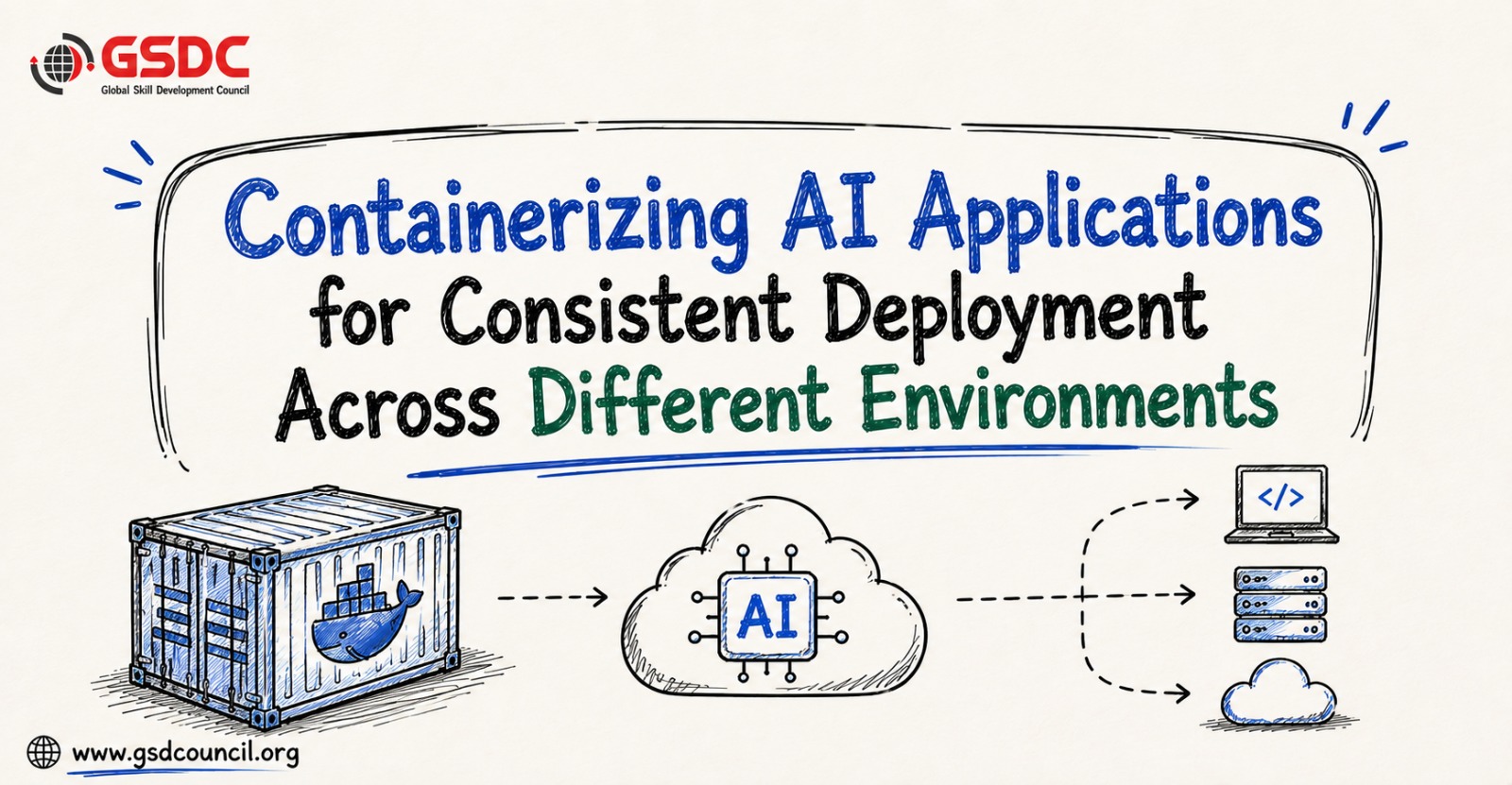
Containerizing AI Applications for Consistent Deployment Across Different Environments
Written by Nisarg Kadam
- Why AI Projects Fail After the Prototype Stage?
- The "Works on My Machine" Problem in AI
- What Is Application Containerization?
- Why Containers Are Ideal for AI Applications
- What Does an AI Container Actually Include?
- Best Practice #1: Pin Every Dependency
- Best Practice #2: Build Smaller Container Images
- Best Practice #3: Separate Model Weights from Application Code
- Best Practice #4: Configure GPUs Correctly for AI Containers
- Achieving Consistent Deployments Across Every Environment
- Why Kubernetes Has Become the Standard for AI Deployment?
- Scaling AI Applications Without Increasing Costs
- Deploy New AI Models Safely with Canary and Blue-Green Releases
- The Role of a Forward Deployed Engineer in AI
- Take Your AI Deployment Skills to the Next Level
- Conclusion
AI application development is only half the journey. The real challenge is reliable AI deployment across development, testing, and production without dependency conflicts or unexpected failures. Despite growing investments in AI, many projects never progress beyond the prototype stage because organizations struggle with operational complexities rather than model performance.
Differences in software versions, libraries, GPU configurations, and runtime environments can cause AI applications to behave differently after deployment, making production reliability a major concern for engineering teams.
In the GSDC webinar, “Containerizing AI Applications for Consistent Deployment Across Different Environments,” we explored how containerization helps solve these challenges by creating consistent, portable environments for AI applications. The session also covered Kubernetes, CI/CD, observability, and security for building production-ready AI systems.
In this blog, we’ll explore the key webinar insights and see how containerization can help move AI applications from prototypes to scalable, enterprise-ready solutions.
Why AI Projects Fail After the Prototype Stage?
AI development has become significantly faster thanks to open-source models, cloud computing, and modern frameworks. Creating an impressive proof of concept is easier than ever.
However, moving that same solution into production is where many organizations struggle.
Industry research continues to highlight this gap:
- Nearly half of AI projects never successfully move from prototype to production.
- A significant percentage of machine learning initiatives are abandoned before delivering business value.
- Organizations worldwide continue increasing investments in AI despite these deployment challenges.
The problem isn't usually the model itself.
Instead, deployment failures often stem from operational complexity.
Teams discover that what worked perfectly on a developer's laptop suddenly behaves differently inside production infrastructure, making it harder to deploy machine learning reliably.
Small differences in software versions, operating systems, GPU drivers, or Python libraries can completely change application behavior.
For organizations investing heavily in AI, solving deployment consistency has become just as important as developing accurate models and establishing reliable AI engineering practices.
The "Works on My Machine" Problem in AI
Almost every software developer has heard the phrase:
"It works on my machine."
For AI engineers, this problem becomes even more complicated, especially when teams deploy machine learning models across different environments.
Imagine a data scientist trains a model using:
- Python 3.11
- CUDA 12.4
- A specific version of PyTorch
- NumPy 1.21
The production server, however, runs:
- Python 3.10
- Older CUDA drivers
- Different PyTorch versions
- Updated NumPy libraries
Unlike traditional software that often crashes immediately when versions conflict, AI applications may continue running while silently producing different outputs.
This makes deployment failures extremely difficult to detect.
Even seemingly minor differences can affect:
- Model predictions
- GPU performance
- Numerical precision
- Framework compatibility
- Overall application reliability
For enterprise AI systems, silent failures are often more dangerous than obvious errors because incorrect predictions may go unnoticed until they affect business operations. This makes enterprise AI deployment a critical engineering priority.
What Is Application Containerization?
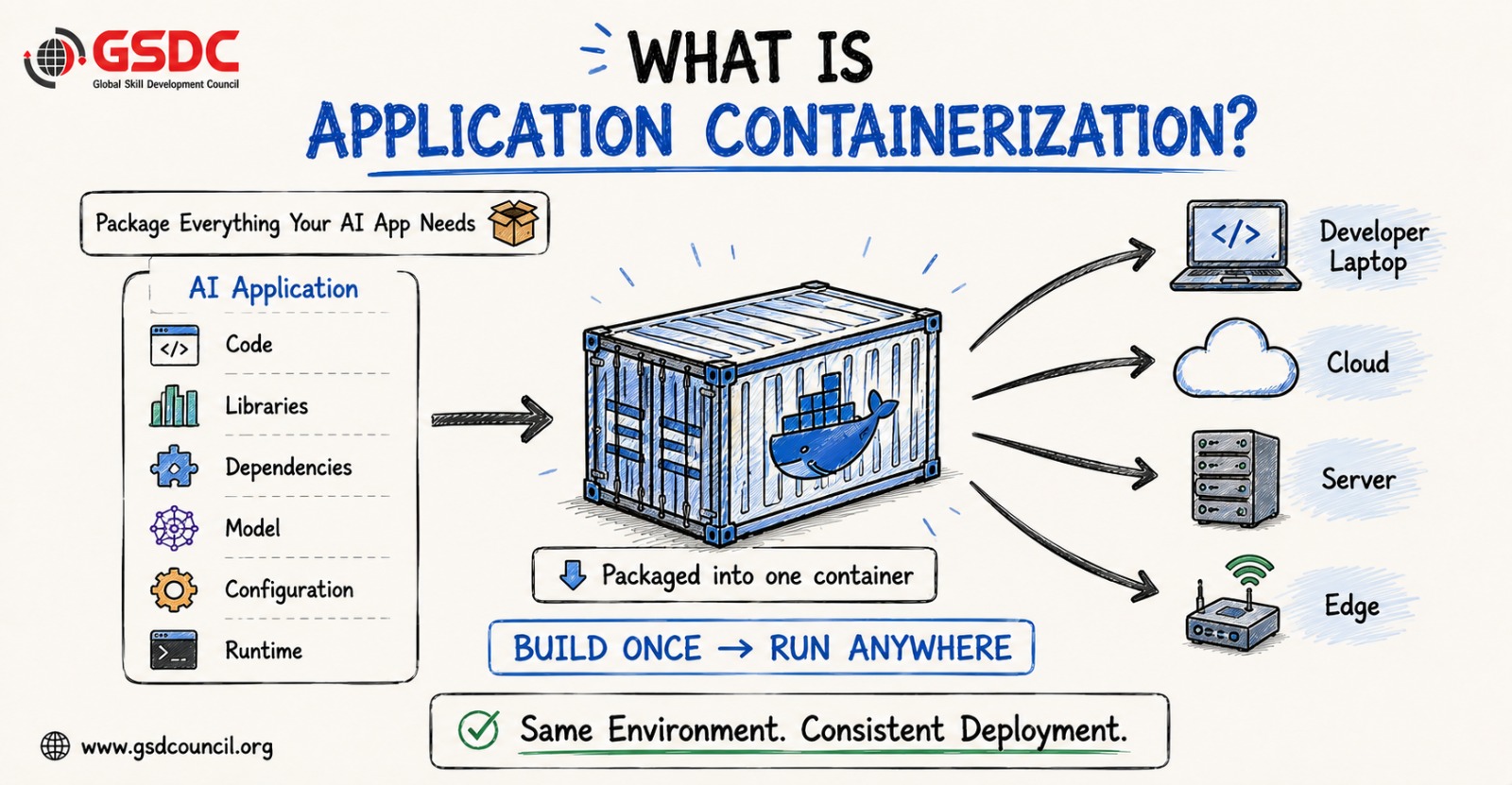
Application containerization solves this deployment problem by packaging everything an AI application needs into a single, portable unit.
Instead of moving only the source code between environments, developers package:
- Application code
- Runtime environment
- Libraries
- Framework dependencies
- Model files
- Configuration
- Required operating system components
This package becomes a container image, forming a consistent foundation for AI model deployment.
Think of it like a shipping container.
Regardless of whether the container travels by ship, truck, or train, the contents remain exactly the same.
Software containers follow the same principle.
Whether an AI application runs on:
- A developer's laptop
- An on-premises server
- AWS
- Microsoft Azure
- Google Cloud
- Edge devices
…the application behaves consistently because it carries its own environment wherever it goes.
This "build once, run anywhere" philosophy eliminates one of the largest causes of AI deployment failures and simplifies model deployment.
Why Containers Are Ideal for AI Applications
Although containers benefit almost every software application, they provide even greater value for AI workloads because of their complex dependency requirements, especially in machine learning model deployment.
Consistent Environments
Containers eliminate configuration drift.
Development, testing, staging, and production all use the exact same runtime environment, ensuring identical behavior across deployments.
Reproducibility
Every dependency version is fixed inside the container.
Months later, developers can recreate the exact same environment and obtain identical results an essential capability for regulated industries like healthcare, finance, and insurance.
Portability
Organizations are no longer locked into one infrastructure.
The same container image can move between local systems, cloud providers, hybrid environments, and edge devices without modification.
Isolation
AI applications often require different versions of frameworks and libraries.
Containers isolate each application so that dependencies never interfere with other software running on the same machine.
This isolation makes deploying multiple AI services on shared infrastructure significantly safer and easier.
What Does an AI Container Actually Include?
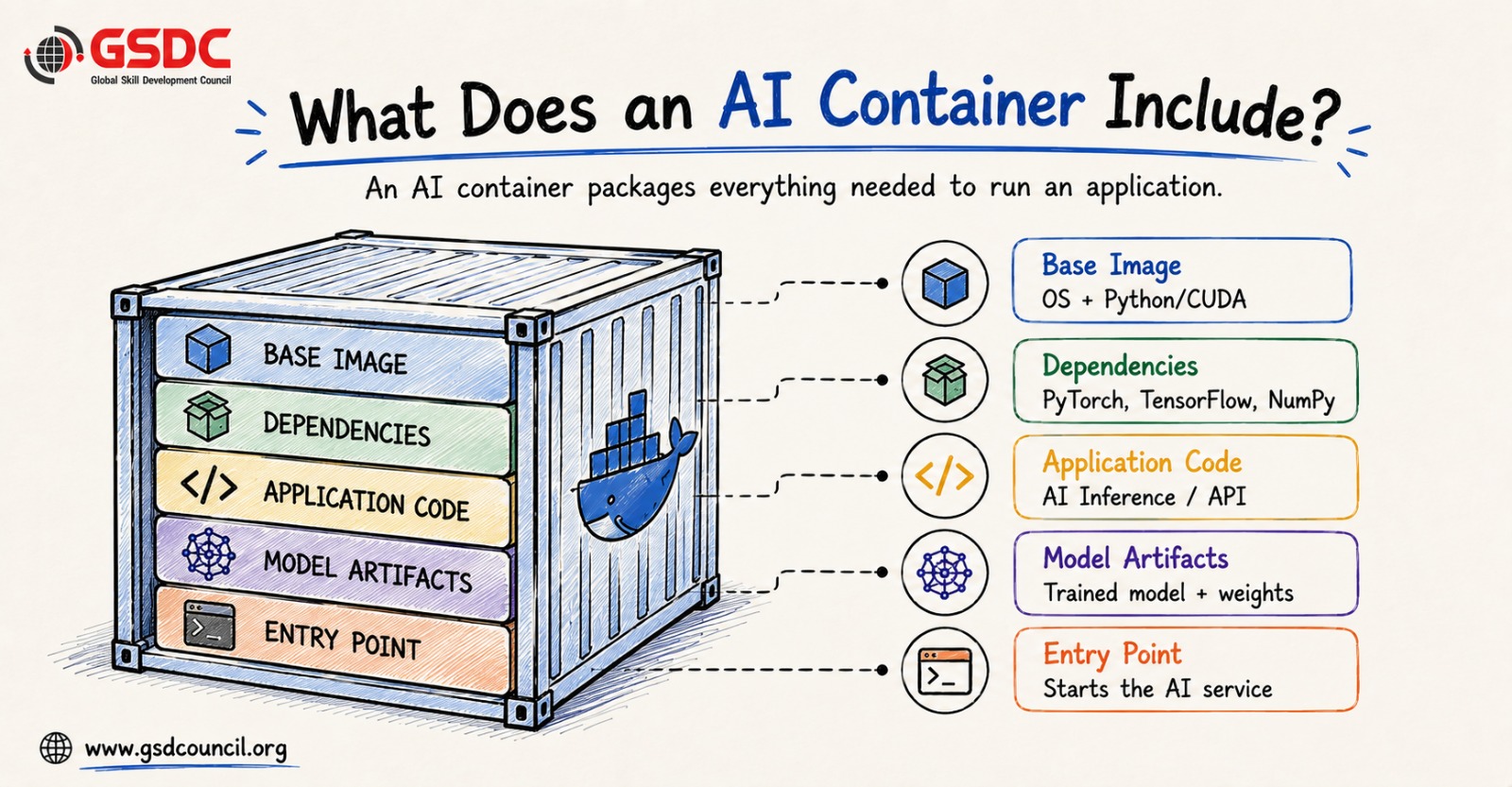
A container image isn't just a copy of your application.
It is built in layers, with each layer serving a specific purpose.
Base Image
Everything begins with the operating system and runtime.
For AI workloads, this may include a lightweight Linux image along with Python or a CUDA-enabled runtime for GPU acceleration.
Dependencies
The next layer installs all required libraries.
These include machine learning frameworks such as PyTorch, TensorFlow, Transformers, NumPy, and any additional packages required by the application.
Application Code
Once dependencies are installed, developers add the inference application itself.
This is often built using lightweight frameworks such as FastAPI or Flask that expose the AI model through APIs.
Model Artifacts
The trained model is then included or referenced depending on the model deployment strategy.
This layer contains the actual weights that power the AI application.
Entry Point
Finally, the container specifies how the application starts.
When the container launches, this command automatically initializes the inference server and begins serving requests.
This layered structure also makes AI application development faster because Docker caches unchanged layers, reducing build times whenever only application code changes.
Best Practice #1: Pin Every Dependency
One of the simplest yet most important deployment practices is version pinning.
Many developers install packages using commands like:
pip install torch transformers
While convenient, this approach introduces uncertainty.
Each future build may install newer versions that subtly change application behavior.
Instead, production AI systems should specify exact versions for:
- CUDA
- Python
- PyTorch
- Transformers
- NumPy
- Other dependencies
Version pinning ensures that every deployment produces the same environment regardless of when or where it is built.
For GPU workloads, this practice becomes even more important because CUDA version mismatches remain one of the most common causes of AI deployment failures.
Best Practice #2: Build Smaller Container Images
AI containers are often extremely large.
Machine learning frameworks, CUDA toolkits, compilers, and trained models can easily create images several gigabytes in size.
Large images introduce multiple challenges:
- Longer deployment times
- Increased storage costs
- Slower auto-scaling
- Larger security attack surfaces
A widely adopted solution is the multi-stage build approach.
During the first stage, developers use all necessary build tools, compilers, and development libraries.
Once compilation finishes, only the required runtime components are copied into a much smaller production image.
This approach can reduce image sizes dramatically while improving:
- Deployment speed
- Infrastructure efficiency
- Startup performance
- Overall security
Smaller containers are easier to distribute, faster to restart, and significantly more efficient for production AI workloads.
Best Practice #3: Separate Model Weights from Application Code
One of the biggest decisions in AI containerization involves handling model weights.
Large language models can occupy several gigabytes.
Including these weights directly inside every container image makes deployments slow and inefficient.
A better approach is to separate model weights from application code.
Organizations commonly use one of three strategies:
- Include weights inside the image for smaller models.
- Mount model files from shared storage at runtime.
- Download model weights when containers start.
Among these, mounting weights externally is often the preferred production approach because it allows developers to update application code without rebuilding enormous container images.
Likewise, models can be updated independently without changing the application itself.
This separation reduces deployment size, shortens release cycles, and improves overall maintainability.
Best Practice #4: Configure GPUs Correctly for AI Containers
Most modern AI applications rely on GPUs for training and inference. However, simply placing a model inside a container doesn't automatically guarantee GPU acceleration.
For GPU-enabled containers to work correctly, several components must align:
- The host machine must have compatible GPU drivers.
- The NVIDIA Container Toolkit should expose GPU resources to containers.
- The CUDA version inside the container must be compatible with the host driver.
One of the most common deployment failures occurs because of CUDA version mismatches. A container may build successfully but fail to utilize the GPU efficiently when deployed.
For teams running multiple AI workloads, proper GPU resource allocation is equally important. Technologies such as Multi-Instance GPU (MIG) allow organizations to divide a single GPU into isolated instances, enabling multiple AI services to share hardware efficiently while reducing infrastructure costs.
Achieving Consistent Deployments Across Every Environment
The primary goal of containerization is consistency.
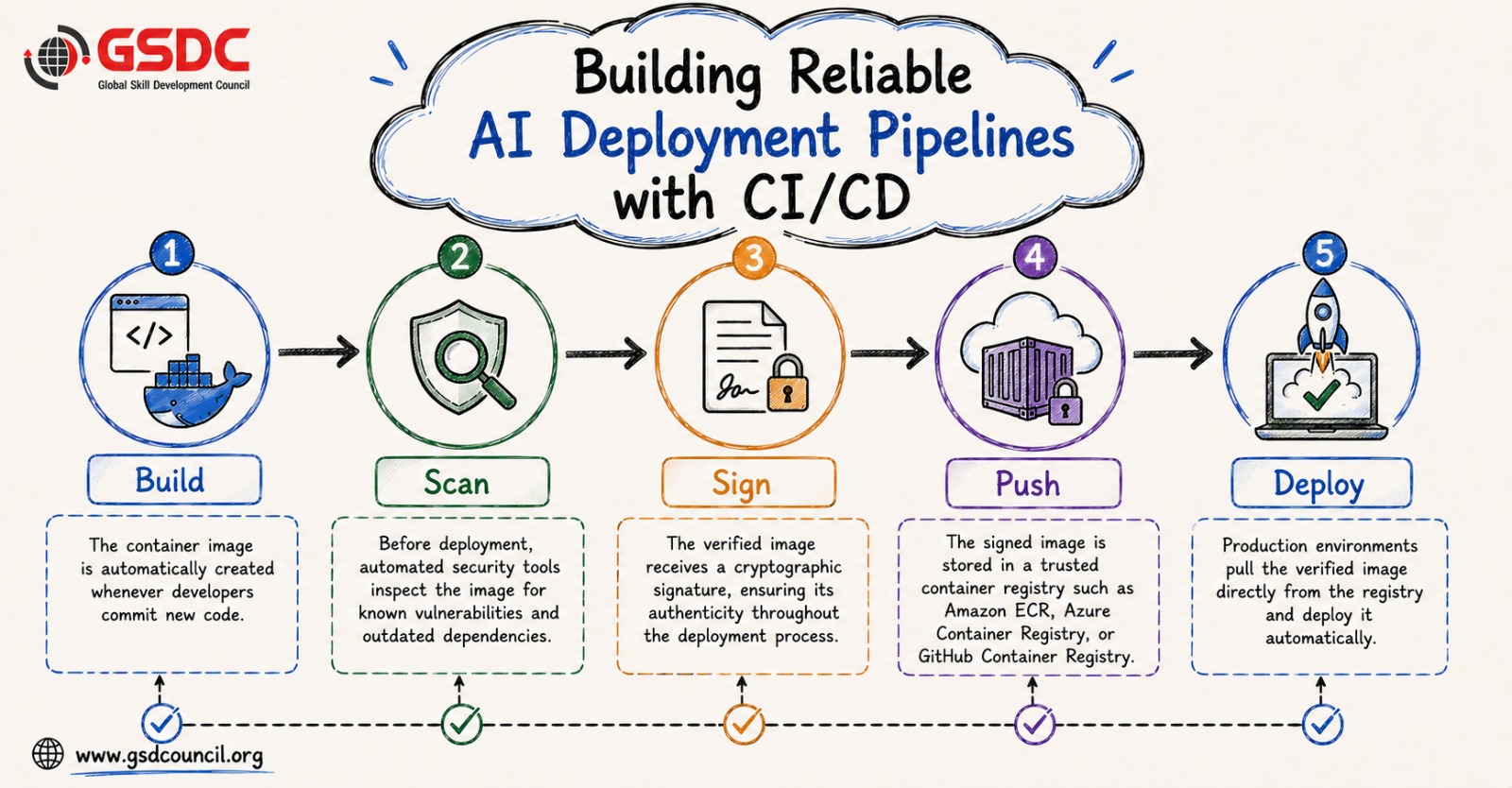
Once a container image is built, that exact image should move through every deployment stage without being rebuilt.
The same image is promoted from:
- Development
- Testing
- Staging
- Production
This eliminates configuration drift because every environment executes the identical application.
Instead of modifying the container itself, organizations manage differences between environments through configuration.
For example:
- Development may connect to test databases.
- Production connects to live databases.
- API endpoints differ.
- Resource limits vary.
These changes are injected using environment variables rather than modifying the container image.
Equally important, sensitive information such as API keys, passwords, and credentials should never be stored inside container images. They should always be injected securely during runtime.
Following these principles creates predictable AI deployment workflows while improving security and maintainability.
Why Kubernetes Has Become the Standard for AI Deployment?
While containers package applications, Kubernetes manages them at scale.
Modern AI systems rarely consist of a single container. Organizations often deploy multiple inference services, APIs, monitoring tools, databases, and supporting applications simultaneously.
Kubernetes automates many operational tasks that would otherwise require constant manual effort.
Some of its most valuable capabilities include:
- Automatically restarting failed containers
- Scheduling workloads on appropriate servers
- Scaling applications based on demand
- Performing rolling updates without downtime
- Instantly rolling back failed deployments
These features enable organizations to build highly available AI services capable of handling unpredictable workloads and support scalable enterprise AI deployment.
As AI adoption grows, Kubernetes has become the preferred orchestration platform for production AI environments because it provides the resilience and automation required for enterprise-scale deployments and modern AI engineering.
Scaling AI Applications Without Increasing Costs
Scaling AI systems involves more than simply launching additional containers.
Organizations must balance performance with infrastructure expenses, particularly when GPUs are involved.
The webinar highlighted several practical techniques for efficient scaling.
Autoscaling adjusts the number of running containers based on real-time demand. Instead of relying solely on CPU usage, AI systems often scale using application-specific metrics such as request queues, token generation rates, or inference latency.
Another valuable technique is scale-to-zero, where idle AI services automatically shut down when no requests are received. This prevents organizations from paying for unused GPU resources.
Large language models also introduce the challenge of cold starts. Since loading a model into GPU memory may take several seconds, maintaining a small number of warm instances can significantly improve response times during sudden traffic spikes.
Effective scaling ensures users receive fast responses while keeping cloud costs under control—an essential goal when you deploy machine learning workloads at enterprise scale.
Deploy New AI Models Safely with Canary and Blue-Green Releases
AI model deployment always involves some level of risk.
Even models that perform well during testing may produce unexpected results in production.
To minimize this risk, organizations increasingly use deployment strategies such as Canary Releases and Blue-Green Deployments.
Canary Release
A new model is initially exposed to only a small percentage of users.
Teams monitor latency, error rates, and output quality before gradually increasing traffic.
If problems appear, traffic is immediately redirected back to the stable version.
Blue-Green Deployment
Two production environments run simultaneously.
The existing version (Blue) continues serving users while the new version (Green) undergoes validation.
Once confidence is established, all traffic switches to Green.
If any issue occurs, organizations simply redirect traffic back to Blue.
These deployment strategies reduce business risk while allowing AI models to evolve continuously, making it easier to deploy machine learning models safely.
The Role of a Forward Deployed Engineer in AI
A forward deployed engineer helps connect AI engineering with real-world business needs.
Unlike a role focused only on model development, forward deployed engineers often work closely with customers, product teams, and technical stakeholders to implement AI solutions in practical environments.
Their responsibilities can include:
- Understanding business requirements
- Integrating AI models into applications
- Supporting AI deployment
- Troubleshooting production environments
- Adapting solutions to customer needs
- Improving application performance
This combination of technical expertise and practical implementation is increasingly valuable as organizations move from experimentation toward enterprise AI deployment.
Take Your AI Deployment Skills to the Next Level
Containerizing AI applications is only one part of building reliable production systems. The Certified Forward Deployed Engineer program by GSDC helps you develop the broader skills needed to take AI solutions from development to real-world enterprise deployment.
This GSDC’s program covers production-ready Python, APIs, ML model lifecycle, LLMs, RAG, agentic systems, cloud deployment, MLOps, monitoring, and client delivery. With hands-on learning, live expert sessions, practical challenges, and a capstone project, you can strengthen both your technical and client-facing capabilities.
Conclusion
Building an AI model is only the first milestone in an organization's AI journey. The next challenge is reliable model deployment at scale.
As AI adoption continues to accelerate across industries, organizations that invest in modern AI deployment practices will be better positioned to deliver scalable, secure, and resilient AI solutions.
Ultimately, successful AI isn't just about building smarter models it's about ensuring they run consistently, wherever they are deployed. This is where the role of a forward deployed engineer becomes valuable: connecting AI engineering with real-world application delivery.

Related Certifications
Frequently Asked Questions
Containerization packages the application, dependencies, runtime, and configurations into a single unit, ensuring the AI model behaves consistently across development, testing, and production environments.
Kubernetes automates container management by handling scaling, self-healing, load balancing, rolling updates, and resource scheduling, making AI applications more reliable and easier to operate.
For large models, it's generally better to keep model weights separate from the application container. This reduces image size, speeds up deployments, and allows models to be updated independently of the application code.
Both strategies release new AI models gradually or alongside existing versions, allowing teams to monitor performance and quickly roll back if issues arise, minimizing disruption to users.
A forward deployed engineer helps connect AI engineering with real-world business needs, supporting implementation, integration, and reliable deployment in production environments.
Stay up-to-date with the latest news, trends, and resources in GSDC
If you like this read then make sure to check out our previous blogs: Cracking Onboarding Challenges: Fresher Success Unveiled
Not sure which certification to pursue? Our advisors will help you decide!