How Cursor Makes Everyday Software Development Faster and Smarter
Written by Matthew Hale
- What Is an AI Agent in Software Development?
- What Is Cursor AI?
- How Cursor Supports the Software Development Life Cycle
- How Teams Use Cursor AI Daily
- How to Choose the Right AI Model for Your Task
- Managing Cost and Performance
- Real-World Use: How Developers Work With Cursor
- How Cursor Turns Plans Into Code
- Benefits of Using Cursor AI
- Developing Skills for the Future of Software Development
- Conclusion
Your product team has a new feature idea, but your developer is already overloaded, and the QA backlog continues to grow. In a traditional software development life cycle, these delays feel normal. However, in today’s era of AI software development, they no longer have to be.
With Cursor AI, even small teams can simulate a complete software development team, from planning and architecture to coding and testing, using coordinated AI agents within a single development environment. This is not just automation; this is about starting a digital workforce whereby intelligent agents collaborate with humans in constructing software more quickly and smartly.
This is currently being experienced firsthand through initiatives such as the GSDC Certified Learning Holiday AI Bootcamp, where one can learn about the way that Cursor is revolutionizing software development.
What Is an AI Agent in Software Development?
In agentic AI systems, an AI agent is a system that can understand context, make decisions, execute actions, and improve outputs with minimal human input.
Cursor uses multi-agent AI systems to simulate the behaviour of a complete software development team directly inside the development environment.
These AI agents work best when they operate directly inside the codebase. Instead of switching between multiple tools, Cursor brings planning, coding, and testing into one intelligent workspace.
What Is Cursor AI?
If you are thinking about what is software development in the age of AI, the answer is simple it is no longer only about writing code. It is about working with smart tools that understand your entire project.
Cursor is an AI-powered code editor that works directly inside your project files. Unlike traditional software development tools that only suggest small pieces of code, Cursor AI behaves like a real software development engineer inside your codebase.
With Cursor, you can:
- Read your full project
- Understand how files are connected
- Update many files at the same time
- Review every change line-by-line
- Undo anything if needed
This is why Cursor is becoming one of the best AI tools for developers who want more control over their software development life cycle.
How Cursor Supports the Software Development Life Cycle
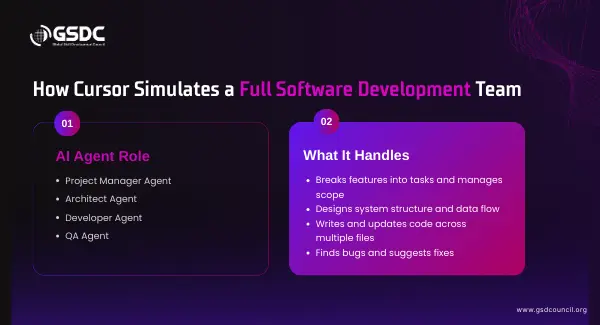
Cursor simplifies the entire software development life cycle (SDLC) by embedding intelligent AI agents directly into everyday development work.
- Planning: With the cursor, you are able to explain new feature descriptions using simple language. The system will scan through your code to determine the connections in files.
- Design: Architect Agent enables consistency in design layout, structure, and logic. Thus, any changes made will be consistent throughout.
- Development: The Developer Agent writes and updates multiple files in a single run, reducing repetitive coding work that slows traditional software development teams.
- Testing: The QA Agent identifies bugs, layout issues, and possible errors before deployment, supporting reliable and high-quality delivery.
This workflow reflects software development best practices and makes agile software development easier for teams of all sizes.
How Teams Use Cursor AI Daily
Cursor is fully integrated into all software development processes, ensuring it is possible to work together effectively without having to use various software applications.
The use of Cursor involves:
- Open the project: The process starts with the developers opening their own project repository with Cursors so that it can interpret the application structure.
- Describe the task clearly: The team discusses what they want to create or correct. The description then eliminates the technical description to expedite the process in the software development lifecycle.
- Select the right AI agent: Choose the appropriate Cursor agent, such as planning, development, or QA, depending on the task at hand.
- Scan the codebase: The cursor checks related files and their dependencies before suggesting any changes. This way, suggested changes are relevant and applicable from the perspective of software development.
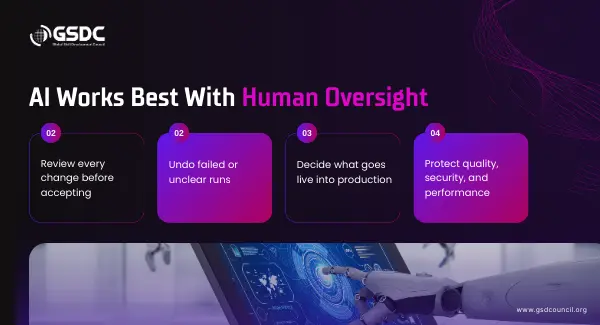
- Review changes line-by-line: All changes are clearly displayed, so you maintain control over quality and security.
- Test locally and refine: Implement the modified project on your personal setup and test its functionality.
- Track usage and impact: Cursor also provides a built-in analytics dashboard that shows how teams are using the tool over time, including total prompts, active users, and suggestion acceptance rates, helping leaders understand adoption and productivity gains.
This setup supports everyday AI software development without needing a full software development bootcamp, letting teams focus on solving problems instead of repeating manual tasks.
How to Choose the Right AI Model for Your Task
Different AI models offer different levels of speed, reasoning ability, and cost efficiency. Selecting the right model is now an important part of AI software development.
- Fast models: Helpful for small tasks such as renaming a variable, labeling a UI component, or tweaking formatting.
- High reason models: More appropriate when there is complex functionality involved, such as page layout design, interrelated files, or optimizing mobile support.
- Premium models: Suitable primarily for critical updates like changes in authentication mechanisms, reorganization in the database, or workflow fixes.
- Cost and efficiency balance: Inherent to efficient software development, it is a balanced approach that uses simple models for routine work and more advanced models only when high precision is necessary, a skill that is nowadays acquired through programs offered by the GSDC (Global Skill Development Council).
Managing Cost and Performance
As the development of AI software becomes an integral part of one’s work routine, managing usage and spending is essential.
- Monitor token usage: Frequent or large execution tasks will drive up expenses, so measure the usage level of the large models.
- Use real-time dashboards: Cursor offers insights into usage trends to help the team understand where the resources are being utilized.
- Create budgetary controls: The enterprise version of Kaspersky offers budgetary controls. It is possible to set a budget to ensure
- Sustainability plan: It is a factor that balances cost and performance for AI to be a sustainable component in software best practices.
Real-World Use: How Developers Work With Cursor
In live projects, developers use Cursor AI to speed up everyday software development tasks without disrupting existing workflows.
- Corrects typos, formatting problems, and UI inconsistencies in several files.
- Enhances mobile responsiveness with layouts and styles that adapt automatically.
- It automatically generates missing components, functions, and placeholders in cases where the features are incomplete.
- It scans the entire code for understanding dependencies before applying any changes.
- Removes redundant manual work in large software development tasks.
- It works well when the tasks are well defined and scoped.
- Needs more specific prompting for complex or legacy systems.
- Enabling faster iterations within the agile software development environment.
How Cursor Turns Plans Into Code
With Cursor, ideas are connected directly to working features, making the software development life cycle a whole lot easier.
- Find related files: Ask Cursor to scan your project and identify which files are linked to your feature.
- Write a clear plan: The change should be described in simple language so that the AI agents understand what is to be achieved.
- Implement the updates on the project: Have Cursor update all necessary files in one pass rather than updating each file one by one.
- Examination of the changes: All changes need to be examined line by line before they are accepted.
- Test and improve: Local development of the project, solving any problems encountered, until the functionality is implemented correctly.
Experts refine these AI-based processes through learning initiatives such as "Certified AI Tool Expert" from the Global Skill Development Council (GSDC).
Benefits of Using Cursor AI
- Less repetitive coding: It automates all the repetitive tasks of the entire software development life cycle, which saves time and effort.
- Full-team simulation: This is the harmonious interaction of various Cursor AI agents, which together emulate a full software development team.
- Rapid feature deployment: Enables very agile development environments with fast iteration cycles.
- High accuracy: It has varied corrections in different file placements to avoid any possible mistakes.
- Better collaboration: Integrates planning, development, and QA into one shared workflow.
- Scalable AI development: Makes possible AI software development without the need for engineering headcount.
Developing Skills for the Future of Software Development
As the tools in software development become smarter, professionals need to learn how to work in collaboration with AI systems, rather than consider themselves competitors to such AI systems. Knowing exactly how to guide, review, and optimize a tool like Cursor is fast becoming one of the core skills in state-of-the-art software development curricula.
This is where the Global Skill Development Council (GSDC) plays a vital role. Through certifications such as Certified AI Tool Expert, the GSDC assists professionals in obtaining knowledge about AI tools and readies them to perform AI-enabled software development tasks.Conclusion
Modern software development is evolving beyond manual coding into a coordinated collaboration between humans and intelligent systems. With Cursor AI and its network of Cursor AI agents, teams can now simulate an entire software development team, manage the full software development life cycle, and follow strong software development best practices all inside a single development environment.
As organisations continue to adopt agentic AI systems and multi-agent AI systems, tools like Cursor will become the foundation of future-ready engineering teams, enabling faster delivery, improved quality, and a scalable digital workforce.

Related Certifications
Stay up-to-date with the latest news, trends, and resources in GSDC
If you like this read then make sure to check out our previous blogs: Cracking Onboarding Challenges: Fresher Success Unveiled
Not sure which certification to pursue? Our advisors will help you decide!