AI Agents for Project Managers: 15 Practical Use Cases That Save Time
Written by Matthew Hale
- What Are AI Agents in Project Management?
- AI in Project Management: 15 Use Cases by Project Phase
- AI Tools for Project Managers
- How to Use AI in Project Management: A Simple Starting Plan
- Risks and Limits to Plan For
- Skills Project Managers Need Alongside AI (and Where PMO Certification Fits)
- Final Thoughts
Most project managers know the feeling. The week disappears into chasing updates, copying numbers between tools and rewriting the same status report. None of that is really managing a project. AI agents for project managers are built to take that load off your plate. Gartner predicted in 2019 that 80 percent of today's project management work, such as data collection, tracking and reporting, will be taken over by AI by 2030. That is a forecast about tasks, not about whole roles: the leadership, negotiation and accountability parts of the job stay with people. It is also why so many teams are now looking closely at AI use cases in project management.
This blog covers 15 practical examples, grouped by project phase. For each one, you will see what the agent does and what still needs a human.
What Are AI Agents in Project Management?
An AI agent is software that gets a goal, reads information from your tools, decides on a next step and then takes it. A normal chatbot waits for your question. An agent can watch your project in the background and act when something needs attention.
"Agentic AI" is the term for this goal-driven way of working. Most agentic AI use cases in project management follow the same pattern: the agent handles the routine flow, and a person handles exceptions, trade-offs and final decisions.
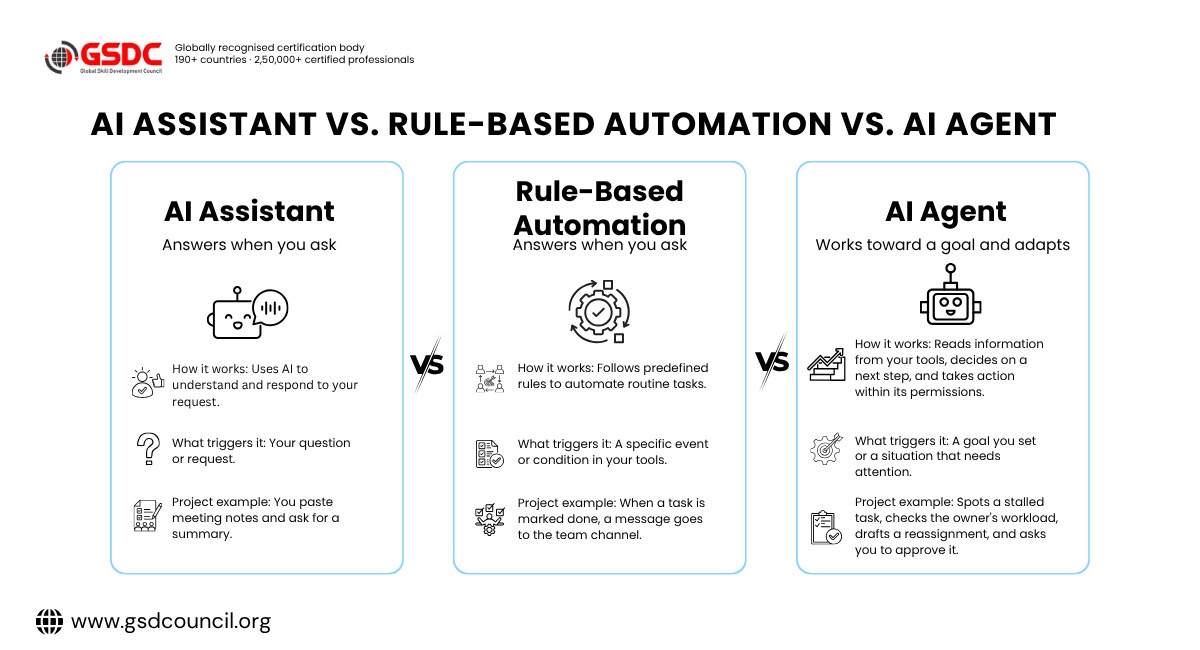
Here is how the three common types of tools differ:
Type | How it works | Project example |
AI assistant | Answers when you ask | You paste meeting notes and ask for a summary |
Rule-based automation | Follows fixed if-then rules | When a task is marked done, a message goes to the team channel |
AI agent | Works toward a goal and adapts | Spots a stalled task, checks the owner's workload, drafts a reassignment and asks you to approve it |
In real setups, these often work together. Rule-based AI workflow automation is the foundation, and agents add judgment on top of it.
AI in Project Management: 15 Use Cases by Project Phase
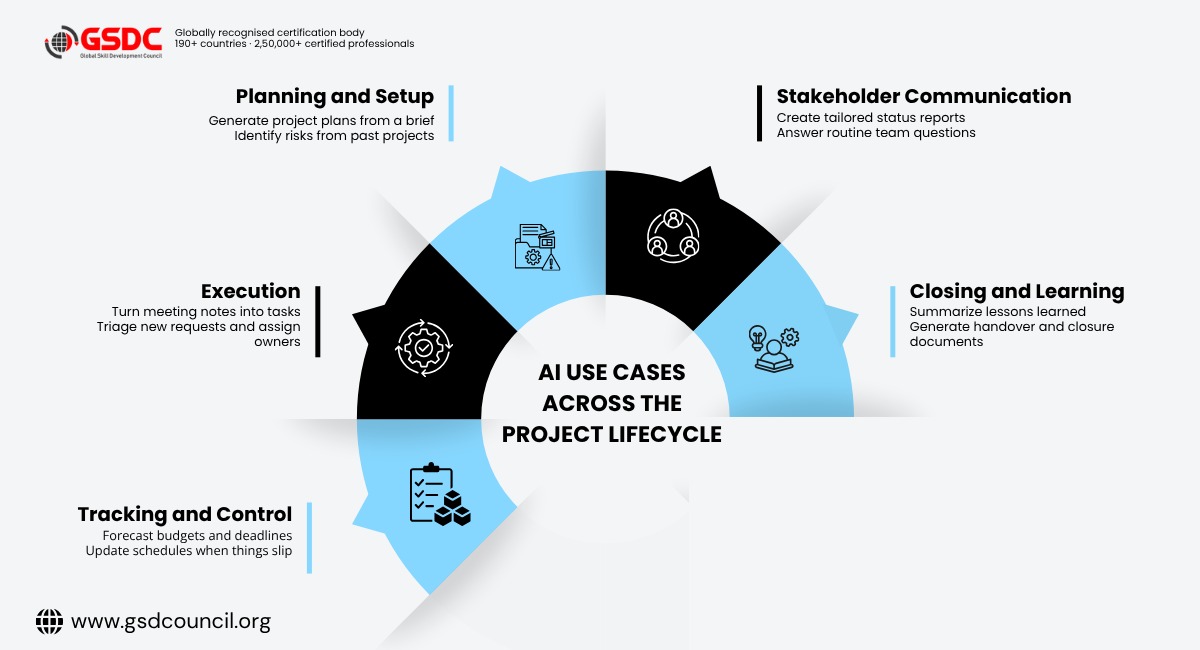
These AI agents' examples are ordered the way a project actually runs, from planning to closing.
One note on autonomy. Some of these tasks, such as reminders, status reports and meeting summaries, can be handled by ordinary automation or an AI assistant. Treat the list as potential agentic use cases: how much an agent can decide on its own depends on the tools you use and how you set up the workflow. The short scenarios below are illustrative, not client case studies.
Planning and Setup
1. Turning a brief into a first project plan
The agent reads a brief, contract or statement of work and drafts the scope, task list and milestones. It removes the blank-page problem.
Human role: check the assumptions and own the final plan.
2. Estimating from past projects
The agent compares new work with similar past projects in your records and flags estimates that look too optimistic.
Human role: decide which past projects are truly comparable.
3. Drafting the risk register
The agent scans the scope and old lessons learned, then suggests likely risks, owners and responses.
role: remove the noise and rank what really matters.
4. Resource and capacity planning
The agent checks calendars, leave and workloads across projects and warns you about clashes weeks ahead.
Human role: make the call when two projects compete for the same person.
Running the Work Day to Day
5. Meeting notes to tracked tasks
The agent records or reads a transcript, pulls out decisions and action items, then creates tasks with owners and due dates. Verbal promises stop disappearing.
Human role: confirm the commitments are real.
6. Follow-ups and blocker chasing
The agent tracks open items, sends reminders and escalates when something is about to be late. Human role: step in when an escalation needs authority or a conversation.
7. Request intake and triage
New requests and change requests arrive by email, forms and chat. The agent sorts them, checks they are complete and routes each one to the right queue.
Human role: set the priority rules.
8. Schedule updates when things slip
When one task runs late, the agent works out which later tasks are affected and proposes a revised schedule.
Human role: approve the new dates and talk to affected stakeholders.
Illustrative scenario: A supplier confirms a two-week delay on hardware. The agent finds the three tasks that depend on the delivery, shows the new end date for the installation milestone and proposes two re-plans: move the go-live date, or add a weekend shift. The PM picks one, and the agent updates the schedule and notifies the team.
Tracking and Control
9. Automated status reports
The agent builds the report from live project data instead of a Friday email chase. It can produce a detailed version for the team and a short one for sponsors. This is where most people start. In PMI's 2023 global survey, reporting was the top way project managers used AI at 34 percent, followed by decision support at 33 percent.
Human role: add the story behind the numbers.
10. Early warnings on budget and deadlines
The agent forecasts cost and completion dates from the current pace and alerts you when the forecast crosses a limit, before the milestone is missed. Human role: decide on the fix.
Illustrative scenario: A website rebuild has an approved budget of $120,000. Each week the agent compares logged hours and vendor invoices with the plan. In week 6, design rework pushes the forecast to $138,000, about 15 percent over. The agent traces the overrun to the user testing milestone, notes that two extra rework rounds caused it and alerts the PM with three options: cut scope, add budget or move the launch.
11. Scope creep detection
The agent compares new requests with the approved scope and flags the ones that go beyond it. Human role: negotiate with the client or sponsor.
Illustrative scenario: A client emails asking for a mobile version of a project scoped as a web portal only. The agent checks the request against the approved scope document, flags it as out of scope and drafts a change request with an effort range based on similar past work. The PM reviews it and takes it to the client.
Communication With Stakeholders
12. Tailored stakeholder updates
The agent drafts different messages for executives, clients and the delivery team from the same data. Human role: check tone and sensitive points before sending.
13. Answering routine team questions
An internal agent answers questions like "who owns this?" or "when is it due?" from project documents, so the PM is not interrupted all day.
Human role: keep the source documents accurate.
Closing and Learning
14. Lessons learned
The agent pulls themes out of retrospectives, tickets and feedback so the next project starts with better estimates and fewer repeated mistakes.
Human role: decide what the patterns actually mean.
15. Handover and closure documents
The agent assembles final reports, handover notes and knowledge base entries from the project record.
Human role: sign off on accuracy.
Where to Start
Not every use case is equally easy. This table helps you choose a first pick.
| Effort | Use cases | Why |
| Quick wins | Meeting notes, status reports, follow-ups, routine questions | Low risk, easy to reverse, results visible in days |
| Medium effort | Request triage, stakeholder drafts, risk register, lessons learned | Needs clear templates and some review time |
| Needs clean data | Budget forecasting, schedule updates, resource planning, scope creep detection | Only as good as the task, cost and time data behind it |
AI Tools for Project Managers
You do not need to build anything from scratch. Many project platforms such as Asana, Jira, monday.com and ClickUp now include built-in AI features. General assistants like Microsoft 365 Copilot can handle meeting notes and document drafts. Automation platforms such as Zapier, Make and n8n connect different apps so an agent can act across them.
The right pick depends on where your project work already lives:
Tool type | Examples | Best suited for | Watch out for |
Project management platforms | Asana, Jira, monday.com, ClickUp | Work already tracked on one board: task summaries, status updates, intake forms | Capabilities depend on integrations and the data the platform can access |
General AI assistants | Microsoft 365 Copilot | Meeting notes, document drafts, email follow-ups | Often better at drafting than at acting inside project tools |
Automation platforms | Zapier, Make, n8n | Connecting several apps, such as turning a form into a task plus a team message | Need setup time and clear rules |
Features and agent capabilities change often, so check each vendor's current documentation before you choose.
A few tips when comparing AI tools for project managers:
- Start with the tool that already holds your project data
- Check what the AI can read and what it is allowed to change
- Look for approval steps and activity logs
- Confirm how your company data is stored and whether it is used for training
- Re-check features and pricing before buying, as they change often
How to Use AI in Project Management: A Simple Starting Plan
If you are wondering how to use AI in project management without creating a mess, keep the first rollout small.
- Pick one painful task: Choose something repetitive, like weekly status reports.
- Fix the inputs: Agents work from your task boards and documents. Messy data gives messy results.
- Begin in suggest-only mode: Let the agent draft, and you send.
- Add approval steps: Decide which actions can happen automatically and which need your sign-off.
- Measure the change: Track hours spent, errors and how often updates arrive on time.
- Expand slowly: Move to the next task only when the first one is working.
A small rollout also works better when the whole team shares the same basics. A structured program, such as the Certified Agentic AI Project Management Professional certification, can help with that. It is aimed at managers who want to apply agentic AI in project work
Risks and Limits to Plan For
AI agents are useful, but they are not magic. Keep these points in mind:
- Wrong or invented details: Always check numbers and dates before they reach a client.
- Poor data: An agent cannot warn you about a delay that nobody logged.
- Privacy: Do not paste confidential client information into tools your company has not approved.
- Over-automation: Messages sent without review can damage trust fast.
- Accountability: The project manager still owns the outcome, whatever the agent did.
Most of these risks come down to habits, such as reviewing outputs and keeping data clean. Shared training, like the programs offered by the Global Skill Development Council (GSDC), makes it easier for a whole team to build those habits together.
Skills Project Managers Need Alongside AI (and Where PMO Certification Fits)
As agents take over routine tracking, the human side of the job grows in importance. The skills that matter most now are:
- Judging when an agent's output is good enough
- Setting rules for what agents may and may not do
- Reading data well enough to question it
- Leading people, handling conflict and managing stakeholders
The same 2023 PMI survey found that only 18 percent of project professionals had extensive or good practical experience with AI tools, so there is plenty of room to stand out by learning early.
For people working in or moving toward a project management office, a PMO certification gives a structured grounding in governance, reporting standards and portfolio oversight. These are the areas where AI is arriving first. Programs such as the Global Skill Development Council (GSDC) Certified Agentic AI Project Management Professional certification focus on PMO roles, responsibilities and skills, which pairs well with hands-on practice using AI tools.
Final Thoughts
AI agents will not run your project for you, and you would not want them to. What they can do is clear away the status chasing, the copy-pasting and the late-night report writing, so more of your week goes to people, risks and decisions. Pick one use case from the list, run it for a month, measure what changes and build from there.
Your next step, in about 15 minutes:
- List the tasks you repeat every week.
- Pick one that is low risk and follows clear rules.
- Write down its steps, from trigger to finished result.
- Mark what an agent may do alone and what needs your approval.
- Run it for a month and compare the hours and errors with your old routine.

Related Certifications
Frequently Asked Questions
They are AI tools that can monitor project data, take routine actions such as creating tasks or sending reminders, and flag problems, while leaving key decisions to the project manager.
Unlikely. Forecasts talk about automating tasks like tracking and reporting, not the leadership, negotiation and accountability that make up the core of the role.
Common examples include agents that turn meeting notes into tasks, chase overdue items, draft status reports, warn about budget overruns and flag scope creep.
Status reporting or meeting follow-ups. They are repetitive, low risk and easy to check.
Workflow automation follows fixed rules every time. Agentic AI can interpret a situation, choose among options and adapt, usually within limits you set.
It can be, especially for people who run or want to join a PMO. A certification such as the GSDC Certified PMO Professional helps show you understand governance, reporting and portfolio practices, which stay important as AI handles more routine work.
Stay up-to-date with the latest news, trends, and resources in GSDC
If you like this read then make sure to check out our previous blogs: Cracking Onboarding Challenges: Fresher Success Unveiled
Not sure which certification to pursue? Our advisors will help you decide!