7 Project Management Tasks to Automate with AI Right Now

Written by Matthew Hale
- What Is AI Project Management?
- Why Manual Work Is Quietly Costing Your Team
- The 7 Project Management Tasks You Should Stop Doing Manually
- How to Automate Tasks: A Simple 5 Step Plan
- Project Management Best Practices and Tips for Automating Safely
- Building the Skills to Work with AI Agents
- Final Thoughts
Most project management tasks that eat up your week, like updating status sheets, chasing approvals and rebuilding schedules, don't need a human to do them. Gartner has predicted that by 2030, 80% of the work of today's project management discipline will be eliminated as AI takes over functions like data collection, tracking and reporting. It's a forecast, not a promise, but it shows where AI project management is heading. In this guide, you'll see seven project management tasks you should stop doing by hand, how project management automation works for each one, and how to get started without a big budget.
What Is AI Project Management?
AI project management means using software that learns from past project data to plan, predict and recommend, not just follow fixed instructions. Project management automation, on the other hand, runs set rules, such as "send this reminder two days before the due date." Most modern AI project management tools combine both, which is why the terms often show up together.
Why does it matter now? Teams are expected to deliver more with the same headcount. Using AI in project management lets one manager keep track of more tasks, risks and stakeholders without working longer hours.
Why Manual Work Is Quietly Costing Your Team
Ask any project manager what their week looks like, and you'll hear the same story. Hours go into copying updates from one tool to another, writing the same report every Friday and nudging people who forgot a deadline. None of this is hard. It's just slow, and it pulls you away from the work that needs your judgment.
In a 2017 report, the McKinsey Global Institute estimated that about half of all paid work activities could be automated using technology that already exists. Many of those activities are repetitive, rule-based and data-heavy, which is a fair description of a lot of project management tasks.
The goal isn't to replace the project manager. It's to hand the boring, predictable parts to software so you can spend your time on people, priorities and problem solving.
Here's what changes when you automate repetitive tasks:
- You lose fewer hours to admin work.
- Data entry mistakes drop because fewer hands touch the data.
- Updates reach stakeholders on time, every time.
- Your team gets clear next steps without waiting on you.
The 7 Project Management Tasks You Should Stop Doing Manually
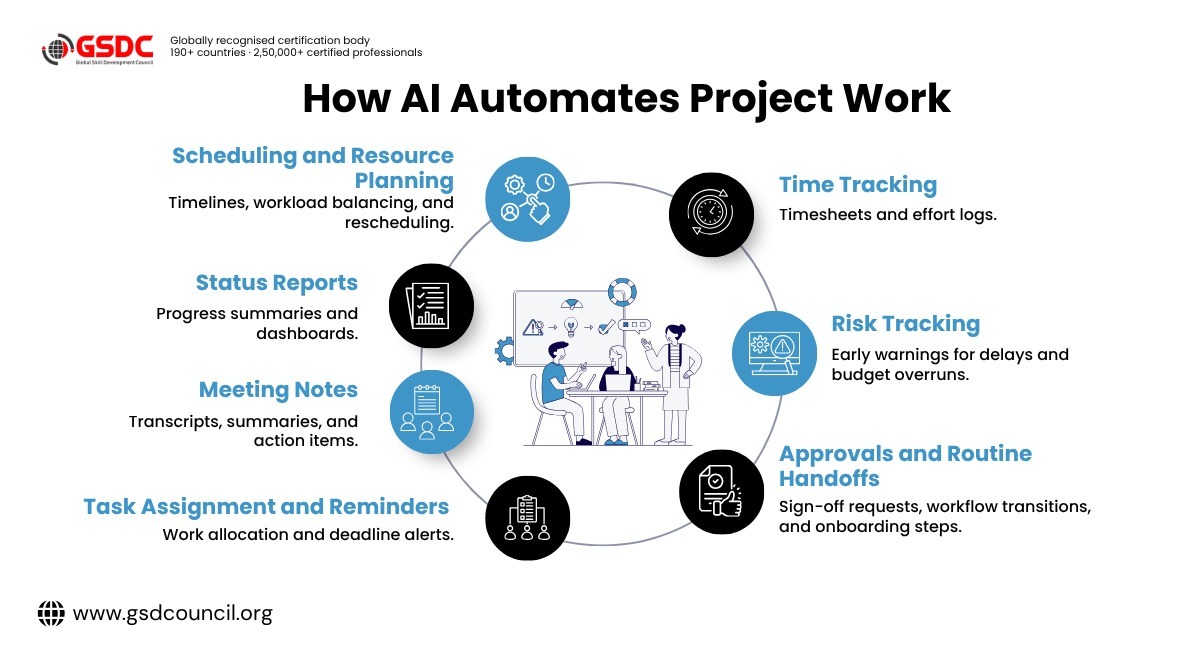
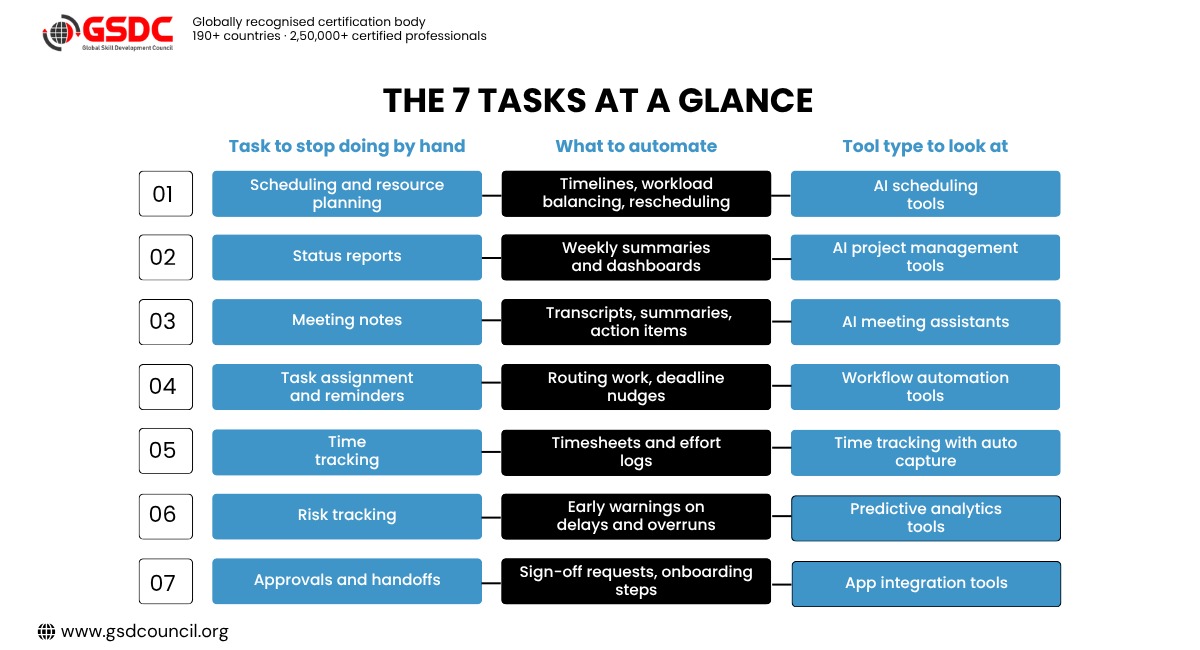
1. Scheduling and Resource Planning
Building a project schedule by hand is a bit like solving a puzzle that keeps changing. One person goes on leave, a client moves a deadline, and suddenly the whole plan needs another pass.
What to automate
- Building the first draft of a timeline from task lists and dependencies
- Balancing workloads so no one is overbooked
- Rescheduling when a task slips
How it works
AI scheduling tools read your tasks, deadlines, team availability and past project data. Then they suggest a plan and update it when things change. With automated scheduling, a delay on one task shifts the linked tasks for you, so you don't have to drag bars across a Gantt chart for an hour.
Sample workflow
Add owners, estimates and dependencies to your tasks, switch on the AI scheduling feature, review the suggested timeline (for example, a flag that two developers are overbooked in week three), then approve or adjust it. Platforms such as Asana, monday.com and ClickUp now offer AI features, but what you get depends on your plan, so check before you commit.
Keep the human part
You still decide which dates are firm and which can bend.
2. Status Reports and Progress Updates
The Friday status report is the classic time sink. You open three tools, copy numbers into a slide, and rewrite the same lines you wrote last week.
What to automate
- Pulling task progress, budget and milestone data into one view
- Writing the first draft of the weekly summary
- Sending the report to stakeholders on a set day
How it works
Most AI project management tools can read live project data and turn it into a short written summary with a simple dashboard. You review it, fix anything odd, and send. Done well, this can cut the time you spend on the weekly report by a good margin.
Sample workflow
Every Friday at 3 pm, the tool gathers completed tasks, open risks and budget status, drafts a summary and sends it to you. You review and correct the draft, and only then does it go to stakeholders. Nothing is sent unchecked.
Quick tip
Keep one standard report format. Automation works best when the output looks the same each week.
Keep the human part
The "so what" is yours. Software can tell you a task is late, but you explain why it matters and what you're doing about it.
3. Meeting Notes and Action Items
How many times has a decision been made in a meeting and then forgotten by Wednesday? Taking notes by hand also means you're half listening while you type.
What to automate
- Recording and transcribing calls
- Summarizing the key decisions
- Turning "someone should do this" into a named task with a due date
How it works
AI meeting assistants join your call, transcribe it and list the action items. Many of them connect to your project board, so each action item lands as a task under the right owner.
Sample workflow
The recorder joins the call, produces a transcript and summary, and pushes action items to your task board with owners and dates. Tools such as Otter.ai and Fireflies.ai do this, and Microsoft Teams and Zoom have built-in recap features, depending on your plan.
Keep the human part
Always check names and dates. Transcription tools can mishear a name or a number.
4. Task Assignment and Follow-Up Reminders
Chasing people is nobody's favorite part of the job. Yet many managers spend a big slice of their day asking, "Is this done yet?"
What to automate
- Assigning new tasks based on role, skill or workload
- Sending reminders before a deadline
- Escalating overdue tasks to the right person
How it works
Two different things get called automation here, and it helps to know which one you need.
- Rule-based workflow automation follows an instruction you write once, such as "when a bug is marked high priority, assign it to the on-call developer and notify the lead." It's predictable and easy to audit. Use it when the logic is simple and the same every time.
- AI-driven task allocation looks at skills, current workload, past speed and deadlines, then recommends who should take a task. Use it when the best answer changes week to week.
Tools like Zapier, Make and the built-in automations in most project boards handle the first type. Many AI project management tools now offer the second.
Quick example
A support team can use a rule to send every billing ticket to the finance queue. But for a project with mixed design, code and testing work, AI can suggest the best owner for each task based on who has the skills and the free time, and you approve the suggestions.
Quick tip
Start with one rule that you repeat every week. Don't try to automate everything on day one.
Keep the human part
Someone who keeps missing deadlines needs a conversation, not another automated reminder.
Worth knowing
Getting good results from AI tools depends a lot on how you prompt them and where you set the limits. If you want to learn this properly, the Certified Generative AI in Project Management certification covers prompt engineering, risk and decision support, and reporting, and it doesn't require coding skills.
5. Time Tracking and Timesheets
Asking a team to log hours by hand almost always ends the same way. Everyone fills the sheet at the end of the week from memory, and the numbers are rough guesses.
What to automate
- Capturing time spent on tasks as work happens
- Filling timesheets from calendar and task activity
- Flagging projects that burn hours faster than planned
How it works
Automatic time capture tools watch which tasks and apps you work in and suggest entries for you. You confirm them in seconds. Over time, you also get cleaner data to plan the next project, because estimates are based on real effort and not on hunches.
Quick tip
Tell your team what is being tracked and why. Trust matters here, and the goal is better planning, not watching people.
Keep the human part
Review the data with the team and ask what slowed them down.
6. Risk Tracking and Early Warnings
Most project problems don't appear overnight. A task slips a day, then three, then the whole milestone is in trouble. Spotting those patterns by eye across ten projects is tough.
What to automate
- Watching deadlines, budgets and workloads for warning signs
- Alerting you when a project drifts from plan
- Suggesting fixes, such as moving resources or changing the order of tasks
How it works
This is one of the strongest uses of AI in project management. Predictive tools compare your live project data with patterns from past projects and flag the ones likely to run late or over budget. You get the warning while there's still time to act.
Sample workflow
- Give the tool your historical delivery data (planned versus actual dates on past tasks) and your current task dependencies.
- Set a trigger, such as "if a critical-path task slips by more than two days, or a milestone is forecast to miss its date, alert the project manager."
- When the alert arrives, check the cause, such as an overloaded owner or a late dependency, then decide whether to reassign work, re-sequence tasks or reset expectations with the client.
Predictions are only as good as your data. If tasks aren't updated, or past projects were tracked in different ways, the warnings will be unreliable. Clean, current data comes first.
Keep the human part
A prediction is a prompt to look closer, not a verdict. You know the context the data doesn't.
7. Approvals and Routine Handoffs
A budget sign-off sitting in someone's inbox for four days can stall a whole phase. The same goes for onboarding a new team member, where the same ten steps get repeated by hand every time.
What to automate
- Sending approval requests and tracking who has responded
- Creating standard task lists when a new project or hire starts
- Moving a task to the next stage once the previous one is signed off
How it works
Workflow automation tools connect your apps so one action triggers the next. When a form is submitted, a project folder is created, a task list appears, and the right people are notified. No copying, no forgetting a step.
Quick tip
Write the process down on one page first. If you can't explain the steps clearly, a tool can't run them either.
Keep the human part
Keep a person in the loop for decisions that carry real money or risk.
How to Automate Tasks: A Simple 5 Step Plan
Wondering how to automate tasks without turning your workflow upside down? Keep it small and start with what annoys you most.
- List your repeat work: For one week, note every task you do more than twice. Mark the ones that follow clear rules.
- Pick one task: Choose the one that is boring, frequent and low risk, such as the weekly report.
- Choose the right tool: Check whether your current project software already has automation or AI features before buying anything new. Compare a few AI automation tools on ease of use, price and how well they connect with your apps.
- Test it with a small group: Run it beside your manual process for two weeks and compare the results.
- Measure and expand: Track hours saved and errors avoided. If the numbers look good, move on to the next task.
A free trial of two or three tools is usually enough to see which one fits your team.
If you'd like guided practice with these tools, the Global Skill Development Council (GSDC) offers training and certification in AI and project management, which can help you test these workflows in a structured way.
Project Management Best Practices and Tips for Automating Safely
Automation helps most when it sits on top of a clear process. These project management best practices keep it working for you and not against you.
- Fix the process first: Automating a messy workflow only makes the mess faster.
- Keep your data clean: AI tools are only as good as the project data you feed them. Update tasks and dates regularly.
- Review before you send: Check AI drafts for tone, names and numbers.
- Protect sensitive data: Check where your tools store information and who can access it, especially for client projects.
- Train your team: Tools only help if people know how to use them, so plan a short training session for everyone and refresh it as features change.
- Document your automations: Write down what each rule does so anyone can fix it when something changes.
- Revisit every quarter: Switch off rules that no longer help.
These project management tips sound basic, but they are what separates teams that save hours from teams that add more tools and more confusion.
Building the Skills to Work with AI Agents
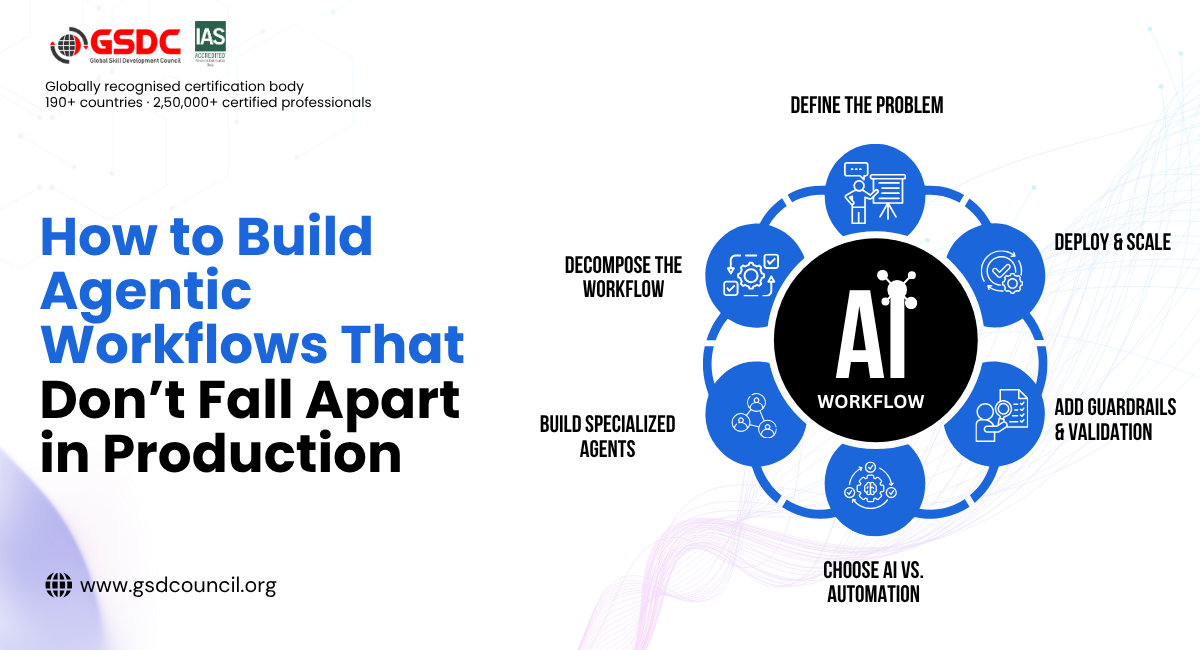
Most of the tasks above can start with simple rules and the AI features already inside your project tool. The next step is AI agents, which can carry out several connected steps on their own. For example, an agent could draft a status report, notice a slipping milestone and suggest a fix. That changes the project manager's role. You spend less time doing the work and more time setting limits, checking results and deciding when a person needs to step in.
If you'd like a structured way to learn this, the Global Skill Development Council (GSDC) offers the Certified Agentic AI Project Management Professional certification. Its modules cover how AI agents fit into each stage of a project, how to use them for resource, cost and risk management, how they connect with tools like Jira, MS Project and Asana, and how to keep human oversight, ethics and data privacy in place. It's aimed at project managers, PMO leaders and delivery managers, and no formal prerequisites are required, though some project management background helps.

Final Thoughts
Project managers don't get paid to update spreadsheets or send reminders. They get paid to keep people and projects moving in the right direction. Handing scheduling, reporting, meeting notes, reminders, time tracking, risk alerts and approvals to software gives you that time back.
Start with one task this week. Measure what you save, then add the next. As AI in project management keeps growing, the professionals who know how to use these tools well will stand out.
Using these tools well is a skill in itself. It takes clear prompts, good judgment about what to hand over, and a firm grip on ethics and data privacy. The sooner you build those habits, the more value you'll get from every tool you adopt.

Related Certifications
Frequently Asked Questions
No. AI handles repeatable work like scheduling, reporting and reminders. People still lead teams, handle conflict and make the final call.
These are project tools that use AI to plan, track and report on work. Common features include automated scheduling, smart task assignment, summaries and risk alerts.
No. Most workflow automation tools use simple "if this, then that" rules you set up by clicking and choosing options.
Start with status reporting or meeting notes. They're frequent, low risk and easy to check.
Not at all. Small teams often see the quickest gains because one person usually handles many tasks.
Stay up-to-date with the latest news, trends, and resources in GSDC
If you like this read then make sure to check out our previous blogs: Cracking Onboarding Challenges: Fresher Success Unveiled
Not sure which certification to pursue? Our advisors will help you decide!