AI Copilot vs AI Agent: Which One Do Project Managers Need?
Written by Matthew Hale
- What Is an AI Agent?
- What Is an AI Copilot?
- The Real Difference: Three Dials, Not Two Boxes
- The Agent Readiness Test: Four Questions Before You Hand Over a Task
- How to Use AI for Project Management: A Simple Starting Plan
- Choosing AI Project Management Tools
- The Risks You Should Plan For
- What Will AI Take Over, and What Stays Human?
- Skills That Help You Lead AI Adoption
- Final Thoughts
An AI tool can draft your weekly status report in seconds. Another can spot a delay, trace its impact across dependencies and prepare the next steps. But should either one be allowed to change your live project plan?
That question sits at the heart of AI copilot vs AI agent, and knowing where to draw the line matters more than memorizing the definitions. A copilot helps you work through a task. An agent can carry out a sequence of steps toward a goal, and it is arriving fast: Gartner forecasts that 40% of enterprise applications will include task-specific AI agents by the end of 2026, up from less than 5% in 2025. For anyone using AI in project management, the real skill is deciding which tasks to delegate, which to review and which to keep human-led.
This guide explains the difference in plain language, gives you a four-question screening test with separate safety checks, and shows how to start without losing control of your projects.
The Short Answer
- An AI copilot helps you do the work. You ask, it drafts or suggests, and you decide and act.
- An AI agent does part of the work for you. You set a goal, it plans the steps, uses your tools and reports back.
- The real difference is not whether a tool waits for a prompt. It is how much autonomy it has, which tools it can touch, and whether it can run several steps on its own.
- Most project managers should start with a copilot, then add agents for narrow, repeatable, low-risk tasks.
What Is an AI Agent?
If you have searched "what is an AI agent," here is the simple version. An AI agent is software that works toward a goal with limited step-by-step instruction. It can break the goal into tasks, use connected tools such as your calendar, email or project tracker, check its own results and adjust.
Here is a project example. You tell an agent: "Watch our sprint board and warn me about delays." A well-designed agent would:
- Scan the board every morning
- Notice a task that slipped by two days
- Work out which dependent tasks and milestones are affected
- Recommend revised dates and explain the impact
- Draft a note for the affected team members
- Wait for your approval before changing the live schedule or sending anything
Small, safe actions, such as posting an internal reminder, can run on their own. Anything that changes the plan, the budget or what clients see needs a person's approval.
What Is an AI Copilot?
An AI copilot is an assistant that sits next to you inside the tools you already use. It responds when you prompt it, and it suggests rather than acts. Typical jobs include:
- Summarizing a 40-message thread into five lines
- Drafting a weekly status report from your task data
- Turning meeting notes into action items
- Suggesting risks from a project brief
- Rewriting a tough stakeholder email in a calmer tone
This is where most generative AI for project management lives today.
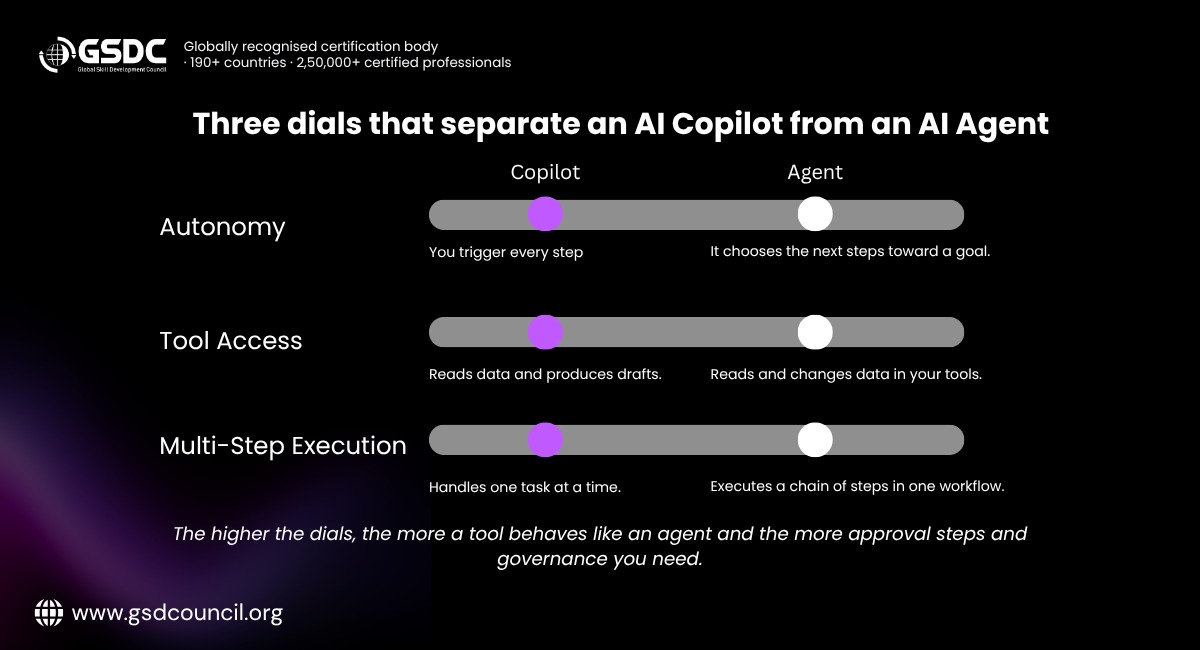
The Real Difference: Three Dials, Not Two Boxes
Most AI agents vs copilots comparisons sort tools into two boxes: "waits for a prompt" and "acts alone." In practice the line is blurry, and many products now include both. A more useful approach is to check three dials:
- Autonomy: Does it wait for each instruction, or can it decide the next step?
- Tool access: Can it only produce text, or can it read and change your project data?
- Multi-step execution: Can it carry out a chain of actions toward a goal, or only one task at a time?
The higher each dial is set, the more it behaves like an agent, and the more oversight it needs.
Factor | AI Copilot | AI Agent |
Autonomy | Low: you trigger every step | Medium to high: it chooses next steps toward a goal |
Tool access | Mostly reads data and produces drafts | Reads and can change data in connected tools |
Multi-step execution | One task at a time | A chain of steps in one workflow |
Your role | Reviewer and decider | Goal setter and approver |
Risk if it is wrong | Lower, you catch it before use | Higher, errors can spread before you notice |
Judge a feature by what it can do, not by what it is called.
The Agent Readiness Test: Four Questions Before You Hand Over a Task
Before you give any task to an agent, ask these four questions. Each "yes" earns one point.
# | Question | Why it matters |
1 | Frequency: Does the task repeat often, such as daily or weekly? | Repeated tasks give you time savings that justify the setup effort. |
2 | Rules: Are the rules clear and the data clean? | Agents struggle when instructions are vague or the data is messy. |
3 | Cost of mistakes: Is a mistake cheap and easy to undo? | Cheap errors let you learn safely. Costly errors need a human gate. |
4 | Judgment: Can the task be done without weighing people, politics or trade-offs? | Judgment calls are where human project managers add the most value. |

The score measures task suitability, not overall safety. Security, permissions, reversibility and approval requirements must be checked independently, regardless of the score.
How to read your score:
- 4 points: A strong candidate for an agent, once it also passes the safety checks.
- 3 points: Let the agent prepare the work, and have a person make the final move.
- 2 points or fewer: Use a copilot for drafting and analysis, or keep the task human-led.
These bands are a guide, not a rulebook. The permissions and review a task needs depend on its risk. A low-stakes 3-point task with a backup may only need a quick review of the agent's changes, while a 3-point task that notifies people should wait for a person's approval.
A low score on one question does not always rule a task out. A one-off cleanup of duplicate tasks in an old tracker scores low on frequency but can suit an agent if the other answers are strong and the safety checks pass.
Safety checks that sit outside the score:
- Security: Does the agent touch confidential data, and is the tool approved for it?
- Permissions: Does it have only the access the task needs, such as read-only where possible?
- Reversibility: Can every change be undone, with a backup or version history?
- Approval: Who signs off before anything changes a plan, a budget or a message to clients?
The test in action:
Task | Frequency | Rules | Cheap mistake | No judgment needed | Score | Best fit |
Collect weekly status updates and remind your own team about late ones | Yes | Yes | Yes | Yes | 4 | Agent, after safety checks |
Alert when spend crosses a set threshold | Yes | Yes | Yes | Yes | 4 | Agent, alert only |
Turn meeting notes into draft tasks | Yes | Yes | No | Yes | 3 | Agent drafts, a person confirms owners and deadlines before anyone is notified |
One-off cleanup of duplicate tasks in an old tracker | No | Yes | Yes | Yes | 3 | Agent can run it, with a backup and a review of the changes |
Re-plan dates after a delay | Yes | Yes | No | No | 2 | Copilot drafts options, you decide |
Escalate a serious risk to a client | No | No | No | No | 0 | Human, with copilot help on wording |
Two rows deserve a closer look. Turning notes into tasks scores only 3, because a wrong owner or deadline causes real problems once people are notified. Rescheduling scores 2, even though it feels like an obvious thing to automate, because changing live dates affects workloads and client promises.
How to Use AI for Project Management: A Simple Starting Plan
If you are wondering how to use AI for project management without making a mess, follow these steps.
- Pick one painful task. Weekly reporting is a common choice, and note how long it takes today so you can measure the gain.
- Start with a copilot. Give it real context: project goal, audience, tone and the data.
- Review everything. Check facts, dates and names before sharing.
- Run the Agent Readiness Test on a routine task, then add an agent for it with an approval step.
- Measure after a month. Compare time saved and error rates, and track results yourself rather than relying on vendor claims.
A prompt that works well for status updates:
You are helping a project manager write a weekly update for a senior stakeholder. Here are this week's completed tasks, open risks and budget notes: [paste data]. Write a summary under 150 words. Lead with what changed, then risks, then what we need from them. Keep the tone calm and direct.
Specific context beats clever wording every time.
Choosing AI Project Management Tools
The market for AI project management tools is crowded, and features change fast. If you are comparing AI tools for project managers, judge each one against the same questions instead of chasing a "best" list. It is also the cleanest way to find the best AI tools for project management for your own team.
Questions to ask before you buy:
- Does it connect to the tools we already use?
- Can we control what data it can read and change?
- Is there an audit trail showing what the AI did?
- Can a human approve actions before they go live?
- Does it work on our real data, not just in a demo?
Most major products now mix both styles, so the table below shows types of features, not a classification of whole products. Descriptions reflect each vendor's own page as of October 2026, so check current documentation before you commit.
Type of feature | What it does | Examples from vendor pages |
Prompt-driven help (copilot-type) | Answers questions, drafts, summarizes and searches when you ask | Chat, search and create in Microsoft 365 Copilot; meeting notes and research in Notion AI; AI chat and search in ClickUp Brain |
Goal-driven action (agent-type) | Runs a task or workflow on a trigger or schedule, often across several tools | Custom agents in Notion AI that run on a trigger or schedule; Asana AI Studio workflows that run after you set instructions; Atlassian Rovo agents that can modify Jira tickets and Confluence pages; monday.com agents for multi-step sales work |
Specialist tools | Focus on one job such as risk, resourcing or meeting notes | Varies by vendor |
Vendor pages describe oversight at very different levels of detail, and features change often. In a demo on your own data, ask three things: what permissions the feature needs, which actions require approval, and whether every action is logged. Then run a two-week pilot with one team, because real work will tell you more than any review.
The Risks You Should Plan For
- Wrong answers that sound confident. Always verify numbers and dates.
- Data privacy. Do not paste confidential client or contract data into tools your organization has not approved.
- Over-trust. The more an agent works, the easier it is to stop checking.
- Unclear ownership. If an agent sends a wrong update, you are still accountable.
Scale matters too. Gartner also warns that more than 40% of agentic AI projects will be canceled by the end of 2027, citing rising costs, unclear business value or weak risk controls. So pilot small, measure results, and write a short policy covering approved tools, allowed data and who reviews AI output.
What Will AI Take Over, and What Stays Human?
The idea of an AI project manager makes headlines, but the job is a bundle of responsibilities. Some are routine. Others depend on trust and accountability.
Responsibility | Where AI is likely to take on more | What stays human-led |
Reporting and documentation | Drafting status reports, notes and summaries | Deciding what the story is and what to emphasize |
Scheduling and tracking | Spotting slips, mapping dependencies, proposing new dates | Approving changes and managing the impact on people |
Risk management | Monitoring signals and flagging patterns early | Judging which risks matter and what to accept |
Stakeholder work | Preparing tailored drafts and briefings | Negotiating scope, building trust, delivering hard news |
Team leadership | Surfacing workload imbalances | Motivation, conflict resolution and coaching |
Project managers who learn to direct AI well will free up time for the work that only they can do.
Skills That Help You Lead AI Adoption
Someone has to set the rules for AI on projects, and that usually falls to project managers and the PMO. The work goes well beyond choosing a tool:
- Governance: Which tools are approved, who signs off on agent actions and how decisions are logged.
- Workflow design: Choosing which tasks to automate, for example with the Agent Readiness Test.
- Risk oversight: Catching errors, bias and data exposure before they reach clients or leadership.
- Adoption and change: Training teams, setting expectations and measuring real results.
There are several ways to build these skills, from vendor training to hands-on pilots to formal study. If you want a structured route, a PMO certification is one option. GSDC's Certified Agentic AI Project Management Professional, for example, lists PMO frameworks and governance, change management, PMO dashboards and generative AI use cases in its syllabus, with no formal prerequisites. Check the current syllabus and exam details on the program page before you decide.

Final Thoughts
In the AI copilot vs AI agent choice, the safest advice for most project managers is simple: start with a copilot, give agents only the tasks that pass the Agent Readiness Test and the safety checks, and keep the judgment calls for yourself. The tools will keep changing. Your ability to question, verify and lead will not go out of date.

Related Certifications
Frequently Asked Questions
Software that takes a goal, plans the steps and carries them out using connected tools, with little prompting along the way. You usually review or approve the important actions.
Microsoft offers both prompt-driven Copilot features and agent capabilities. Whether a particular feature behaves like an agent depends on what it can do and how it operates.
Screen with the Agent Readiness Test, then run the safety checks. Tasks that repeat, follow clear rules and are cheap to fix, such as budget threshold alerts, are common starting points.
It can be, if you use approved tools, limit what data they can access and review outputs. Follow your organization's data policy.
Stay up-to-date with the latest news, trends, and resources in GSDC
If you like this read then make sure to check out our previous blogs: Cracking Onboarding Challenges: Fresher Success Unveiled
Not sure which certification to pursue? Our advisors will help you decide!