The Python Developer’s Guide to Agentic AI and AI Agents
Written by Matthew Hale
- What Is Agentic AI?
- How AI Agents Work
- Types of AI Agents and Common Workflows
- Agentic AI Examples and Use Cases
- How to Build an AI Agent: The Big Picture
- Python Frameworks for AI Agents
- Common Mistakes to Avoid
- A Simple Learning Path for Python Developers
- Is an Agentic AI Developer Certification Worth It?
- Final Thoughts
For years, Python developers wrote every step of a program by hand. If this happens, do that. If that fails, try this. Agentic AI changes the idea. Instead of writing every step, you build a system that decides which step comes next.
So, what is agentic AI, and how does a Python developer get started? This guide answers both in plain language. The timing matters, too: Gartner predicts that by 2028, 33% of enterprise software applications will include agentic AI, up from less than 1% in 2024. Much of that software will be written in Python.
What Is Agentic AI?
Agentic AI meaning and definition
Agentic AI definition: Agentic AI refers to AI systems that pursue a goal on their own. They decide the next step, use tools to act, check the result, and keep going until the task is done.
The word "agentic" comes from "agency," which means the ability to act independently. You still set the limits. The AI chooses the next step within those limits.
AI agent vs chatbot vs script
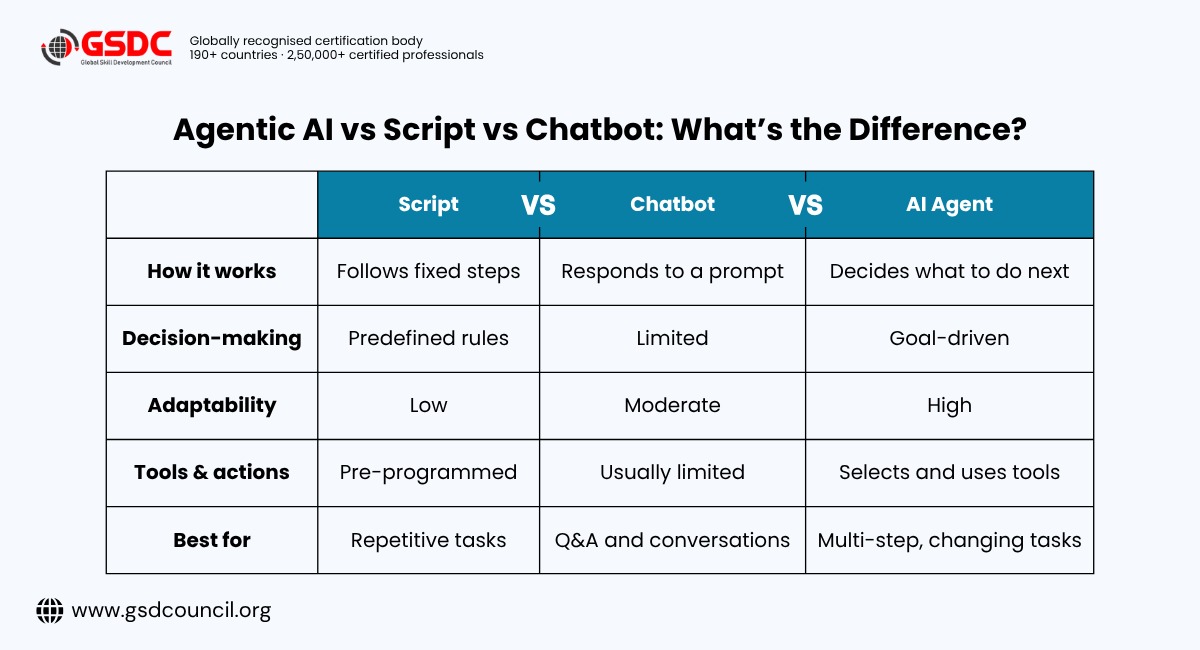
The easiest way to understand the agentic AI meaning is to compare it with things you already know:
- A normal script runs the same steps in the same order every time.
- A chatbot takes a question and gives back text.
- An AI agent gets a goal, then decides which actions to take, in what order, and when to stop.
A simple rule: if the steps never change, write a script. If the path depends on what happens along the way, consider an agent.
How AI Agents Work
If you are asking what are AI agents, think of one as a smart loop. It keeps working until the goal is met. Most agents share four parts.
- Model: the language model that does the thinking
- Tools: the actions the agent can take, such as searching the web, reading a database, or sending a message. In Python, these are usually ordinary functions.
- Memory: the record of what has happened so far, so the agent does not repeat itself
The loop: the cycle that ties it all together
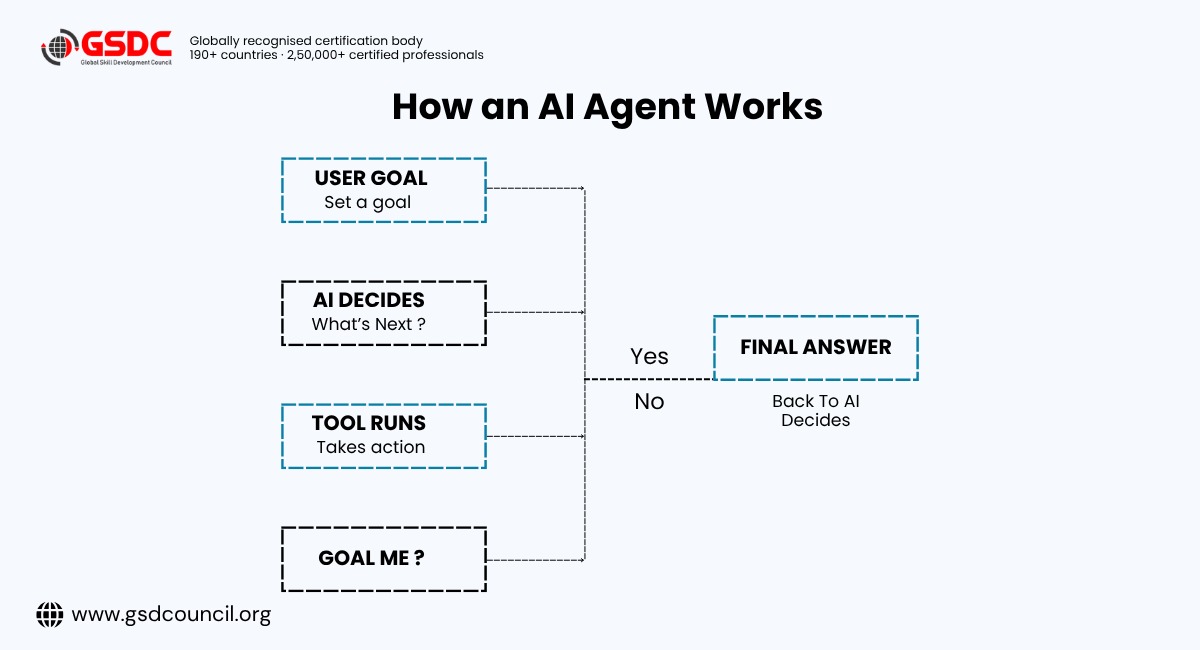
That loop is the basic pattern behind many AI agents. The frameworks you'll meet later add structure, memory, orchestration, and other capabilities around it.
Types of AI Agents and Common Workflows
Types of AI agents
Classic AI theory describes five types of AI agents. This is the textbook view, and today's agent tools do not use these labels directly. Still, they help you think about how much decision-making an agent has. Here is each type with an everyday example:
- Simple reflex agents: follow basic if-then rules based on what they sense right now. A thermostat that switches on the heater when the room drops below 20 degrees is a good example.
- Model-based agents: keep track of the state of the world, even when they cannot see all of it. A robot vacuum that remembers which rooms it has already cleaned works this way.
- Goal-based agents: choose actions that move toward a target. A navigation app looking for any route to your destination fits here.
- Utility-based agents: compare options and pick the best one. The same navigation app, when it weighs time, tolls, and traffic to pick the best route, is acting on utility.
- Learning agents: improve from feedback over time. A recommendation system that gets better as you watch more videos is a learning agent.
Many modern LLM-based agents are designed around goals, while some systems also use memory and feedback to improve their behavior. That is why you will hear the term autonomous AI agents used for a wide range of setups, from simple tool-calling assistants to more independent systems. The word "autonomous" describes how much freedom the agent has, not a single fixed design.
Single-agent vs multi-agent
- A single-agent system uses one loop and a few tools. It is the best place to start, and it handles a surprising amount of real work.
- A multi-agent system uses several specialised agents that work together, such as a planner, a writer, and a reviewer. It is the same idea as splitting a big function into smaller ones. Each agent has one clear job, which can make complex tasks easier to manage. The trade-off is more moving parts, more cost, and more to debug.
Common agentic workflows
AI agentic workflows are repeatable patterns for using AI and tools together. You only need to know four:
- Tool use: the AI calls your code or an outside service. Example: an agent calls a function that fetches today's orders from your database.
- Planning: the AI breaks a big goal into small steps. Example: asked to "prepare a weekly sales report," the agent lists its steps first: pull the data, calculate totals, spot changes, write the summary.
- Reflection: the AI checks its own work and fixes mistakes. Example: a coding agent runs the tests, reads the failure message, and rewrites its own code until the tests pass.
- Multi-agent teamwork: different agents handle different roles. Example: one agent researches a topic, a second writes the draft, and a third checks it for errors.
Start with tool use. Add the others only when a real problem needs them.
These four patterns also show up as core topics in most Agentic AI Developer Certification programs, since they are the building blocks behind almost every agent you will design or review at work. Knowing them well is useful whether or not you ever take a formal exam.
Agentic AI Examples and Use Cases
Here are some practical agentic AI examples a Python developer can build:
- A code review agent that reads a pull request and comments on issues
- A data cleaning agent that checks a spreadsheet and fixes problems
- A support agent that looks up an order and drafts a reply
- A research agent that searches sources and writes a short summary
- A DevOps agent that reads logs and points to the failing service
These AI agents examples all work the same way. A human sets the goal, and the agent handles the steps.
Common agentic AI use cases include finance (fraud checks), healthcare (claims processing), e-commerce (returns handling), software teams (testing and bug fixing), and marketing (reporting). In each case, the pattern is the same: a task that used to need a person to decide the next step can now be handled by an agent, with a person setting the goal and checking the result.
If you want to go from reading about these use cases to building them, the Global Skill Development Council (GSDC) is a good place to look for structured learning in this area.
How to Build an AI Agent: The Big Picture
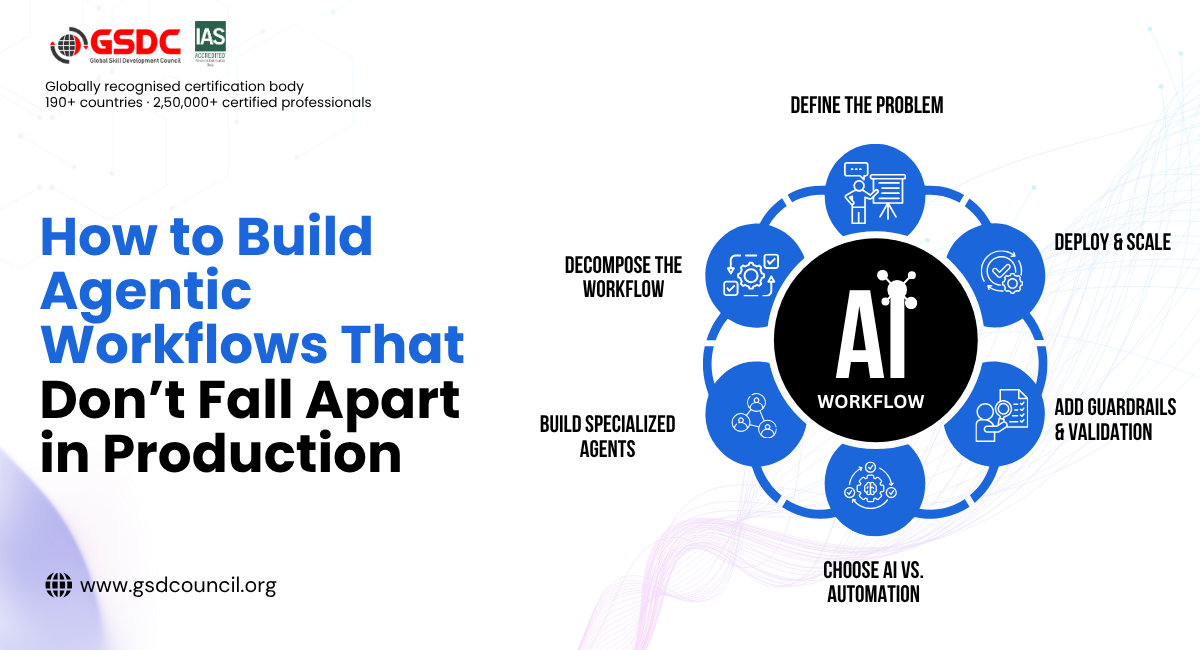
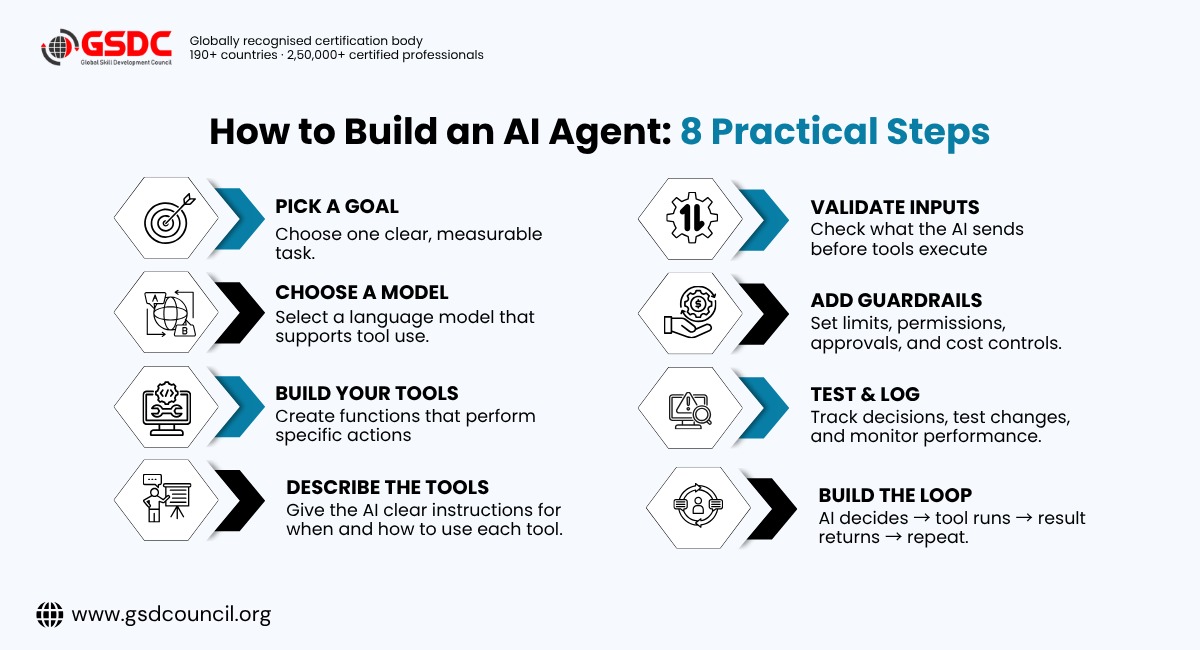
If you have been searching for how to build an AI agent, the process is simpler than it sounds. Here are the steps, without the code.
To make each step concrete, we will follow one running example: an agent that summarises today's support tickets.
Step 1: Pick one clear goal. Small and specific beats broad and vague. "Summarise today's support tickets" is better than "Run customer support." A tight goal is easier to build, test, and trust.
Step 2: Choose a language model. Pick one that supports tool use, which means it can ask your program to run a function. Your provider's documentation will list which models do. For our example, any tool-capable model will work.
Step 3: Build your tools. In Python, a tool is just a function that does one job well. Our agent needs two: get_tickets(), which fetches the tickets created today, and save_summary(), which stores the finished summary. Start with two or three tools at most.
Step 4: Describe each tool clearly. The AI cannot see your code. It only reads your description, so a clear description leads to better choices. For example, describe the first tool as "Fetches all support tickets created today, including subject and status." A vague description like "gets data" leaves the AI guessing.
Step 5: Build the loop. Ask the AI what to do, run the tool it picks, send the result back, and repeat. In our example, the AI asks for the tickets, reads them, then asks to save its summary. Always add a limit so the loop cannot run forever.
Step 6: Check every input. The AI can make mistakes, such as sending a date in the wrong format. Validate what it sends to your tools before they run. Python libraries like Pydantic are popular for this.
Step 7: Add guardrails. These keep your agent safe:
- Set a hard step limit so loops cannot run forever. Five steps is plenty for our example.
- Give each tool the minimum access it needs. Our agent can read tickets and save a summary, but it cannot delete anything.
- Ask for human approval before risky actions like payments or deletions
- Set a cost budget for every run
- Treat anything the agent reads from outside, such as web pages, emails, or files, as untrusted, because it may contain hidden instructions. A customer ticket could contain text like "ignore your instructions," and your agent should not obey it.
- Keep API keys out of your code and out of public repositories
Step 8: Test and keep logs. Test the tools you control, record every decision the agent makes, and re-run a few sample goals whenever you change something. Logs are how you answer the question, "Why did it do that?"
Ready to go deeper on how to build AI agents with real code? Official documentation from your model provider and the agent frameworks below are good places to start, since they update as tools change.
Python Frameworks for AI Agents
You can build an agent with plain Python, and it is worth doing once to learn how it works. When projects grow, frameworks save time by handling the repeated parts. Here is what each one is good for:
- LangGraph: build agents as clear steps with shared state. Pick it when you need tight control over long or complex workflows.
- CrewAI: set up teams of role-based agents. Pick it when your idea fits a team with roles, like researcher and writer, and you want a quick prototype.
- OpenAI Agents SDK: a light way to build agents with tools and handoffs. Pick it when you want a simple setup and already use OpenAI models.
- Microsoft Agent Framework: an open framework for building agents and multi-agent workflows in Python and .NET. Pick it when your team works in the Microsoft ecosystem.
- Pydantic AI: agents with checked, structured outputs. Pick it when you care about type safety and validated data.
- LlamaIndex: great for agents that work with your own documents. Pick it when your agent mostly needs to search and answer from company files.
Frameworks change quickly, so check each project's official page before you choose one.
Tip: Do not pick a framework first. Understand the loop, then choose a tool that removes the boring parts.
Common Mistakes to Avoid
Agentic AI is powerful, but many projects stall. Gartner has predicted that over 40% of agentic AI projects will be canceled by the end of 2027, and it advises using agentic AI only where it delivers clear value or ROI. Several causes are things developers can control:
- No step limit: leads to runaway loops and big bills
- Trusting AI output blindly: always check before acting on it
- Too many tools: the AI gets confused, so start with two or three
- Vague tool descriptions: the AI picks the wrong tool
- No logging: you cannot fix what you cannot see
- Using an agent for a fixed task: a normal script is cheaper and simpler
A Simple Learning Path for Python Developers
If you are wondering where to begin, follow this order:
- Learn the basics of language models: how they take prompts and return answers
- Practice tool use: let a model call a simple function
- Add memory: help the agent remember earlier steps
- Try a framework: LangGraph or CrewAI
- Go to production: testing, logging, and cost control
You can follow this path alone with documentation and side projects. Many developers, though, prefer a structured route once they reach steps 4 and 5, where design choices and safety matter more. That is where certification comes in.
Is an Agentic AI Developer Certification Worth It?
Tutorials teach you to copy code. A structured program teaches you why it works and how to make it safe. An Agentic AI Developer Certification shows employers that you understand agents, tools, workflows, and responsible use, not just one framework.
An agentic AI developer certification makes the most sense if you:
- Are a Python developer moving into AI roles
- Want proof of skills that hiring managers recognise
- Prefer hands-on projects to scattered videos
- Lead a team and want a shared standard for building agents
Look for programs with real projects and coverage of current tools. You can explore the Agentic AI Certification programs from the Global Skill Development Council to build practical, job-ready skills.

Final Thoughts
Agentic AI is not magic, and it is not going away. For a Python developer, it is one more layer on top of skills you already have: writing clean functions, working with APIs, checking inputs, and testing.
Start small. Build one agent with one tool. Then add memory and guardrails, and try a framework once the basics feel solid.

Related Certifications
Frequently Asked Questions
It is AI that plans and completes tasks on its own by using tools, instead of only answering questions.
No. Most agents use ready-made models through APIs. Good Python skills and careful testing matter more than ML theory.
Start by understanding the basic loop, then try LangGraph, CrewAI, or Pydantic AI.
An AI agent is one program that acts toward a goal. Agentic AI is the wider approach, including systems where several agents work together.
Yes, when you limit permissions, check inputs, set step and cost limits, and keep humans involved in high-risk actions.
Stay up-to-date with the latest news, trends, and resources in GSDC
If you like this read then make sure to check out our previous blogs: Cracking Onboarding Challenges: Fresher Success Unveiled
Not sure which certification to pursue? Our advisors will help you decide!