AI Can Draft Your Storyboard. Should You Let It?
Written by Matthew Hale
- What Learning Experience Design Actually Means
- What GenAI Actually Changed
- Where AI Is Actually Good at Storyboarding
- Where AI Still Needs a Human
- An AI-Assisted Storyboarding Workflow, With an Example
- Storyboard Formats Worth Knowing
- The Skills That Matter More Now
- How to Build an AI-Ready Instructional Design Portfolio
- How the Career Is Changing
- Conclusion
A few years ago, a storyboard started as a blank spreadsheet and a blinking cursor. An instructional designer would sit with a subject matter expert, take pages of notes, and spend the better part of a week turning them into screen-by-screen scripts. That week adds up: one of the most cited benchmarks in the field puts the average time to build a single finished hour of basic eLearning at around 79 hours once every phase analysis, storyboarding, scripting, and review is counted. Rapid-development tools had already pulled that down to 33–40 hours before generative AI entered the picture. In 2026, teams building storyboard drafts with AI assistance are compressing that even further, often turning a first structure around in a day, sometimes in an afternoon.
The shift isn't really about speed, though. It's about what instructional designers do with the time they get back and what still has to happen by hand, no matter how good the AI tool is. That's the more useful question if you work in learning experience design (LX design), or you're trying to break into it: not "does AI write storyboards now," but "which parts of the storyboard should still be yours."
What Learning Experience Design Actually Means
Learning experience design is instructional design with a UX lens. Traditional instructional design asks what the learner needs to know. LX design asks that, then adds a second question: what will it actually feel like to sit through this course, screen by screen, as someone with a short attention span and limited patience for qeneip-paced content?
The two disciplines overlap almost completely in practice an LX designer still writes objectives, maps content, and builds assessments. What's different is the weight given to flow, pacing, and the emotional arc of a course. That emphasis on experience is exactly why storyboarding hasn't lost relevance in an AI-assisted workflow. A tool can draft text in seconds. Deciding what a learner should feel at each screen is still a design call.
What GenAI Actually Changed
A storyboard is the blueprint for a course before anyone touches production software, with each screen's objective, on-screen text, narration, visuals, interactions, and developer notes mapped out before a single asset gets built. Skip it or rush it, and you find out the hard way: a script that needs re-recording, an interaction rebuilt because the logic didn't hold, a module that's accurate but doesn't land. A storyboard catches those problems on a page, where they cost an edit, instead of in production, where they cost days.
What GenAI has changed is where that page starts. It hasn't replaced the storyboard; it's replaced the blank page. In a survey of 144 practicing instructional designers run in early 2026, 83% said tools like ChatGPT were already part of their regular workflow, and two out of three reported real-time savings that let them spend more effort on learner analysis and stakeholder alignment instead of first drafts. Storyboarding is one area where those time savings can show up directly, especially because so much of the work involves structured drafting that AI tools can accelerate.
The shift is easiest to see side by side:
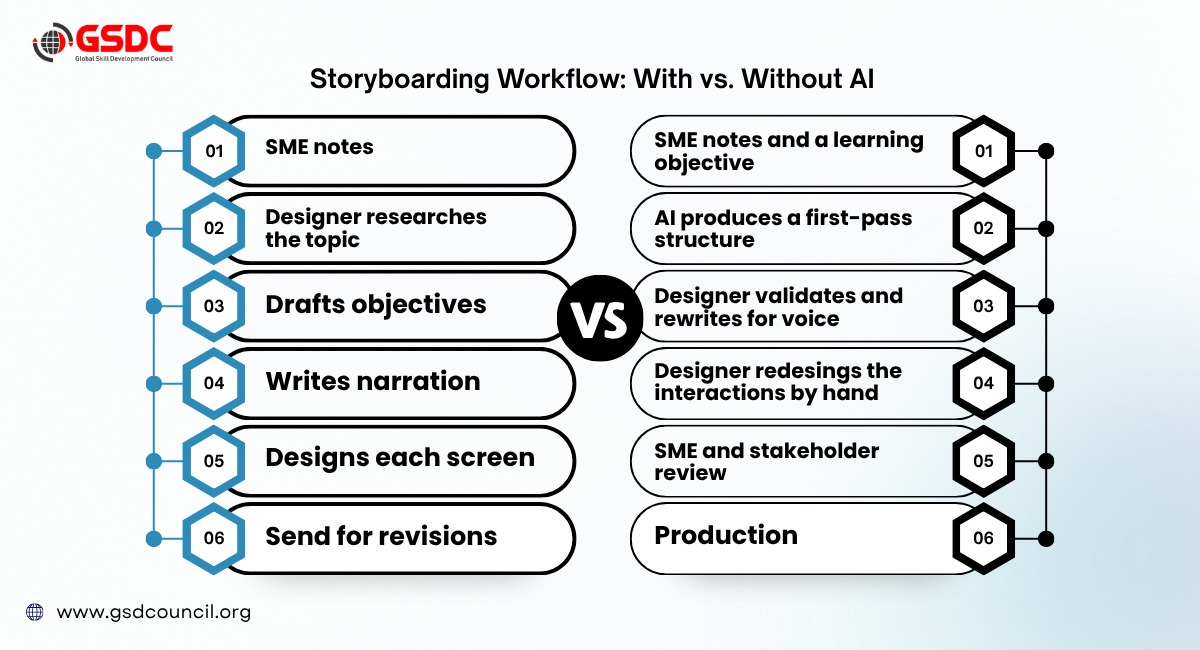
The steps didn't disappear. The order shifted, and the designer's time moved from drafting toward validating and designing, which is the more valuable half of the job anyway.
Where AI Is Actually Good at Storyboarding
Used well, AI earns its place in a few specific spots:
- Turning a learning objective into a screen-by-screen skeleton fast enough to start editing instead of staring at a blank page.
- Drafting narration and on-screen text options you can pick from and rewrite, rather than composing from scratch.
- Suggesting interaction and quiz-question ideas for a given piece of content, even if half of them get discarded.
- Producing structural variations quickly, three different screen orders for the same content, so you can compare instead of committing to the first idea.
That's genuinely useful. It's also where most of the confusion about "AI writing storyboards now" comes from, because a fast, plausible first draft can look a lot like a finished one. What AI is actually doing here is pattern-matching against instructional design models it's absorbed, which is also why a working knowledge of those models, the kind covered in a Certified Instructional Designer certification, makes it easier to tell a genuinely sound structure from one that just looks tidy.
Where AI Still Needs a Human
That's the catch. AI can generate a plausible storyboard. That isn't the same as a good one, and the gap between the two is where a lot of first-draft confidence goes wrong. Left unchecked, AI-generated storyboards tend to:
- Invent details that aren't in the SME material, stated with the same confidence as the facts that are.
- Default to generic interactions, a click-to-reveal or a multiple-choice quiz, where the content actually calls for something more specific.
- Overestimate what learners can absorb on a single screen, because the model isn't weighing cognitive load the way a designer would.
- Produce scenarios that are technically correct but flat, with no real stakes or consequences for a wrong choice.
- Misses organizational context, internal terminology, past training history, a policy detail - that a first-time prompt rarely captures.
- Make every course sound like every other course, because the underlying phrasing patterns are the same regardless of client or audience.
None of that shows up in a quick skim of the draft. It shows up when a learner clicks through a course that's accurate but forgettable, or when an SME flags a fabricated detail in review. That's the actual argument for keeping a human in the loop, not caution for its own sake, but because these specific failure modes are hard to spot without one.
An AI-Assisted Storyboarding Workflow, With an Example
Here's how that plays out on an actual objective. Say the brief is: "By the end of this module, employees can identify three common phishing indicators."
- Start with the objective, not the tool.
That sentence above is the brief written before anything gets prompted.
- Feed it a structured request.
Objective, audience (general staff, no security background), tone (practical, not alarmist), and any SME notes on real incidents the organization has seen.
- Let AI draft a first-pass structure.
A typical output: Screen 1 introduces phishing with a real-world stat; Screens 2–4 each cover one indicator (urgent language, mismatched sender address, suspicious links) with an example email; Screen 5 is a short quiz identifying indicators in a sample message.
- Check it against what you actually know.
Does the "real-world stat" check out, or did the model invent a plausible-sounding number? Do the three indicators match what your organization's own phishing reports show, or are they generic textbook examples?
- Rewrite the narration and redesign the interaction.
Swap the flat multiple-choice quiz for something closer to real behavior a simulated inbox where the learner has to click the suspicious email, not just answer a question about it.
- Send it for SME and stakeholder review,
the same step you'd use on a manually built storyboard.
The AI draft saved a genuine chunk of time on steps one through three. Steps four through six are where the course stopped being generic and started being yours. This kind of six-step discipline objective first, structured brief, then a deliberate validation pass is close to what bodies like the Global Skill Development Council (GSDC) teach as standard practice in instructional design training, AI-assisted or not.
Download the checklist for the following benefits:
Storyboard Formats Worth Knowing
Not every course needs the same format, and each one leans on AI differently:
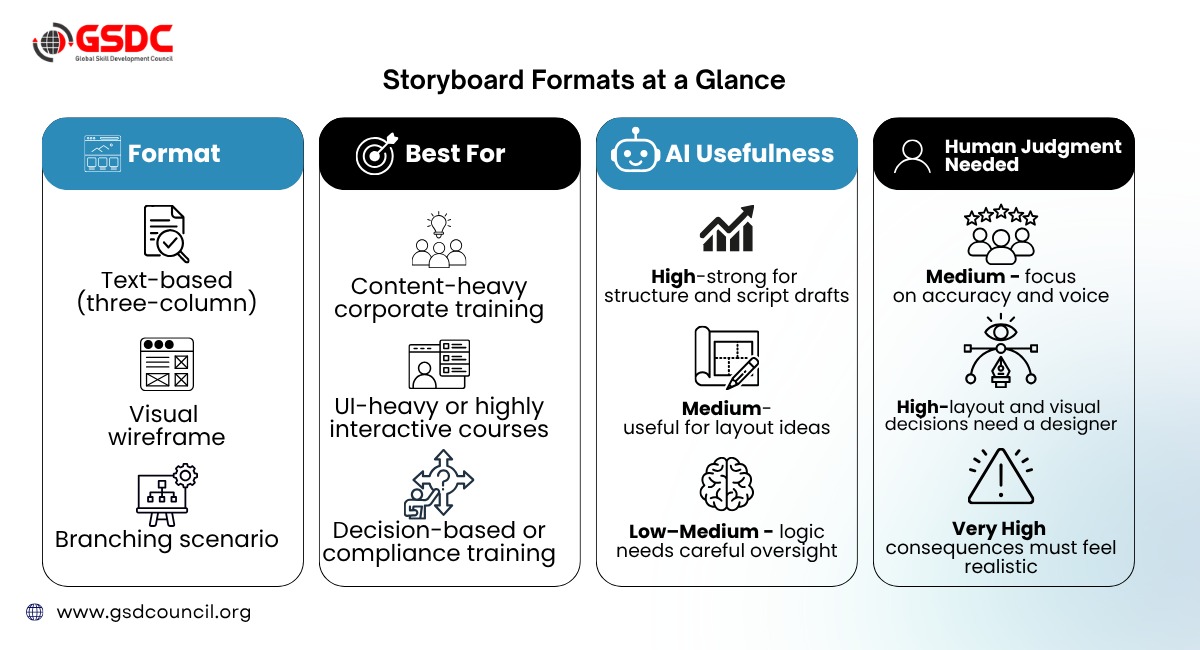
A common approach is a hybrid workflow: AI drafts the text-based skeleton, and the designer builds the visual or branching layer by hand where it counts.
The Skills That Matter More Now
The instructional designer skill set hasn't been replaced - it's been rebalanced toward the parts AI can't do:
- Prompt literacy: briefing an AI tool with enough context to get a usable draft, not a generic one.
- Editorial judgment: spotting when AI output is technically correct but pedagogically flat, or quietly wrong.
- Learner empathy and UX thinking: the pacing and motivation a machine can't make for you.
- Data literacy: reading completion rates and engagement data to know if a course is actually working.
- Stakeholder and SME management: untouched by AI, and increasingly what separates senior designers from junior ones.
Instructional design models like ADDIE and SAM are still the scaffolding behind all of this - arguably more useful now, since they give you a structure to brief an AI tool against, stage by stage, instead of prompting blindly.
How to Build an AI-Ready Instructional Design Portfolio
Employers hiring for LX and instructional design roles are increasingly looking for evidence of this exact process, not just finished courses. What matters is showing the judgment, not just the output. A few pieces worth including:
- A before-and-after storyboard.
The raw AI-generated draft next to your edited final version, with a short note on what you changed and why. This is the single clearest way to demonstrate editorial judgment to someone skimming a portfolio.
- A hand-built branching scenario.
This is the format hardest to automate well, so it's the strongest evidence you can design real consequences and decision logic, not just assemble AI output.
- A data-driven revision case study.
A short write-up of how completion rates, quiz scores, or learner feedback led you to change a course after launch - proof you can close the loop, not just produce content.
- A prompt-to-output sample.
The actual brief or prompt you gave an AI tool, alongside what it returned, shows you can brief a tool with enough context to get something usable - a skill hiring managers increasingly ask about directly.
- One project with visible SME or stakeholder input.
Meeting notes, a feedback thread, or a revision log that shows you can navigate that relationship - something no AI-generated draft can demonstrate on its own.
None of this needs to be from paid work. Volunteer projects, coursework, or a self-initiated course built specifically to showcase this process work just as well and are often easier to document thoroughly since you control the full process end to end.
How the Career Is Changing
The bigger shift isn't in pay; it's in what the job actually involves day to day:
- Junior roles are shifting toward review, not drafting.
Less time producing first drafts from a blank page, more time reviewing, editing, and validating AI output a different, and arguably harder, skill to learn early on.
- Senior roles are shifting toward workflow design.
Knowing which parts of a project should route through AI, which shouldn't, and where a team's review process needs a checkpoint that wasn't necessary before.
- Pay still varies by experience, location, and employer.
Current U.S. data puts average instructional designer pay around the $80,000 mark, but that number matters less than what people are actually being asked to do at each career stage.
- Certification can shorten the path.
For career changers from teaching, training, HR, or content writing, a structured instructional design certification with an applied storyboarding project, the kind where the coursework itself becomes portfolio material, can help considerably. GSDC's Certified Instructional Designer program is one option worth looking at if you want that structure.

Conclusion
GenAI changed the speed of storyboarding. It didn't change what a storyboard is for: making sure a course works before anyone builds it. AI can get you from a blank page to a plausible first draft in minutes; what it can't do is know your learners, catch its own invented details, or decide what a screen should actually feel like. That's still the designer's job, and it's arguably the more interesting half of it now that the drafting grind is shorter.
The designers pulling ahead in 2026 aren't the ones using AI the most. They're the ones who know exactly which parts of the process still need them in the room.

Related Certifications
Frequently Asked Questions
Designing training with as much attention to the learner's experience, pacing, engagement, and usability as to the accuracy of the content itself.
They overlap heavily. Instructional design traditionally emphasizes content and objectives; LX design adds a stronger focus on the end-to-end learner experience.
Start with a clear objective per screen, map on-screen text and narration, note the interaction type, and get a human review before production, with or without AI in the drafting stage.
Not without review. AI drafts can look finished while still containing invented details, generic interactions, or content that doesn't match your organization's context all things a human check is meant to catch.
No, but one with an applied portfolio project can help career changers move faster if they don't yet have course-building samples to show.
Pay varies significantly by experience, location, and employer, with current U.S. data putting average instructional designer pay around the $80,000 mark.
Stay up-to-date with the latest news, trends, and resources in GSDC
If you like this read then make sure to check out our previous blogs: Cracking Onboarding Challenges: Fresher Success Unveiled
Not sure which certification to pursue? Our advisors will help you decide!