AI Copilots for Managers, Leaders, and Tech Leads: Practical Tools to Boost Productivity
Written by Matthew Hale
This was the message that the GSDC session taught me: modern teams are not going to simply use tools but instead do.
There were live demos and use cases shown by speakers on how lightweight automation, agent-driven workflows, and integrated copilots eliminate busy work and enable leaders to make decisions.
We have summarized the practical aspects of the transcript here, and you can use the pieces below to guide you in the present day.
Quick takeaways from the session
- Across the event emphasized real-world, tool-first approaches to automation, not abstract theory.
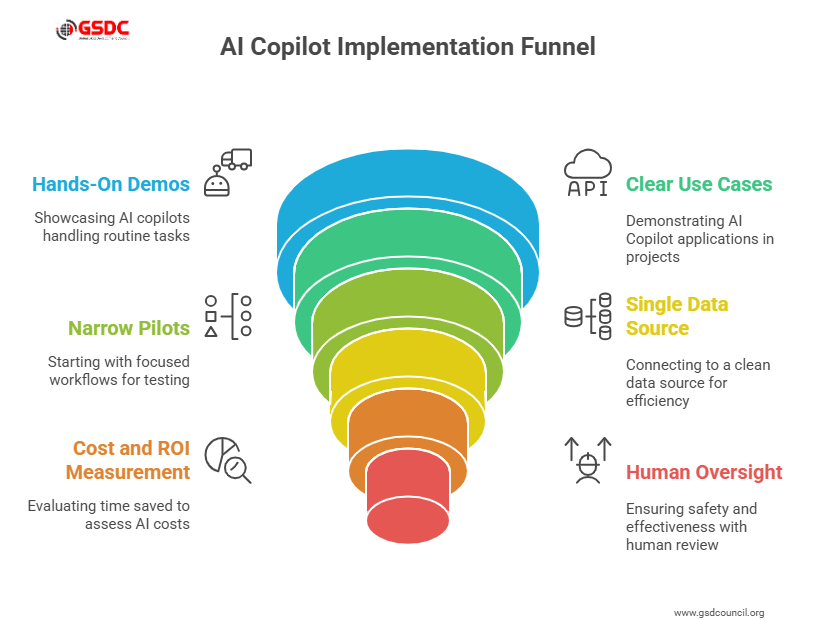
- The transcript repeatedly highlighted hands-on demos where AI copilots handled routine tasks, freeing managers to prioritize strategy.
- Several examples tied to project dashboards, reporting, and customer follow-up showed clear AI Copilot use cases that any team can test in a week.
The speaker stressed starting with narrow pilots rather than broad initiatives; pick one workflow, measure outcomes, then scale.
Multiple speakers called out the importance of connecting a copilot to a single, clean data source first; that one good integration yields the fastest wins.
Cost and ROI were framed practically: run a short pilot, measure time saved, and use those numbers to answer “how much does AI cost” for your team.
Finally, the session reinforced that human review, clear escalation paths, and simple guardrails make copilots both effective and safe to deploy.
What are AI copilots? Short answer?
During the session, we framed the question clearly: What are AI copilots? In practice, they are context-aware assistants embedded in workflows.
They read project data, draft outputs, suggest next steps, and in some setups execute simple tasks automatically. The webinar used the term repeatedly when showing how these assistants plug into existing tools and data sources.
(Use this as your quick definition: AI copilots = task-aware assistants that sit alongside your systems and remove repetitive, time-consuming work.)
What does a copilot do? (Practical checklist)
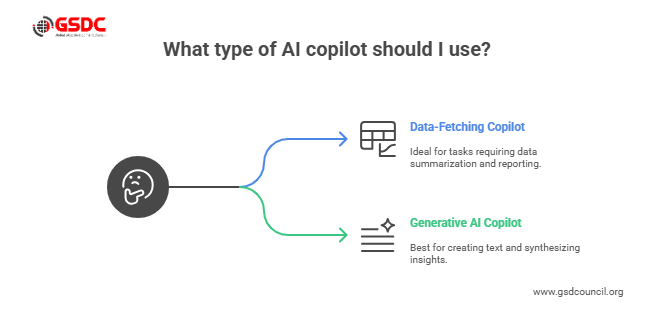
The transcript included a demo checklist that makes it easy to see what Copilot does in a live environment:
- Summarize meeting notes and push action items to a project board.
- Draft status updates by pulling the latest task and sprint data.
- Run routine data pulls and produce one-click reports for stakeholders.
- Triage and escalate issues that need human attention.
When you read the demos, each of these items was shown end-to-end, which is why what does Copilot do became a recurring theme in the session.
Generative AI copilots: when to use them
The term Generative AI copilots came up during the demos to describe copilots that don’t just fetch data but generate text, summaries, and creative outputs. Use them when:
- You need polished written outputs quickly (reports, briefs, customer emails).
- You want synthesized insights from multiple documents or data sources.
- You want a co-author who can draft first versions and follow your tone.
The transcript showed several short demos of generative outputs being used as first drafts that humans then refine. This is the ideal balance: speed plus human judgment.
Cost realities: how much does AI cost in practice
People asked the practical finance question: how much does AI cost? The webinar covered this from two angles:
- Direct service costs: licensing for a copilot or platform, which varies by seats, usage, and generation volume.
- Hidden costs: integration, change management, and the time to set rules and guardrails.
A couple of speakers suggested a baseline approach: run a pilot, measure time saved, and compare the pilot cost to the hourly value of the team’s time.
That gives a clear answer to how much AI costs for your org, and in many small pilots, the ROI is positive within a quarter.
Careers and roles: copilot careers explained
The session touched on talent implications, what we will call copilot careers. Two points stood out:
- New roles are emerging that combine domain expertise with tool design. Think “workflow owner” or “copilot config lead.” These are practical copilot careers that require no deep ML training but do require systems thinking.
- Managers and tech leads will shift toward oversight and quality control; they become trainers, reviewers, and policy owners for copilots.
If you’re thinking about hiring or upskilling, the session recommends investing in skills that pair domain know-how with prompt design and simple automation configuration.
How to pilot an AI copilot (three-step plan)
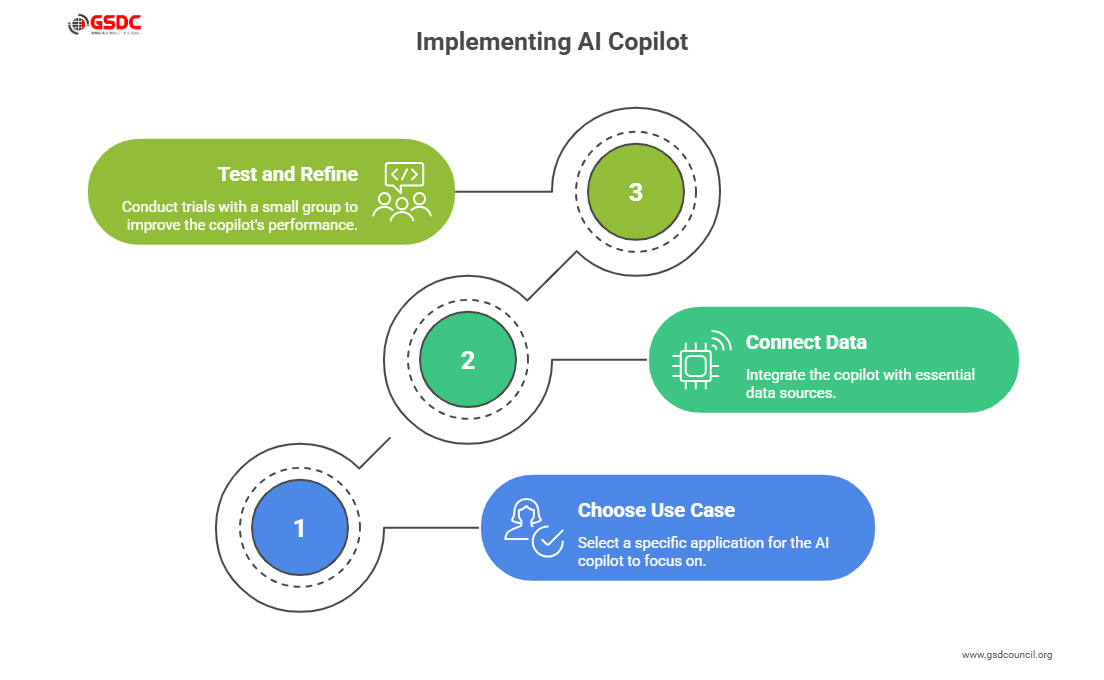
Based on the step-by-step demos in the transcript, here’s a short playbook to get started:
- Pick a narrow use case, choose one of the AI Copilot use cases above, like weekly status or customer follow-up.
- Connect data sources, integrate the copilot with the single most important data source: project board, CRM, or shared drive. The demos always started with one connection.
- Run and refine test with a small group, collect feedback, and tune the copilot’s rules and prompts.
This mirrors how the session presenters built copilots live: start small, iterate fast, measure impact.
Think you have enough skills to dominate the AI space? Enroll in GSDC AI Tool Expert certification and get the global validation that your ability deserves.

Final notes for managers, leaders, and tech leads
To close, the session reinforced a simple message: copilots are not a replacement for judgment.
They are an accelerant for good teams. If you want practical next steps from the transcript:
- Identify one AI Copilot use case that would save time this week.
- Run a fast pilot and answer “how much does AI cost” for that pilot by measuring time saved.
- Start planning roles and skills for Copilot careers inside your team.
Across the webinar, the same idea surfaced repeatedly: when implemented with care, AI copilots let leaders move from firefighting to strategy.
Whether you use generative AI copilots for content or workflow copilots for operations, the path is clear: pick practical pilots, measure impact, and scale what works.

Related Certifications
Stay up-to-date with the latest news, trends, and resources in GSDC
If you like this read then make sure to check out our previous blogs: Cracking Onboarding Challenges: Fresher Success Unveiled
Not sure which certification to pursue? Our advisors will help you decide!