How Instructional Designers Can Keep Up With New Technology
Written by Matthew Hale
- What Is Instructional Design and Technology?
- Four Shifts Redefining the Instructional Designer's Role
- The Models That Still Matter (Because Tools Change Faster Than Principles)
- Instructional Design Tools Worth Knowing in 2026
- Learning and Development Trends Worth Watching in 2026
- Instructional Design Strategies for Staying Current (Without Burning Out)
- The Skills That Matter Most Right Now
- If You're Weighing This as a Career
- Building This Fluency With GSDC
- Final Thoughts
Six months ago, "AI tools" meant a chatbot that could draft a quiz. Today, the same instructional designer might use AI to generate a branching scenario, auto-tag competencies in an LMS, and build a working prototype before lunch. That pace of change is exactly why so many instructional designers feel like they're a step behind, even the ones who genuinely love the work.
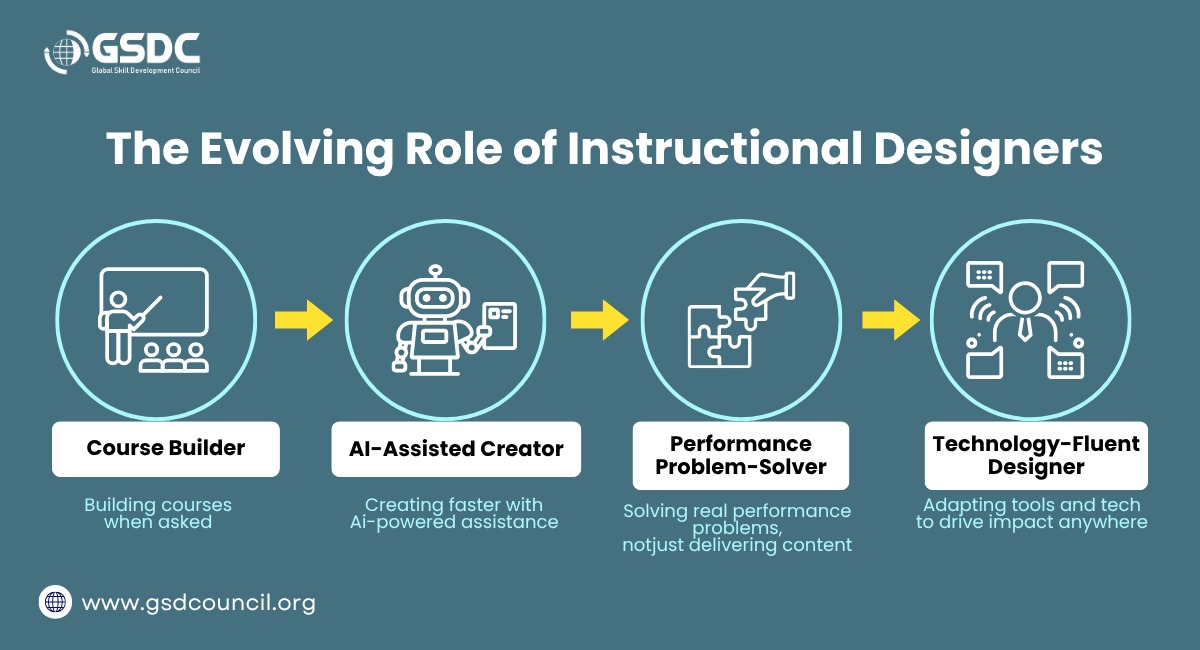
But the real story of 2026 isn't that AI is replacing instructional designers. It's that the role itself is being redefined. The instructional designer of 2026 isn't simply a course builder they're closer to a performance consultant who happens to use AI, data, and design models as their toolkit. Understanding that shift, more than any single new app, is what actually keeps you current.
This blog covers what instructional design and technology mean today, the shifts reshaping the role, the tools and models still worth knowing, and practical habits for staying sharp without burning out.
What Is Instructional Design and Technology?
Instructional design and technology is the discipline of applying learning theory, systematic design processes, and digital tools to create effective training, courses, and learning experiences. It sits at the intersection of three things: how people actually learn (psychology and pedagogy), a structured process for building content (design models like ADDIE or SAM), and the software used to deliver it (LMS platforms, authoring tools, and increasingly, AI).
In simple terms, it's the "why," "how," and "with what" of building learning that works. An instructional designer isn't just someone who makes slides look nice; they diagnose a performance problem, design a solution around it, and use technology to deliver that solution at scale.
Four Shifts Redefining the Instructional Designer's Role
Instead of listing every trend in isolation, it's more useful to see them as four connected shifts. Each one changes what "staying current" actually means in practice.
1. From Course Builder to Performance Problem-Solver
The old default was: someone requests a course, you build a course. Increasingly, the expectation is that a designer first asks whether a course is even the right solution or whether the real fix is a job aid, a process change, or better manager coaching. This is really just the "Analysis" phase of instructional design being taken seriously again, after years of teams jumping straight to content production.
2. From Manual Production to AI-Assisted Production
This is the most visible shift, and the one most designers are already feeling. First drafts of scripts, storyboards, and quiz banks that used to take days can now take hours, with AI handling the rough draft and the designer handling judgment, accuracy, and tone. The skill that matters isn't knowing how to write a perfect AI prompt; it's knowing how to evaluate what the AI gives you and fix what it gets wrong.
3. From Completion Rates to Measurable Business Outcomes
L&D teams are under growing pressure to show that training changed something - a performance metric, an error rate, a sales number - rather than just reporting how many people clicked "complete." This is pushing instructional designers to get more comfortable with data than the role has traditionally required.
4. From Tool Expertise to Adaptable Technology Fluency
Because the tools themselves change so quickly, deep expertise in any single platform has a shorter shelf life than it used to. What's replacing it is fluency, the ability to pick up a new authoring tool, LMS, or AI assistant quickly, because the underlying design principles don't change even when the interface does. It's part of why becoming a Certified Instructional Designer has picked up momentum recently: a good certification is less about memorizing one tool and more about proving you can adapt as the tools around you change.
Everything below the models, the tools, the habits exists to support these four shifts, not to replace them.
The Models That Still Matter (Because Tools Change Faster Than Principles)
New tools come and go, but design models are the foundation that keeps your work grounded, especially during Shift 1 and Shift 4 above.
ADDIE (Analysis, Design, Development, Implementation, Evaluation):
ADDIE remains one of the most widely taught instructional design models, and it's usually the one designers learn first. It's linear and thorough, and still highly relevant for compliance training or large-scale programs where documentation matters.
SAM (Successive Approximation Model):
A faster, more iterative alternative to ADDIE. Instead of one long build cycle, SAM uses short sprints with frequent prototyping and stakeholder feedback, closer to how agile software teams work.
Bloom's Taxonomy:
Not a build process, but a framework for writing learning objectives at the right cognitive level, from simple recall to analysis and evaluation. Still one of the most-referenced tools when writing assessments.
Gagné's Nine Events of Instruction:
A sequencing framework for structuring a lesson, from gaining attention to providing feedback, that maps surprisingly well onto modern e-learning modules and video scripts.
None of these models are outdated. The skill isn't picking one and memorizing it; it's knowing which one fits the project in front of you and being able to blend them when needed. Structured programs like the ones offered through the Global Skill Development Council (GSDC) tend to walk through all four of these models in context, which is often a faster way to build that judgment than picking it up piecemeal from scattered blog posts.
Instructional Design Tools Worth Knowing in 2026
Here's a practical, name-specific breakdown of where the field currently stands. You don't need to master every tool in every row; working familiarity with one option per category is a reasonable target.
Category | What It Does | Examples |
Authoring tools | Build interactive e-learning modules | Articulate 360, Adobe Captivate, Rise 360 |
LMS / LXP platforms | Host, assign, and track training | Moodle, Canvas, Docebo, Cornerstone |
Video and screen-capture tools | Create demos, walkthroughs, microlearning | Camtasia, Descript, Loom |
Collaboration and prototyping | Storyboard and get stakeholder sign-off | Miro, Figma, Google Workspace |
Instructional design AI tools | Draft scripts, generate quiz items, summarize source material, build first-pass storyboards | ChatGPT, Claude, Gemini, and purpose-built AI course generators |
Instructional design AI tools specifically are the fastest-growing category right now, and they're the clearest expression of Shift 2 above. They're not replacing the designer's judgment — a machine still can't decide what "good enough" looks like for your learners or your compliance requirements — but they've meaningfully compressed the time spent on repetitive drafting work.
Learning and Development Trends Worth Watching in 2026
A few learning and development trends connect directly to the four shifts and are worth building into your own practice:
- AI-assisted personalization - content adapting to a learner's role, pace, or existing knowledge instead of one-size-fits-all courses.
- Skills-based learning over role-based learning - organizations increasingly hire, train, and promote around specific skills rather than fixed job titles.
- Microlearning embedded in the flow of work - short, targeted lessons delivered exactly when someone needs them, rather than one long annual course.
- A stronger link between training and business metrics, reflecting the shift away from completion rates as the primary success measure.
- Coaching and manager-led development as a supplement to formal courses, often supported by AI-assisted tools.
According to LinkedIn's 2025 Workplace Learning Report, roughly seven in ten learning and development professionals are already experimenting with or actively integrating AI into their work. That doesn't mean every designer needs to be an AI expert, but it does suggest that AI-assisted workflows are quickly becoming a normal part of the job rather than an optional add-on.
Instructional Design Strategies for Staying Current (Without Burning Out)
Here are the habits that actually keep working instructional designers current, in order of how much time they realistically take.
1. Follow a small, curated set of sources - not everything:
Pick two or three newsletters, podcasts, or blogs run by working practitioners rather than trying to track the entire industry. Consistency beats volume.
2. Join one active community:
Whether it's a LinkedIn group, a Slack community, or a local L&D meetup, being around peers exposes you to tools and problems you wouldn't encounter alone, and it's often where new instructional design strategies get tested and discussed before they hit the mainstream blogs.
3. Build one small project per quarter using a new tool:
You don't need a client project to learn a tool. Build a five-minute mock module with a new authoring tool or AI assistant just to understand its limits.
4. Read one research-backed report a year, cover to cover:
Reports like LinkedIn's Workplace Learning Report or major L&D industry surveys are dense, but reading one thoroughly beats skimming twenty blog summaries of it.
5. Revisit the fundamentals annually:
It's easy to assume you already "know" ADDIE or Bloom's Taxonomy. Revisiting core instructional design models with fresh eyes, especially after using new tools, often reveals gaps you didn't know you had.
6. Pursue structured learning through certification:
Self-study only goes so far. A structured instructional design certification or an instructional design and technology certificate program forces you through material you might otherwise skip, and it gives employers a concrete signal of your current skill level.
The Skills That Matter Most Right Now
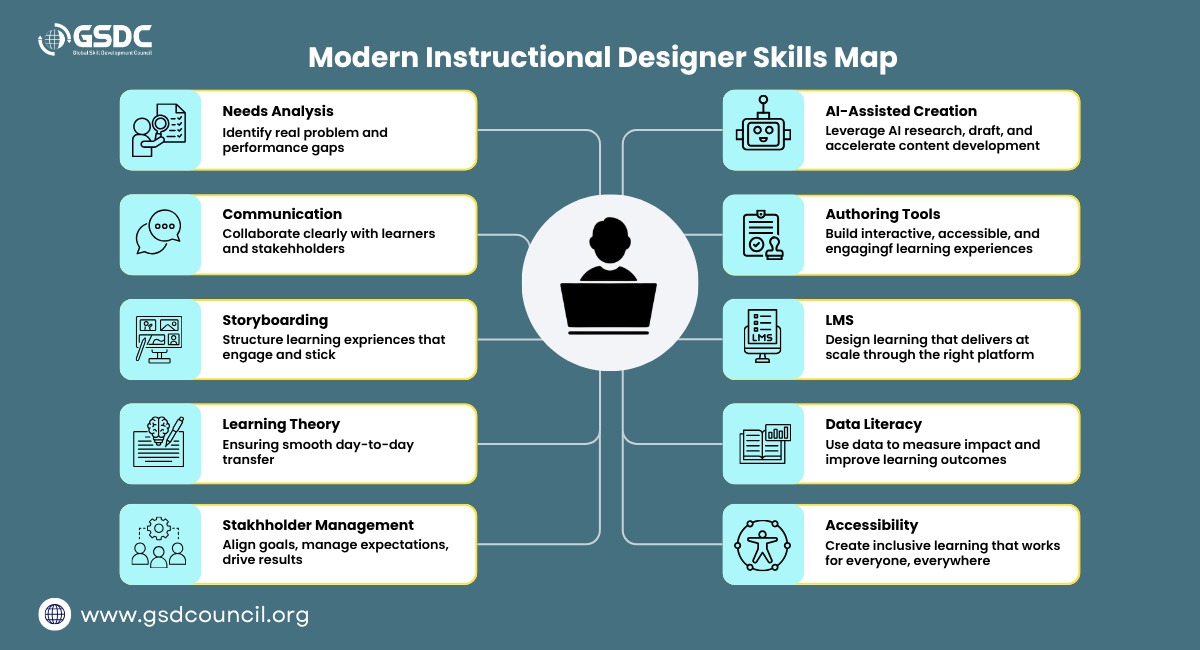
In many current instructional design roles, employers look for a mix of technical and human skills. The instructional design skills that tend to come up most often include:
- Needs analysis and stakeholder interviewing
- Storyboarding and scriptwriting
- E-learning authoring tool proficiency
- Basic LMS administration
- Working knowledge of AI-assisted content creation
- Data literacy - reading completion, assessment, and performance data
- Project management and stakeholder communication
- Accessibility and universal design principles
Notice that only two or three of these are purely technical. The strongest instructional designers tend to be strong communicators and analytical thinkers first, and tool-proficient second — which is really just Shift 4 in practice.
If You're Weighing This as a Career
A few quick pointers, in case you're entering the field or plotting your next move:
Getting in:
Learn the core models and adult learning theory, get hands-on with one authoring tool and one LMS, build two or three portfolio projects (even unpaid, showing process rather than just a polished screenshot), then consider a certification to formalize your knowledge and fill gaps. Many instructional design jobs are still filled through community referrals, not just job boards — another reason the networking habit above pays off.
Skills employers want:
The mix from the section above needs analysis, authoring and LMS proficiency, AI-assisted content creation, data literacy, and strong stakeholder communication matters more than deep expertise in any one tool.
Salary:
In the U.S., instructional designers average around $92,450 a year, with senior-level roles averaging closer to $121,393, according to Glassdoor. Pay varies by region and industry, but compliance-heavy sectors like pharma and aerospace tend to pay above average.
Career progression:
It typically moves through a few recognizable stages:
- Associate / Junior Instructional Designer
- Instructional Designer (owning projects end-to-end)
- Senior Instructional Designer / Learning Experience Designer
- L&D Manager or Director
- Head of L&D or Chief Learning Officer
Lateral moves into UX design, learning technology consulting, or higher-ed curriculum development are common too, since the core skill set transfers well.
Building This Fluency With GSDC
Everything covered above the four shifts, the models, the tools, the habits points to the same conclusion: staying relevant now means combining design fundamentals with technology fluency, not choosing one over the other. That's a hard balance to build on your own through scattered blog posts and one-off tutorials.
The Global Skill Development Council (GSDC) offers structured programs built around exactly that combination, including its Certified Instructional Designer credential, which walks through the design models, AI-assisted workflows, and evaluation practices instructional designers are now expected to know. For designers who want a faster, more organized path to that fluency rather than assembling it piece by piece, it's a practical place to start.

Final Thoughts
The goal isn't to become an expert in every new instructional design tool that launches this year. It's to become the kind of instructional designer who can learn, evaluate, and apply new technology quickly — without losing sight of how people actually learn. That's the real difference between the course builder of a few years ago and the instructional designer of 2026.
If you're looking to formalize that fluency, a structured, industry-recognized instructional design certification can be one of the fastest ways to close skill gaps and signal your expertise to employers.

Related Certifications
Frequently Asked Questions
ADDIE stands for Analysis, Design, Development, Implementation, and Evaluation. It's a five-step process for building training, and it's usually the first model instructional designers learn because it's methodical and easy to explain to stakeholders.
Not always, but it helps. A degree or strong portfolio can get you in the door, while a certification often speeds things up by proving you know current tools and models without an employer having to take your word for it.
Most people start as a junior or associate designer, move into owning full projects, then progress toward senior design or L&D management roles. Some branch sideways into UX or curriculum design instead of climbing straight up.
Mostly general assistants like ChatGPT or Claude for drafting scripts and quiz questions, plus a growing number of AI features built directly into authoring tools and LMS platforms. Designers still review and edit everything AI produces.
Beyond the classic "instructional designer" title, this covers roles like e-learning developer, learning experience designer, LMS administrator, and curriculum technologist. The titles vary more than the underlying skill set does.
Stay up-to-date with the latest news, trends, and resources in GSDC
If you like this read then make sure to check out our previous blogs: Cracking Onboarding Challenges: Fresher Success Unveiled
Not sure which certification to pursue? Our advisors will help you decide!