Liquid Cooling vs Air Cooling: Which Is Better for High-Density Data Centres?
Written by Matthew Hale
- Liquid Cooling vs Air Cooling: Understanding the Difference
- Why High-Density Data Centres Are Moving Towards Liquid Cooling
- Types of Liquid Cooling Used in Data Centres
- Does Liquid Cooling Always Use Less Energy and Water?
- When Should a Data Centre Choose Air Cooling or Liquid Cooling?
- Practical Example: Upgrading an Existing Data Centre for AI Workloads
- What Should Data Centre Professionals Evaluate Before Choosing a Cooling System?
- Develop Your Data Centre Knowledge with GSDC Certification
- Conclusion
Data centre cooling systems are designed to maintain the temperature required for servers and other IT equipment to operate reliably. As organisations introduce AI servers, GPUs, and high-performance computing systems, managing heat has become more demanding. These workloads generate considerable heat within a relatively small space, placing additional pressure on conventional cooling systems.
Air cooling has been used in data centres for many years and continues to meet the requirements of most conventional IT environments. However, higher rack power densities are making it difficult for some facilities to remove heat through airflow alone. Liquid cooling offers another approach by using a circulating fluid to collect and transfer heat away from IT equipment.
Choosing between the two technologies requires an understanding of their cooling capabilities, infrastructure requirements, energy consumption, maintenance needs, and suitability for different workloads. This comparison explains how both systems work and where each one is most appropriate.
Liquid Cooling vs Air Cooling: Understanding the Difference
The main difference between air cooling and liquid cooling lies in how heat is collected and transferred away from IT equipment.
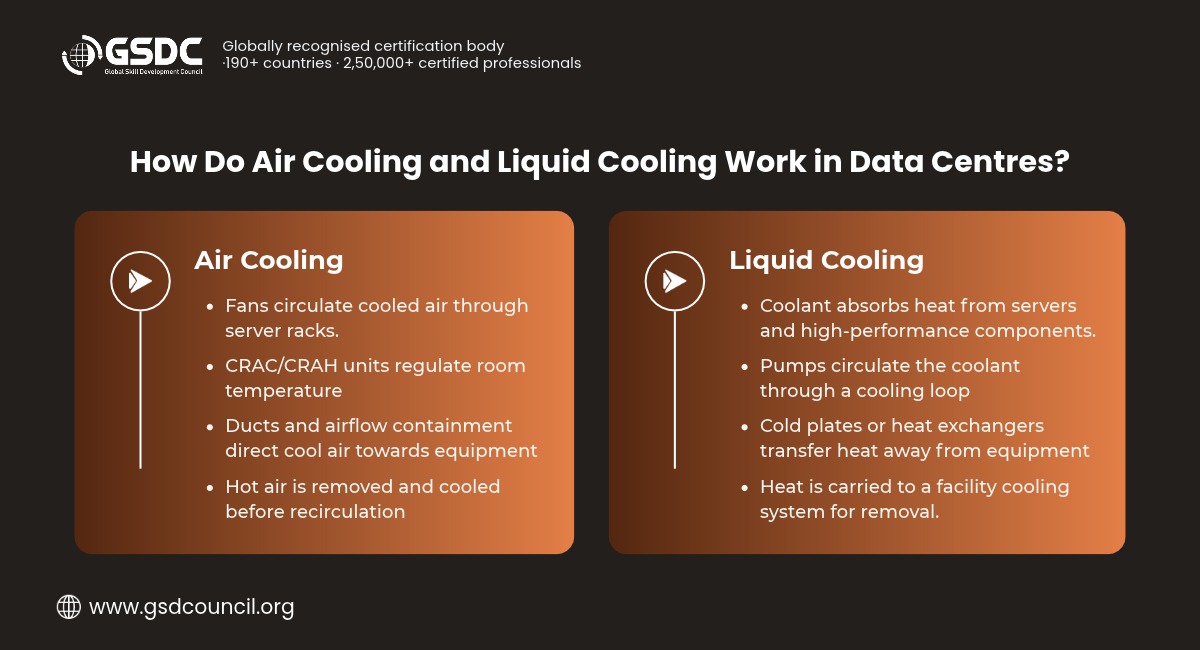
Air cooling uses fans and cooling units to circulate conditioned air through server racks. As the air passes over components such as processors and memory modules, it absorbs heat and carries it towards the cooling system for removal.
Liquid cooling uses a circulating fluid to absorb heat from processors, server equipment, or other components. The heated fluid then passes through a heat exchanger, where the heat is transferred to another cooling circuit or removed by the facility's heat rejection system.
Liquid cooling can manage concentrated heat more effectively in many high-density environments because liquids can transfer larger amounts of heat within compact systems. Air cooling, however, remains suitable for a wide range of enterprise workloads and does not require the additional liquid infrastructure used by specialised cooling systems.
| Factor | Air Cooling | Liquid Cooling |
| Heat removal | Uses airflow to carry heat away from servers | Uses liquid to collect and transfer heat |
| High rack power density | Can become difficult to manage as heat loads increase | Better suited to concentrated heat loads |
| Infrastructure | CRAC/CRAH units, fans, ducts, and airflow containment | Cold plates or immersion tanks, pumps, CDUs, and piping |
| Hardware compatibility | Supported by most conventional servers | Depends on the cooling method and server design |
| Maintenance | Requires attention to filters, fans, cooling units, and airflow | Requires coolant management, pump maintenance, connection checks, and leak detection |
| Retrofitting | Often easier to introduce in existing facilities | May require changes to facility infrastructure |
| Common applications | Conventional enterprise workloads | High-density AI and high-performance computing workloads |
The choice depends largely on the amount of heat generated by the IT equipment and the capacity of the existing cooling infrastructure. Liquid cooling is generally more suitable when high rack power densities place demands on the cooling system that conventional airflow cannot manage efficiently. It is not necessarily the right choice for every server or data centre.
Why High-Density Data Centres Are Moving Towards Liquid Cooling
The growing use of GPUs and AI accelerators is changing the thermal requirements of data centres. Traditional enterprise workloads are often distributed across several servers, whereas AI training and high-performance computing can involve multiple high-power processors operating within a single rack.
As IT power consumption increases, the amount of heat that must be removed also rises. The cooling system must therefore handle higher thermal loads without allowing equipment temperatures to exceed their operating limits.
Conventional air cooling can face three major challenges in these environments:
- Limited airflow capacity: Moving sufficient air through densely populated server racks becomes increasingly difficult as rack power density rises.
- Localised hotspots: High-performance processors generate concentrated heat. If airflow is not distributed properly, certain components may become significantly hotter than others.
- Higher cooling requirements: Increased airflow demands can require more fan power and greater cooling capacity, adding to the facility's energy consumption.
Liquid cooling addresses these challenges by collecting heat closer to the components that generate it. Instead of relying entirely on air moving through the server, the system uses a circulating fluid to transfer heat away from high-power components.
This makes liquid cooling particularly relevant to AI infrastructure, where several high-performance processors may operate continuously within a limited rack space.
Types of Liquid Cooling Used in Data Centres
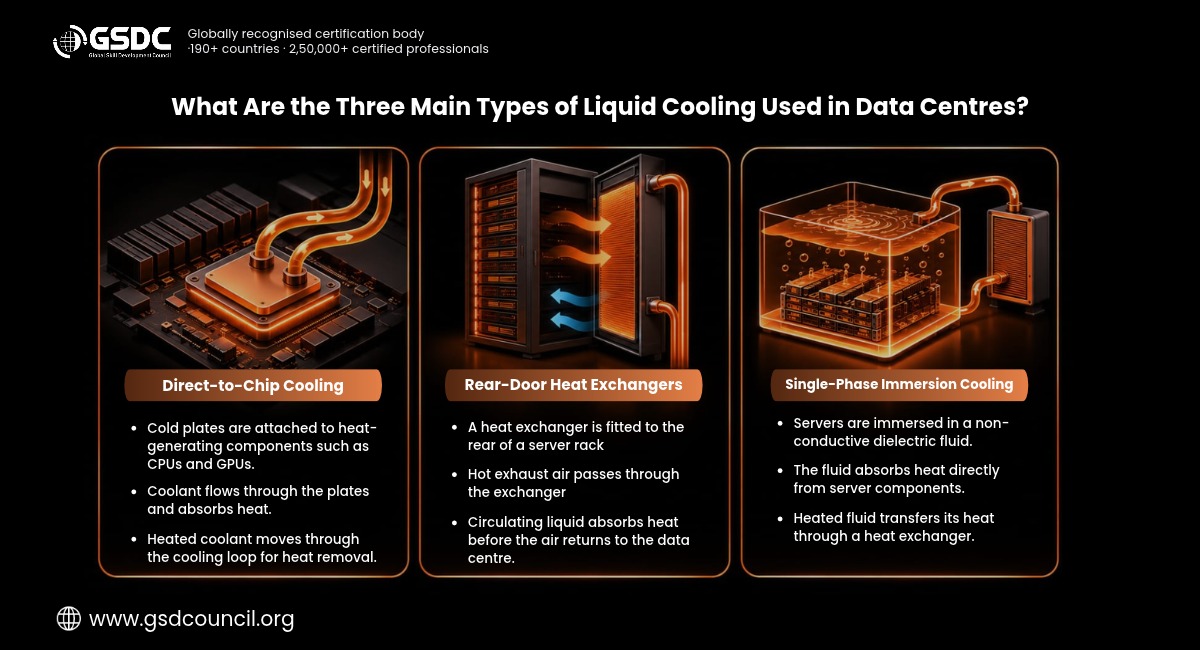
Liquid cooling is not a single technology. Different systems use different methods to collect and transfer heat, depending on the server design, workload, and cooling requirements of the facility.
1. Direct-to-Chip Liquid Cooling
Direct-to-chip liquid cooling uses cold plates installed on components such as CPUs and GPUs. Coolant flows through these plates, absorbs heat from the processors, and carries it to a cooling distribution unit (CDU).
A typical system includes:
- Cold plates fitted to high-power processors.
- Coolant pipes and distribution manifolds.
- Pumps that maintain coolant circulation.
- CDUs that manage heat transfer between the IT cooling loop and the facility cooling system.
This method is particularly useful for GPU-intensive servers because it removes heat directly from the components that produce it. However, components not connected to the liquid cooling loop may still require conventional airflow.
2. Rear-Door Heat Exchangers
Rear-door heat exchangers are fitted to the back of server racks. Hot air discharged by the servers passes through the heat exchanger, where a liquid circuit absorbs the heat before the air returns to the data centre room.
This arrangement can help existing facilities manage higher rack densities without requiring every server to be redesigned for direct liquid cooling.
The servers continue to use internal fans to move air across their components. The heat exchanger then removes heat from the exhaust air. For this reason, rear-door systems are often used in environments that combine conventional air cooling with liquid-based heat removal.
3. Single-Phase Immersion Cooling
Single-phase immersion cooling involves placing IT equipment inside a tank filled with a specialised dielectric fluid. The fluid absorbs heat from the equipment while remaining in liquid form. It then circulates through a heat exchanger, where the collected heat is transferred away.
Unlike direct-to-chip cooling, immersion cooling brings the fluid into contact with a much larger portion of the IT equipment.
This approach can support specialised high-density computing environments. However, it requires compatible hardware, dedicated tanks, fluid management procedures, and maintenance practices suited to immersion systems.
Does Liquid Cooling Always Use Less Energy and Water?
Liquid cooling can reduce the need for high-volume airflow and may lower some cooling-related energy consumption. However, the complete system also requires pumps, cooling distribution units, and heat rejection equipment. These components consume energy and must be included when assessing overall efficiency.
Water consumption also depends on the facility's cooling arrangement. A closed liquid cooling loop does not automatically mean that the data centre uses no water. For example, if the facility relies on cooling towers to reject heat, water may still be consumed through evaporation.
A proper assessment should consider the following measurements and operating requirements:
- Power Usage Effectiveness (PUE): Measures the total energy consumed by the data centre in relation to the energy used by IT equipment.
- Water Usage Effectiveness (WUE): Measures data centre water consumption in relation to IT equipment energy use.
- Cooling energy: Includes the electricity consumed by fans, pumps, chillers, and other cooling equipment.
- Heat rejection capacity: Determines how effectively the facility can transfer heat from its cooling systems to the external environment.
A cooling system may reduce electricity consumption while having different water requirements. Data centre operators should evaluate both factors, along with operating costs and cooling performance, before selecting a technology.
When Should a Data Centre Choose Air Cooling or Liquid Cooling?
The choice between air and liquid cooling should be based on rack power density, workload characteristics, and the capacity of the existing infrastructure. A technology that works well in one facility may not be suitable for another.
Air cooling is generally suitable when:
- The facility supports conventional enterprise applications.
- Rack power density remains within the capacity of the existing cooling system.
- Airflow management and containment are working effectively.
- The installed servers are designed for conventional air cooling.
- Introducing liquid cooling would add infrastructure costs without providing a meaningful operational benefit.
Liquid cooling is worth considering when:
- GPU-intensive workloads generate concentrated heat.
- Rack power density is approaching or exceeding the practical capacity of the existing airflow system.
- The facility supports high-performance computing applications.
- New AI infrastructure is being planned.
- The organisation needs to increase computing capacity within limited floor space.
A hybrid cooling approach is suitable when:
- Only selected racks have high cooling requirements.
- Conventional servers and AI servers operate within the same facility.
- The organisation plans to upgrade cooling infrastructure in stages.
- High-power processors require liquid cooling while other server components continue to use airflow.
For many existing data centres, a hybrid arrangement offers a practical way to support new workloads while retaining the existing air cooling infrastructure where it remains effective.
Practical Example: Upgrading an Existing Data Centre for AI Workloads
Consider an enterprise data centre that uses air cooling for its application servers, storage systems, and databases. The organisation plans to introduce GPU servers to support new AI workloads.
The existing cooling system may be sufficient for the current IT load, but the additional GPU racks could create localised hotspots because of their higher power density. Simply increasing the overall room cooling capacity may not address the heat generated within these specific racks.
The operator should first assess the existing infrastructure and identify where additional cooling is required.
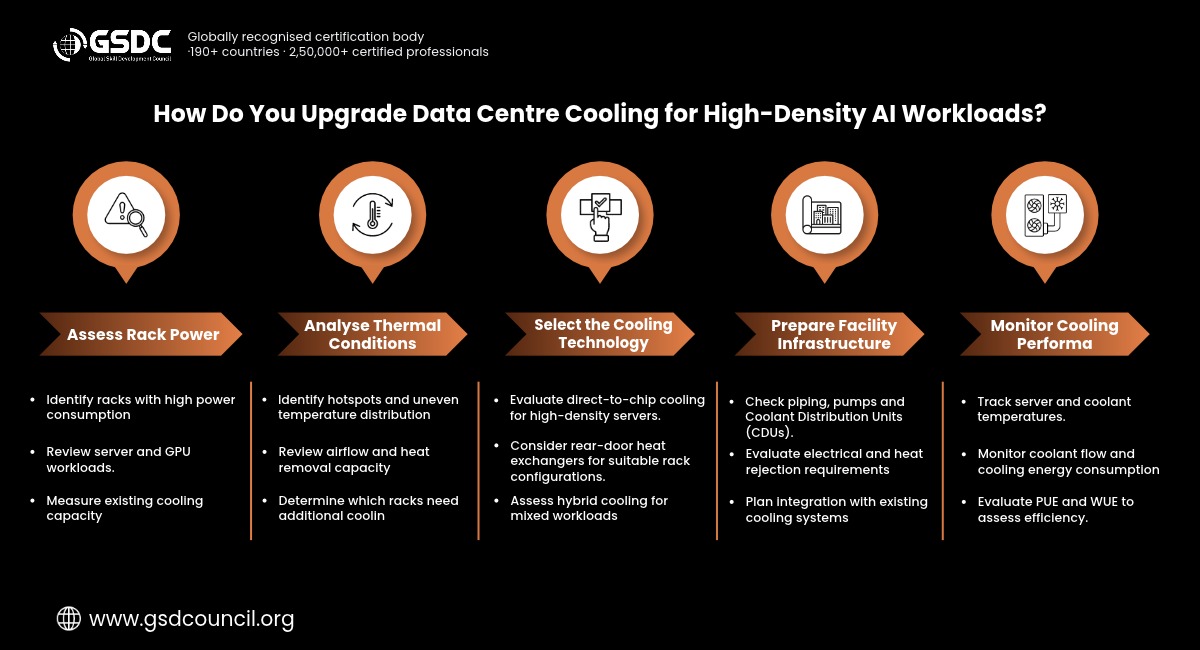
The assessment can include the following steps:
- Assess rack-level power consumption: Calculate the current and expected power requirements of individual racks, including the planned GPU servers.
- Review thermal conditions: Examine server inlet temperatures, airflow patterns, and the cooling capacity available in different areas of the facility.
- Identify high-density racks: Determine which racks are likely to exceed the practical capacity of the existing air cooling arrangement.
- Evaluate liquid cooling options: Compare direct-to-chip cooling and rear-door heat exchangers based on server compatibility and heat removal requirements.
- Check facility readiness: Assess whether the facility can support additional piping, pumps, CDUs, electrical loads, and heat rejection equipment.
- Monitor system performance: After deployment, track equipment temperatures, coolant flow, cooling energy consumption, and overall system performance.
This approach allows the facility to retain air cooling for conventional workloads and introduce liquid cooling only where the additional thermal capacity is needed.
What Should Data Centre Professionals Evaluate Before Choosing a Cooling System?
Selecting a cooling system involves more than comparing the heat removal capacity of different technologies. Data centre professionals must also consider the effect of the system on existing infrastructure, daily operations, and future expansion.
The following factors should be evaluated before making an investment:
- Rack power density: What is the current power consumption of each rack, and how is it expected to change as new equipment is introduced?
- Workload requirements: Will the facility support conventional applications, AI training, AI inference, or high-performance computing?
- Hardware compatibility: Are the installed servers designed to support direct-to-chip or immersion cooling?
- Cooling infrastructure: Can the facility accommodate the additional piping, pumps, CDUs, and heat exchangers required?
- Energy and water consumption: How will the proposed system affect PUE, WUE, and overall operating costs?
- Maintenance requirements: Does the operations team have the procedures and technical knowledge needed to maintain the cooling equipment?
- Future expansion: Can the proposed design support higher rack densities and changes in server technology?
Evaluating these factors helps organisations select a cooling arrangement that meets current requirements without creating unnecessary limitations as computing workloads expand.
Develop Your Data Centre Knowledge with GSDC Certification
Managing data centre cooling requires an understanding of more than temperature control. Professionals must also consider power distribution, capacity planning, redundancy, infrastructure efficiency, and the operational requirements of different IT environments.
The GSDC Data Centre Professional Certification is designed for professionals who want to develop their knowledge of data centre infrastructure and operations.

Through this certification, professionals can build knowledge of:
- Data centre infrastructure, components, and operational practices.
- Power distribution, cooling systems, and environmental controls.
- Capacity planning, redundancy, and infrastructure management.
- Data centre efficiency, maintenance, and operational requirements.
Explore the GSDC Data Centre Professional Certification
Conclusion
Air cooling and liquid cooling serve different requirements within modern data centre infrastructure. Air cooling remains effective for many conventional enterprise workloads, while liquid cooling provides a more direct method of removing heat from high-power equipment.
The increasing use of AI servers, GPUs, and high-performance computing is making liquid cooling an important consideration for facilities with high rack power densities. However, replacing air cooling across an entire data centre may not be necessary or cost-effective.
A combination of both technologies can often provide a more practical solution. Air cooling can continue to support conventional equipment, while liquid cooling can be introduced in areas where higher thermal loads require additional capacity.
The selection should ultimately be guided by the facility's workload, power density, cooling capacity, operating costs, and plans for future expansion.

Related Certifications
Frequently Asked Questions
Liquid cooling is generally better suited to high-density racks because it can collect and transfer concentrated heat more directly. Air cooling remains suitable for lower-density workloads where the existing airflow and cooling capacity are sufficient.
Not every AI data centre requires liquid cooling. The requirement depends on the type of AI workload, server configuration, and rack power density. However, GPU-intensive workloads can generate enough concentrated heat to make liquid cooling a more practical option than conventional airflow alone.
Yes. A hybrid cooling arrangement uses both technologies within the same facility. For example, high-power processors may use direct-to-chip liquid cooling, while other server components continue to rely on airflow.
Liquid cooling may reduce certain cooling-related energy costs, but the overall financial benefit depends on equipment costs, pumping requirements, heat rejection, maintenance, and water consumption. Organisations should assess the total cost of installation and operation before choosing a system.
Yes. An existing facility can introduce liquid cooling for selected racks instead of replacing its entire cooling system. Before deployment, operators should assess server compatibility, piping requirements, CDUs, heat exchangers, electrical capacity, and maintenance arrangements.
Stay up-to-date with the latest news, trends, and resources in GSDC
If you like this read then make sure to check out our previous blogs: Cracking Onboarding Challenges: Fresher Success Unveiled
Not sure which certification to pursue? Our advisors will help you decide!