Design Thinking for AI Agents: Designing Workflows Humans Actually Trust
Written by Emily Hilton
- Why Design Thinking Matters When Building AI Agents
- Applying Human-Centred AI Principles to Agent Design
- Five AI Agent Design Patterns That Support Human Trust
- Designing AI Workflows Around Different Autonomy Levels
- AI Agent Best Practices for Building Trust
- Developing Human-Centred AI Design Skills
- Conclusion
Imagine asking an AI agent to manage customer support requests, process business documents, or coordinate tasks across multiple applications. It completes the work, makes decisions, and moves from one step to another without requiring constant instructions. Sounds useful, right? But what happens when it makes the wrong decision, misunderstands a request, or takes an action that affects a customer?
This is where trust becomes important.
As businesses move beyond basic chatbots and introduce autonomous AI agents into everyday operations, the focus is shifting from what these systems can do to whether people can confidently work with them. An AI agent may be technically capable of completing a task, but that does not automatically make its decisions reliable, understandable, or acceptable to users.
This is why design thinking matters in agent development. Rather than focusing only on automation and technical performance, teams need to understand human expectations, identify potential risks, and design workflows that keep people informed and in control.
A well-designed AI agent workflow should not simply automate tasks. It should create an experience where humans understand what the agent is doing, know when to intervene, and feel confident about the outcomes.
Why Design Thinking Matters When Building AI Agents
Traditional software applications generally follow predefined instructions. Users provide input, the system processes it, and a predictable output is generated.
AI agents work differently. Depending on their capabilities, they can interpret instructions, plan tasks, use external tools, retrieve information, and make decisions based on changing conditions.
For example, consider an AI agent designed to manage customer support operations. It might:
- Read incoming customer messages.
- Identify the customer's issue.
- Retrieve relevant information from company databases.
- Recommend a solution.
- Update a support ticket.
- Escalate complex requests to a human employee.
Although this sounds efficient, each step introduces potential challenges. The agent might retrieve incorrect information, misunderstand the customer's problem, or close a ticket without resolving the issue.
A purely technical approach may focus on improving response accuracy or execution speed. However, a human-centred AI approach asks additional questions:
- Does the employee understand why the agent recommended a particular action?
- Can the employee review or correct its decisions?
- Does the customer know when they are interacting with an AI system?
- What happens when the agent encounters an unfamiliar situation?
- Who is responsible when an automated action causes a problem?
Design thinking helps teams address these questions before deploying AI agents into real-world environments.
Applying Human-Centred AI Principles to Agent Design
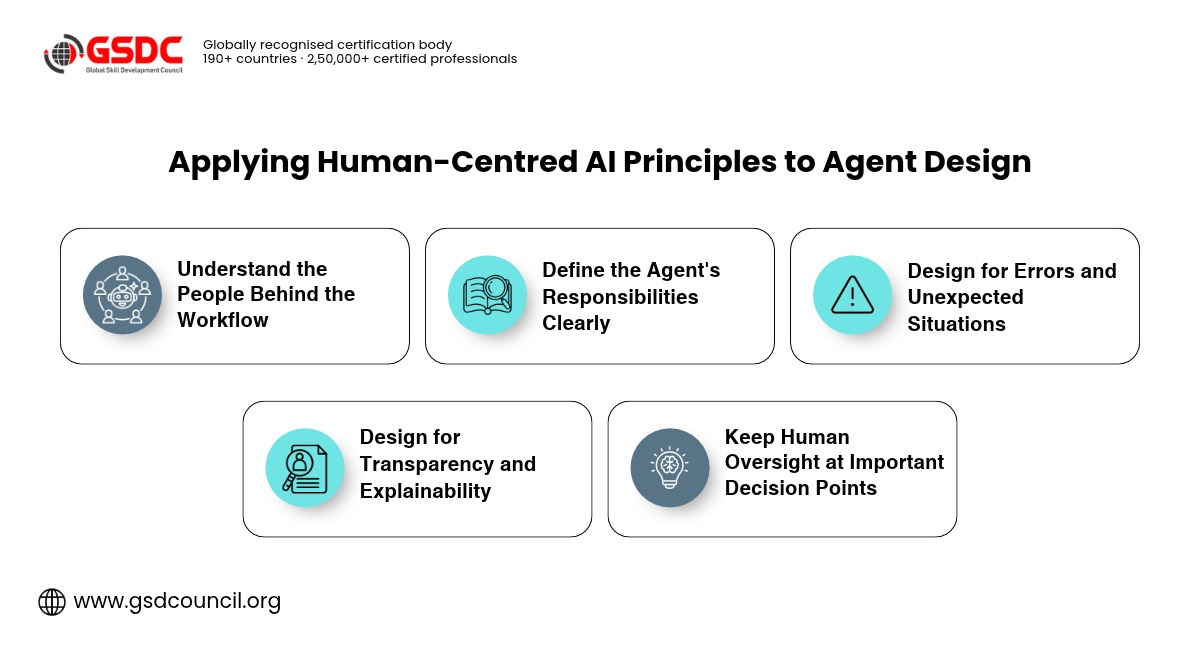
Human-centered AI focuses on developing AI systems that support human needs, values, capabilities, and decision-making.
Instead of treating users as passive recipients of AI-generated outcomes, this approach considers their expectations and involvement throughout the design process.
When designing AI agents, five principles are particularly important.
1. Understand the People Behind the Workflow
Before building an AI agent, understand its users, their needs, and the problems they want to solve. For example, a sales team may use an agent to research customers and update CRM records but require approval before sending offers or changing important information. Interviews and user journey mapping help identify these expectations.
2. Define the Agent's Responsibilities Clearly
Every AI agent needs a clear purpose, scope, and set of responsibilities. For example, a recruitment agent can organise applications and schedule interviews, while final hiring decisions should remain under human control. Clear boundaries make agent behaviour more predictable and trustworthy.
3. Design for Transparency and Explainability
Users should understand an agent's important actions, recommendations, and limitations. For example, a customer support agent should explain why it prioritises a particular ticket. Clear notifications, explanations, and supporting information help build trust.
4. Keep Human Oversight at Important Decision Points
AI agents can handle routine tasks independently, but sensitive decisions may require human approval. For example, an invoice-processing agent can verify details automatically while requiring approval for payments above a defined financial threshold.
5. Design for Errors and Unexpected Situations
AI agents should be prepared to handle incorrect results, missing information, and system failures. For example, if an agent cannot verify a customer's identity, it should stop the process and transfer the request to an authorised support representative.
Understanding AI Agent Workflow Design
An AI agent workflow describes how an agent receives instructions, processes information, makes decisions, interacts with tools, and completes tasks.
Unlike a traditional automated workflow, an AI agent workflow may involve dynamic decisions based on the information available at each stage.
For example, a customer onboarding agent might follow this sequence:
- Receive a new customer onboarding request.
- Collect the required customer information.
- Check whether the submitted details are complete.
- Retrieve relevant information from connected business systems.
- Identify missing documents or inconsistencies.
- Request additional information when necessary.
- Prepare the onboarding record.
- Submit the record for human approval when required.
- Notify the customer about the next steps.
This AI agent workflow combines automated activities with decision points and human intervention.
An effective design should clearly define what happens at each stage, what information the agent needs, which tools it can access, and when it should stop or request assistance.
Five AI Agent Design Patterns That Support Human Trust
Different business requirements call for different agent structures. Choosing the right AI agent design patterns helps teams create workflows that are easier to manage, monitor, and improve.
1. Human-in-the-Loop Pattern
In this pattern, the AI agent performs routine tasks but requests human approval before taking important actions.
For example, an AI purchasing agent may compare suppliers, prepare purchase recommendations, and generate orders. However, a procurement manager approves the final purchase.
This pattern is useful when decisions involve financial, operational, or reputational risks.
2. Planner-Executor Pattern
The agent first creates a plan and then executes the individual tasks.
For example, a travel management agent may receive a request to organise a business trip. It can break the task into activities such as comparing flights, checking hotel availability, estimating costs, and preparing an itinerary.
The user can review the proposed plan before the agent proceeds with bookings.
This pattern improves visibility into what the agent intends to do.
3. Supervisor-Agent Pattern
A primary agent coordinates specialised agents responsible for different activities.
For example, an e-commerce workflow may involve one agent researching products, another checking inventory, and another preparing customer recommendations.
A supervisor agent coordinates their outputs and checks whether the overall task has been completed.
This pattern is useful for complex workflows, but teams should establish clear responsibilities and communication rules to prevent conflicting actions.
4. Retrieval-Augmented Generation (RAG) Pattern
In this pattern, the agent retrieves relevant information from approved knowledge sources before generating a response.
For example, a company HR agent can retrieve information from official employee policies when answering questions about leave entitlements.
This reduces dependence on general model knowledge and helps users verify the information through relevant documents.
However, retrieved information must still be checked for accuracy, relevance, and freshness.
5. Escalation Pattern
The agent handles requests within its capabilities and transfers complex or uncertain situations to a human.
For example, a customer service agent may independently answer questions about delivery status but escalate complaints involving refunds, disputes, or unusual circumstances.
This pattern prevents the agent from attempting to solve problems it cannot reliably handle.
Designing AI Workflows Around Different Autonomy Levels
One of the most important decisions when designing AI agents is determining how much independence they should have.
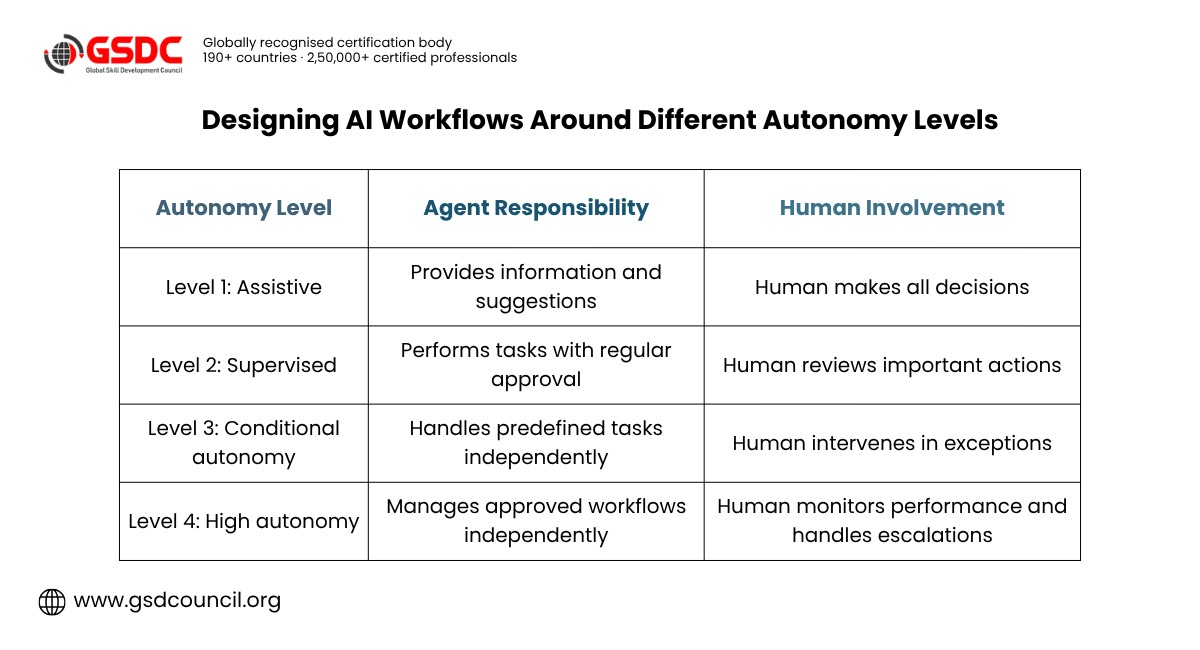
AI autonomy levels help teams establish the extent to which an agent can operate without human involvement.
A practical way to approach this is through four levels:
Autonomy Level | Agent Responsibility | Human Involvement |
Level 1: Assistive | Provides information and suggestions | Human makes all decisions |
Level 2: Supervised | Performs tasks with regular approval | Human reviews important actions |
Level 3: Conditional autonomy | Handles predefined tasks independently | Human intervenes in exceptions |
Level 4: High autonomy | Manages approved workflows independently | Human monitors performance and handles escalations |
These levels are a practical design framework rather than a universal industry standard.
For example, an AI email assistant may operate at Level 1 when drafting messages, while an internal scheduling agent may work at Level 3 when managing routine calendar updates.
The appropriate autonomy level depends on the task's complexity, potential consequences, available safeguards, and organisational requirements.
A common mistake is giving agents more independence simply because they can technically perform additional actions. Autonomy should increase only when the system demonstrates sufficient reliability and appropriate controls are in place.
AI Agent Best Practices for Building Trust
Creating a reliable agent requires more than selecting an AI model and connecting it to business applications. Teams need to establish practical design and governance principles.
Some important AI agent best practices include:
Start with a specific use case: Avoid building agents with broad responsibilities initially. Begin with a clearly defined workflow that addresses a measurable business problem.
Set permission boundaries: Give agents access only to the information and tools required for their assigned responsibilities.
Make important actions visible: Users should be able to understand what the agent has done, what it plans to do, and whether an action requires approval.
Provide clear escalation options: Agents should recognise when they lack sufficient information or encounter situations outside their capabilities.
Test with realistic scenarios: Evaluate normal tasks, incomplete requests, unexpected inputs, and potential failure conditions before deployment.
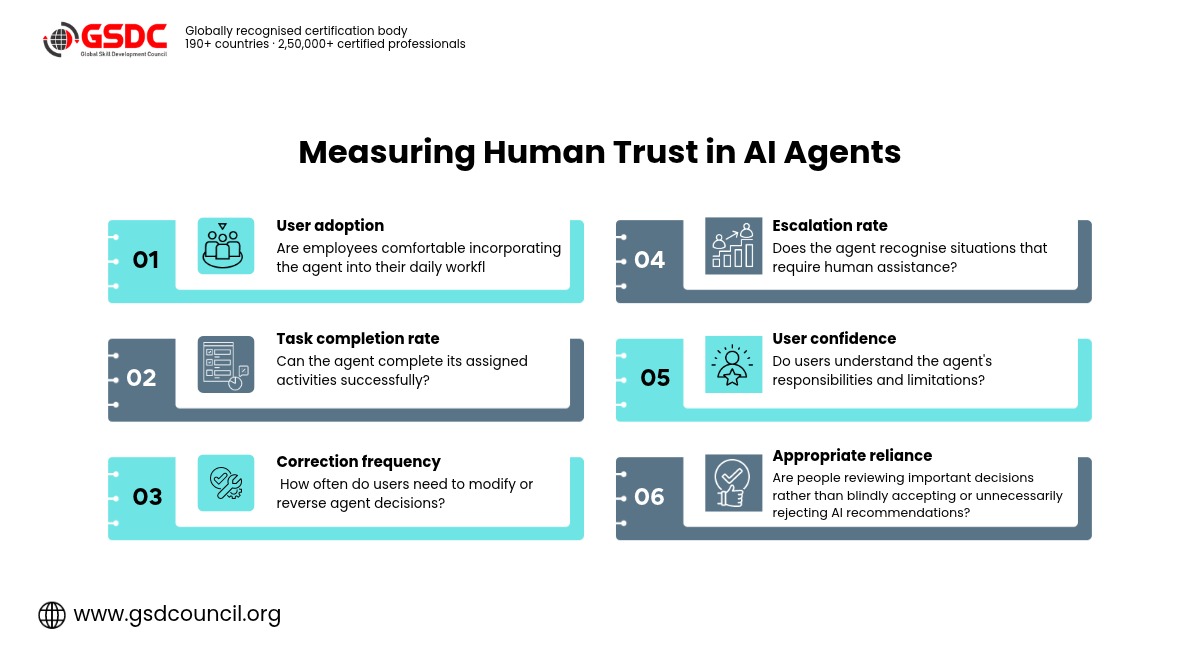
Monitor performance continuously: Track task completion, error rates, escalation frequency, user satisfaction, and other relevant performance indicators.
Protect user information: Apply appropriate access controls, data protection measures, and privacy requirements throughout the workflow.
These practices help organisations move towards more dependable agentic workflow design without sacrificing human oversight.
Developing Human-Centred AI Design Skills
As organisations adopt autonomous systems, professionals need to understand AI capabilities and human-centred problem-solving. Designing effective AI workflows requires understanding user needs, identifying risks, and building trust.
GSDC's Design Thinking Certification helps professionals develop skills in user research, problem definition, ideation, prototyping, and testing. These skills support the creation of AI-powered solutions that are practical, user-friendly, and trustworthy.

Design Thinking Certification also helps professionals apply structured design approaches to real-world business challenges. It can benefit product managers, UX designers, business analysts, and AI professionals looking to improve user experiences and design solutions that align with organisational goals.
Conclusion
The future of AI agents will not depend only on how independently they can operate. It will also depend on how effectively they collaborate with people.
A powerful agent that makes decisions without transparency, ignores user expectations, or lacks appropriate safeguards can create more problems than it solves. In contrast, an agent designed around human needs can improve productivity while keeping important decisions understandable and manageable.
Design thinking provides a practical foundation for achieving this balance. By understanding users, defining responsibilities, selecting appropriate AI agent design patterns, and establishing clear autonomy levels, organisations can create workflows that support both automation and human judgement.
Ultimately, successful AI agent design is not about removing humans from workflows. It is about creating systems that know when to act independently, when to ask for help, and how to earn human trust through consistent and responsible behaviour.

Related Certifications
Stay up-to-date with the latest news, trends, and resources in GSDC
If you like this read then make sure to check out our previous blogs: Cracking Onboarding Challenges: Fresher Success Unveiled
Not sure which certification to pursue? Our advisors will help you decide!