Atlassian Rovo for PMs: Your AI Copilot for Faster, Smarter Delivery
Written by Matthew Hale
- What Is Atlassian Rovo?
- Why Atlassian Rovo Matters for PMs Today
- Rovo vs. Atlassian Intelligence: What’s the Difference?
- Rovo’s Three Core Powers: Discover, Learn, Act
- Prebuilt Rovo Agents You Can Use Today
- Real Examples: How Project Managers Use Rovo
- How to Build a Custom Rovo Agent
- Key Benefits of Using Atlassian Rovo
- Who Can Use Rovo?
- Building Future-Ready PM Skills With Modern AI Tools
- Conclusion: The Future of Project Management Starts Now
- FAQs
What if an AI copilot could support your project delivery without forcing you to change the way you work?
What if it could understand your Jira issues, summarize long documents, highlight risks, and answer questions instantly?
That’s exactly what Atlassian Rovo brings to project teams.
Rovo works inside tools you already use-Jira and Confluence-acting like an intelligent teammate that helps you work smarter, not harder. During the GSDC Studio: AI Implementation Series, one message stood out clearly: AI becomes most valuable when it blends seamlessly into your workflow. Rovo is the perfect example of AI in project management done right
What Is Atlassian Rovo?
Atlassian Rovo is an AI-powered assistant designed to streamline work across Jira, Confluence, and connected apps. It behaves like a teammate who instantly understands your project context and helps accelerate delivery.
Rovo enables:
- Knowledge discovery across Jira issues, Confluence pages, and documents
- Clear summaries that simplify requirements documentation
- Recommendations for planning and organizing work
- Faster writing, sorting, prioritization, and issue refinement
- Real-time updates that support decision-making and transparency
And with rovo chat, you simply ask questions like you would ask a coworker-no JQL expertise, no setup, no learning curve.
Why Atlassian Rovo Matters for PMs Today
Project managers juggle multiple responsibilities:
- Project tracking across teams
- Early risk identification
- Stakeholder updates
- Backlog refinement
- Meeting notes & documentation
- Release planning and coordination
Rovo reduces this manual workload by helping you:
- Get instant answers with rovo search
- Act on tasks without digging through tickets
- Improve cross-team collaboration through shared insights
- Speed up planning with smart automation
With Rovo, work that normally takes hours can be completed in seconds.
Rovo vs. Atlassian Intelligence: What’s the Difference?
Here's a simple side-by-side comparison to make the difference even clearer:
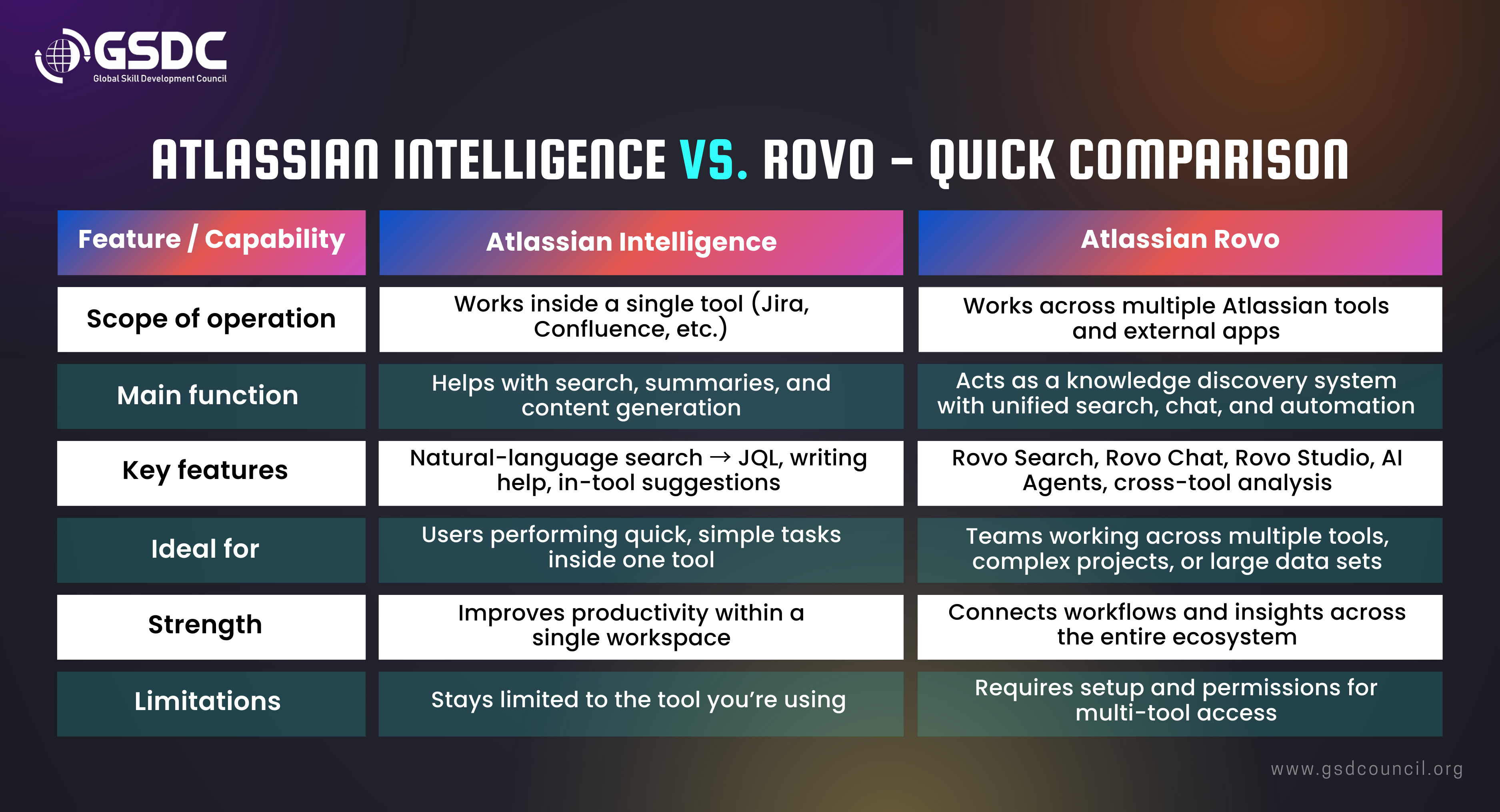
In short, Atlassian Intelligence helps within a tool-while Rovo connects everything together, making it far more valuable for project managers.
Rovo’s Three Core Powers: Discover, Learn, Act
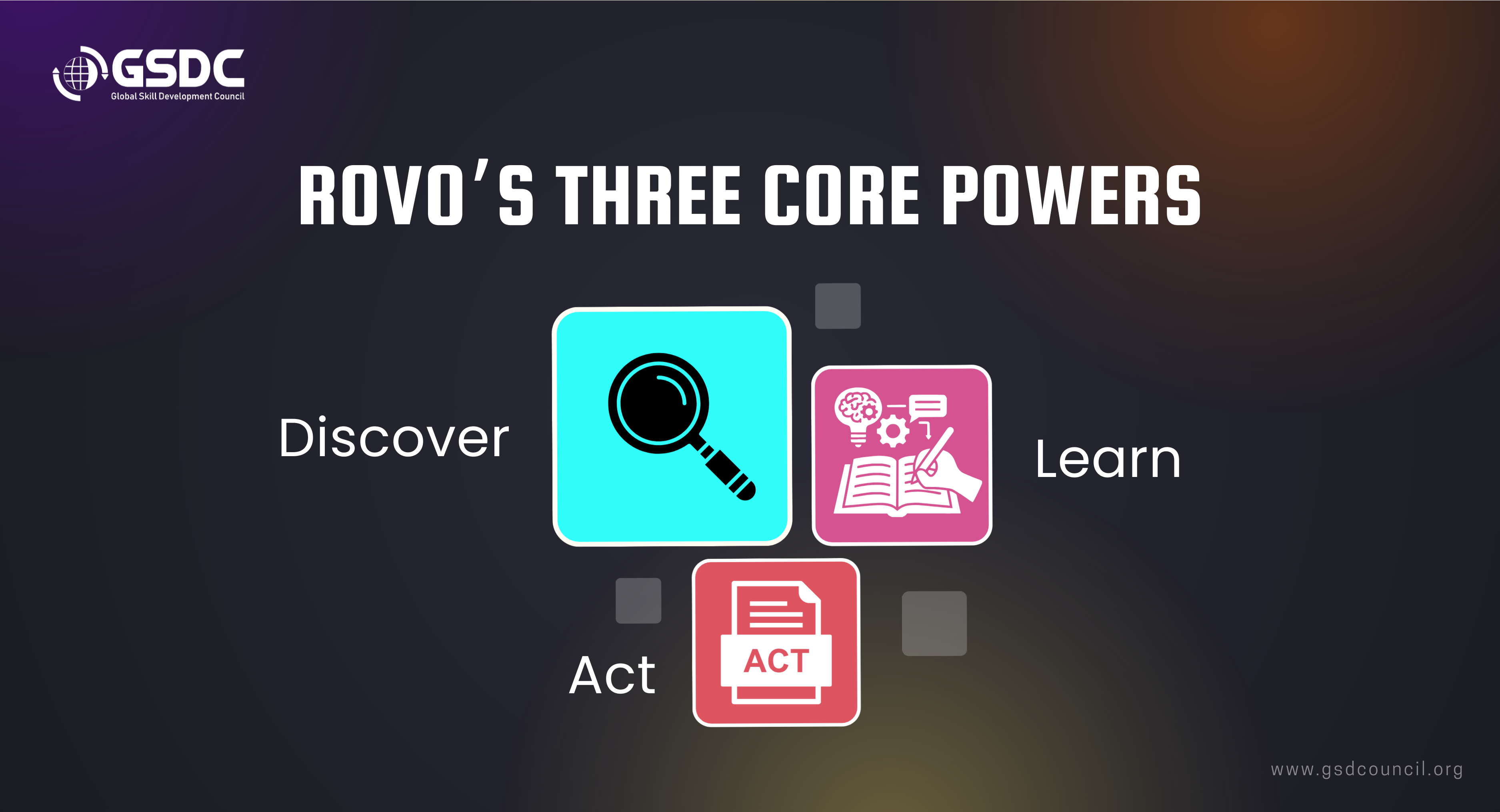
Rovo is built around three key capabilities that make it truly effective for project managers:
1. Discover: Quickly find any information across Jira, Confluence, and connected apps-no searching, no filters, no dashboards.
Perfect for knowledge discovery and fast context switching.
2. Learn: Identify patterns, summarize large documents, highlight blockers, and surface risks or dependencies automatically.
3. Act: Generate content, update issues, refine requirements, and even create release notes or summaries with simple prompts.
Together, these three powers turn Rovo into a complete AI workflow assistant for faster, smarter project delivery.Prebuilt Rovo Agents You Can Use Today
Rovo comes with ready-made AI agents that automate common project and product management tasks inside Jira, Confluence, and connected tools.
Below are some of the most useful agents available today:
-
Planning & Documentation Agents
- Product Requirements Guide: Helps create or review PRDs so teams can establish clear requirements faster.
- Release Notes Drafter: Generates clean, structured release notes using Jira work items - ideal for stakeholder communication.
- Comms Crafter: Drafts internal updates, summaries, and announcement-style messages.
- Social Media Writer 1: Helps teams draft posts or updates for internal or external communication channels.
Tracking & Progress Agents
- Progress Tracker: Provides an overview of project or release status by pulling information directly from Jira.
- Work Item Planner: Breaks down epics or larger work items into smaller, actionable tasks.
- Work Item Organizer: Organizes your backlog based on scope, priority, or themes.
Quality & Readiness Agents
- Readiness Checker: Checks whether an issue meets the team’s “Definition of Ready” before sprint planning begins.
- Bug Report Assistant: Creates well-structured bug reports to help teams capture issues clearly and consistently.
Insight & Analysis Agents
- Jira Theme Analyzer: Identifies trends, patterns, or themes across large sets of Jira issues.
- Customer Insights: Summarizes customer feedback and converts it into actionable insights.
- Transcript Insights Reporter: Analyzes meeting transcripts and extracts decisions, risks, and next steps.
Productivity & Communication Agents
- Global Translator: Translates documentation or content into multiple languages for distributed teams.
- Decision Director: Helps structure decisions using frameworks like DACI.
- User Manual Writer: Supports creating onboarding guides, working style documents, and team norms.
Real Examples: How Project Managers Use Rovo
Here are simple, practical ways project managers use Rovo in daily work.
1. Query Jira Without Knowing JQL
Instead of writing filters, just ask:
“Show me all issues in progress in the MT project.”
Rovo converts your request into JQL and fetches the results.
Why it helps: Faster access to the right data, no query skills needed.
2. Summarize Long Confluence Documents
Have a long PRD or sprint plan?
Ask:
“Summarize the blockers and dependencies on this page.”
Rovo gives a clear summary in seconds.
Why it helps: Saves hours of reading and preparing notes.
3. Generate User Stories From a PRD
Upload or link a requirement document and say:
“Give me user stories based on this.”
Rovo produces stories, acceptance criteria, and key details.
Why it helps: Backlog creation becomes faster and more consistent.
4. Analyze Sprint or Release Progress
Ask:
“What progress was made this week?”
Rovo returns:
- Status
- Completed work
- Pending work
- Blockers
- Risks
Why it helps: You get a full update without opening multiple dashboards.
5. Build Custom Agents for Your Workflow
You can create agents that do exactly what your project needs.
Example: A Release Progress Tracker Agent that collects:
- Release status
- Blockers
- Risks
- Next steps
Why it helps: Weekly reporting becomes largely automated.
How to Build a Custom Rovo Agent
1. Create an Agent
Open Rovo Studio and choose either manual setup or AI-assisted setup. The AI option is great for beginners because it builds the base structure for you.
2. Describe What the Agent Should Do
Type a plain-language instruction such as:
“Create a release progress tracker that summarizes blockers, risks, and next steps.”
Rovo uses this to shape the agent’s purpose and behavior.
3. Add Conversation Starters
Include quick prompts like:
- “Show release status”
- “List blockers”
These guide users on what they can ask the agent.
4. Add Knowledge Sources
Connect the Jira projects, Confluence pages, or documents the agent should reference.
Better sources = more accurate outputs.
5. Activate & Test
Turn the agent on and try a few queries.
You can refine its prompts, sources, or behavior anytime.
Custom agents give PMs a simple way to automate reporting, analysis, and documentation without any coding or technical setup.
Key Benefits of Using Atlassian Rovo
- Find information instantly with unified search across Jira, Confluence, documents, and chats.
- Learn faster through summaries of pages, issues, meetings, and transcripts.
- Act quickly with AI agents that draft documents, organize work, and automate repetitive tasks.
- Works for every function - PMs, Scrum Masters, support, IT ops, product, and marketing teams.
- Improves cross-team alignment by pulling all project context into one place.
- Better decision-making with instant status, risk, and blocker summaries.
- Keeps documentation consistent using team templates and structured outputs.
Who Can Use Rovo?
- Project Managers: faster tracking, reporting, decision support.
- Scrum Masters: backlog refinement, sprint readiness, issue analysis.
- Program Managers: dependency insights and cross-team visibility.
- Product Managers: PRDs, user stories, release notes, customer insights.
- Engineering Managers: workload clarity and risk awareness.
- Business Analysts: requirement breakdowns and structured documentation.
- Leaders & Stakeholders: quick summaries without navigating Jira.
Building Future-Ready PM Skills With Modern AI Tools
AI is reshaping project management, and tools like Atlassian Rovo help PMs work faster and make smarter decisions.
But technology delivers the best results when paired with strong PM fundamentals.
That’s why many professionals upskill through global bodies like the Global Skill Development Council (GSDC), where programs such as Certified AI Tool Expert strengthen core delivery skills.
Combining solid fundamentals with AI tools like Rovo helps PMs become more efficient, adaptable, and future-ready.

Conclusion: The Future of Project Management Starts Now
AI isn’t here to replace PMs-it’s here to empower them.
Atlassian Rovo simplifies work that typically slows teams down-summaries, risk checks, project tracking, user story generation, and complex queries.
PMs who learn to work with an AI copilot like Rovo will lead modern delivery.
Rovo isn’t a future idea.
It’s already here-ready to make your work faster, clearer, and dramatically more efficient.
FAQs
1. Does Rovo provide metrics?
Rovo doesn't produce visual dashboards, but it gives clear text-based metrics summarizing progress, blockers, risks, and scope changes-ideal for quick interpretation during project management AI workflows.
2. Can we try Rovo for free?
Access to Rovo depends on your Atlassian Cloud plan and whether your organization admin has enabled AI features. Some workspaces may still be on a waitlist as Atlassian rolls out Rovo gradually, so availability varies by account.
3. Can Rovo show progress in graphs?
Rovo cannot create graphical charts or dashboards yet. However, it can explain exactly how to build them in Jira-suggesting widgets, filters, and JQL queries you should use for visual reporting.
4. Can Rovo generate reports on features or sprint progress?
Rovo can produce written summaries of sprint activity, feature updates, risks, and release progress. It analyzes Jira data and provides structured narratives, allowing PMs to create reports quickly without manual compilation.
5. Can Rovo extract user stories from documents?
Rovo can read PRDs, SRS documents, meeting notes, or requirement pages and convert them into user stories with acceptance criteria. This helps PMs accelerate backlog creation with consistent, well-formatted stories.

Related Certifications
Stay up-to-date with the latest news, trends, and resources in GSDC
If you like this read then make sure to check out our previous blogs: Cracking Onboarding Challenges: Fresher Success Unveiled
Not sure which certification to pursue? Our advisors will help you decide!