Cloud Computing Interview Questions and Answers: The Complete Guide
Written by Emily Hilton
If you've got a cloud interview coming up, you know the feeling. One recruiter wants you to explain IAM policies, the next asks for a whiteboard walkthrough of a disaster recovery plan, and somewhere in between someone asks you to define cloud computing services in a single sentence. It's a lot to hold in your head at once.
This guide pulls together the cloud computing interview questions candidates are actually being asked right now, with clear answers you can put in your own words. Employers today expect candidates to understand core concepts, security, and best practices, not just definitions. We've refreshed it with current market numbers, added a section on AI in cloud computing, and laid out a straightforward path for getting certified.
What Is Cloud Computing? A Quick Refresher
Almost every cloud interview opens with some version of "what is cloud computing?" It sounds basic, but how you answer it tells the interviewer a lot about how deeply you actually understand the subject.
In plain terms, cloud computing is the delivery of computing resources, servers, storage, databases, networking, and software, over the internet instead of through hardware you own and maintain. Rather than buying physical servers and running your own data center, you rent capacity from a provider and pay only for what you use.
Three groups are usually involved: end users, who consume the services without worrying about what's behind the scenes; business and cloud management teams, who are accountable for the data and services running on the cloud; and cloud service providers, who own and maintain the infrastructure.
A strong answer connects this back to the "why": cost savings, scalability, and speed. You're not managing physical machines, so you can scale up during a product launch and scale back down the week after, paying only for what you actually use.
Cloud Computing Services and Market Size: Why It Matters for Your Career
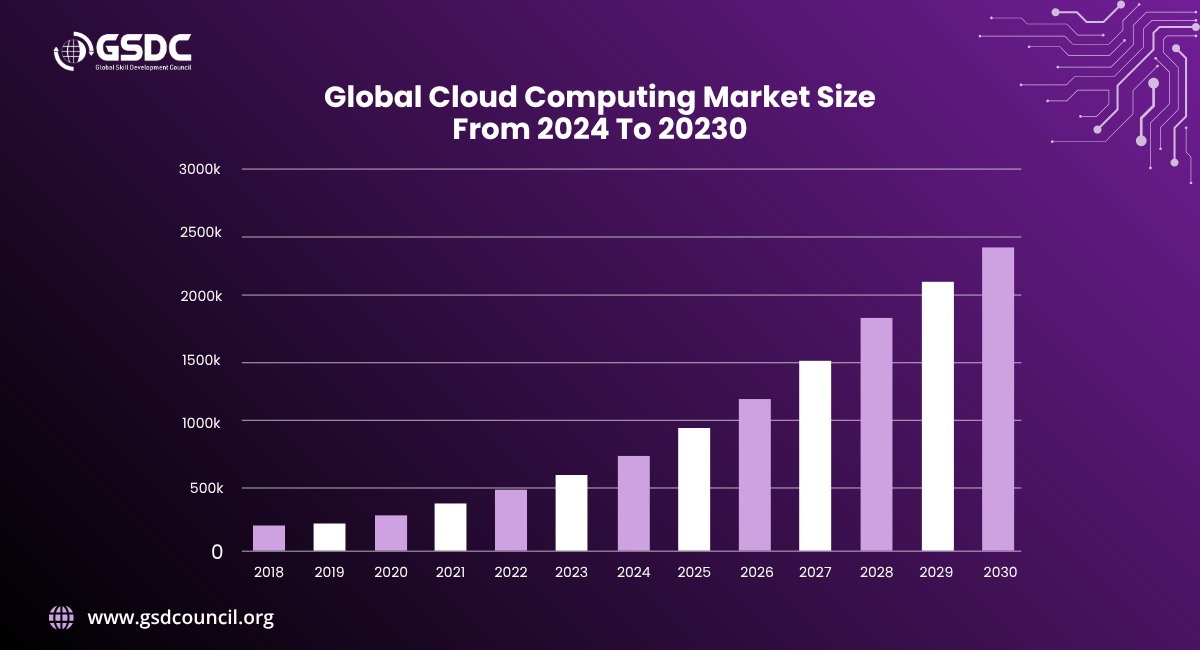
Numbers help make your case in an interview, especially if you're asked why you want to work in this field. According to Grand View Research, the global cloud computing market was valued at roughly $943.6 billion in 2025, with SaaS accounting for over half of total revenue. Gartner puts public cloud end user spending at about $723 billion for the year, up from around $596 billion the year before. This is not a slow moving niche, it's an industry hiring aggressively.
A few numbers worth having ready:
- SaaS leads by revenue share, though IaaS is growing fastest as companies shift AI workloads onto rented compute.
- Public cloud still leads deployment, but hybrid and multi-cloud adoption keeps climbing.
- North America remains the largest market, with Asia Pacific growing quickest.
- AWS, Microsoft Azure, and Google Cloud together control the majority of the global infrastructure-as-a-service market, so expect a question comparing them.
If an interviewer asks why cloud skills are worth investing in, you now have real data instead of a vague "it's the future" line.
What Is AI in Cloud Computing?
This question comes up constantly now, so it's worth having a genuine answer ready instead of a memorized definition.
AI in cloud computing refers to how artificial intelligence and machine learning capabilities are built into, or delivered through, cloud platforms. Instead of buying its own GPUs, a company rents compute power, pre-trained models, and machine learning tooling directly from providers like AWS, Microsoft Azure, or Google Cloud. This is a big reason cloud computing services have exploded in demand: AI workloads need massive, flexible compute that renting from the cloud is often the only practical option for.
A few things worth mentioning if this comes up:
- AI-powered operations - Providers now use machine learning to predict outages and flag anomalies before they become incidents.
- Generative AI services - Platforms like Amazon Bedrock, Google Vertex AI, and Azure OpenAI Service let businesses build on large language models without training one from scratch.
- Rising adoption and cost - AI is now used inside most cloud environments, and rising bills tied to AI workloads are part of why FinOps has become such an in-demand skill.
- Day-to-day impact - AI now helps write and review infrastructure-as-code, summarize logs, and flag misconfigurations, cutting down manual work.
Talk about AI in cloud computing as a practical shift in how infrastructure gets managed, not just a buzzword, and you'll stand out. It's worth pairing this with a solid grasp of cloud security, since AI workloads introduce new risk surfaces interviewers like to probe.
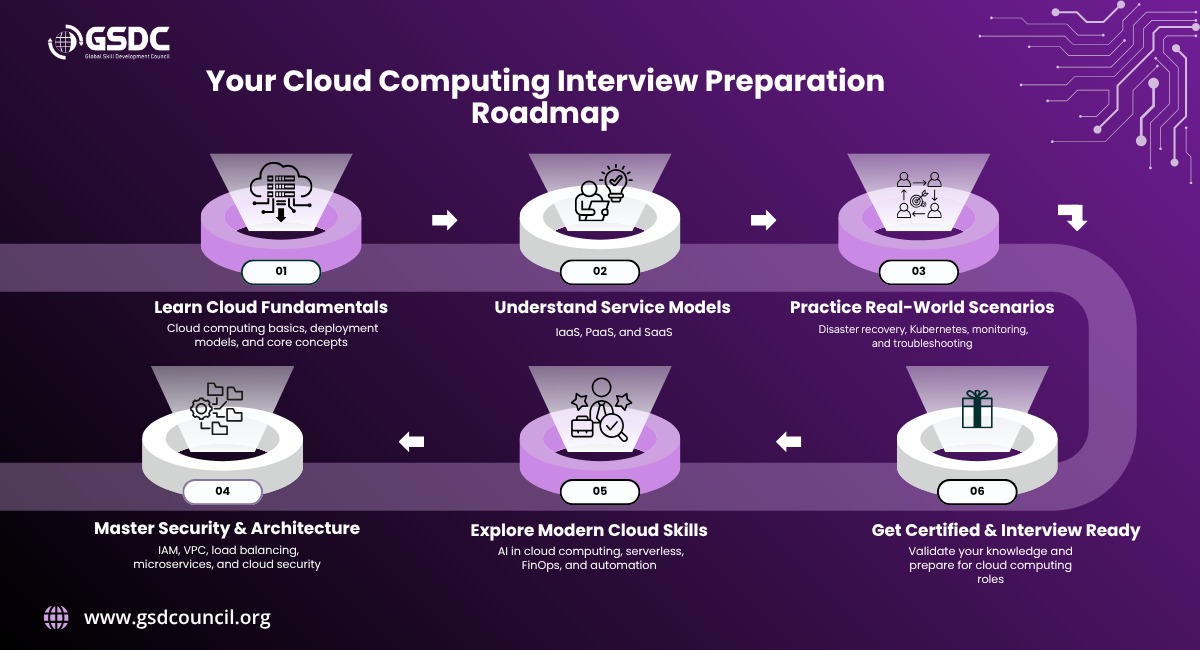
Cloud Computing Interview Questions and Answers
Here's the core list, grouped from foundational to advanced. Want more practice? Download our free PDF for additional intermediate and advanced level cloud computing interview questions and answers.
Foundational Questions
These are the fundamentals almost every cloud interview starts with, and they're also where GSDC's own certification training begins, so getting them right pays off twice.
1. What is cloud technology?
Cloud technology combines networks, hardware, storage, services, and interfaces to deliver computing as a service, removing the need for organizations to own and manage physical infrastructure themselves.
2. What are the three main service models in cloud computing?
Infrastructure as a Service, Platform as a Service, and Software as a Service.
3. What is Infrastructure as a Service, or IaaS?
IaaS gives you access to virtualized computing resources such as servers, storage, and networking, while you manage the operating system, applications, and configurations yourself. Examples include AWS EC2 and Google Compute Engine.
4. What is Platform as a Service, or PaaS?
PaaS gives developers a ready-made platform, complete with tools and frameworks, to build and deploy applications without worrying about the underlying servers or databases. Examples include Google App Engine and AWS Elastic Beanstalk.
5. What is Software as a Service, or SaaS?
SaaS delivers fully managed software over the internet on a subscription basis. Users interact only with the application itself, there's no infrastructure to manage. Google Workspace and Microsoft 365 are common examples.
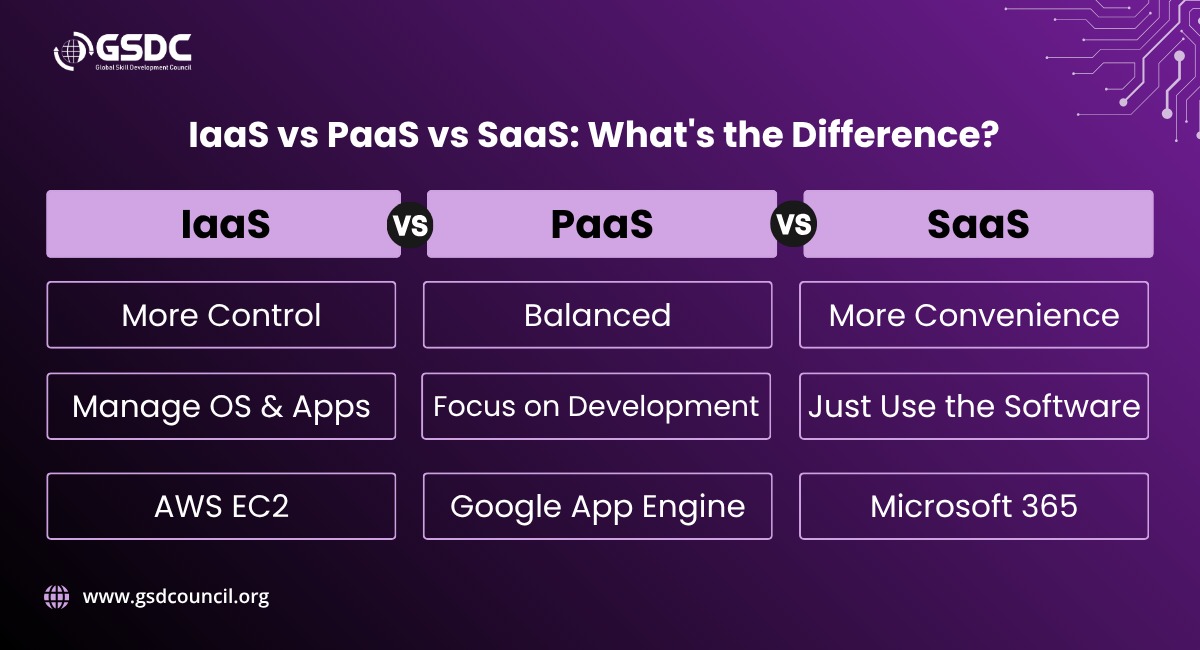
6. What's the real difference between IaaS, PaaS, and SaaS?
It comes down to control versus convenience. IaaS gives you the most control, since you manage almost everything above the hardware layer. PaaS strikes a balance, handling infrastructure while you focus on code. SaaS hands you a finished product with no management required. The right choice depends on how much a business wants to build versus how much it simply wants to use.
7. Why is cloud computing a smart option for hosting websites?
It removes the upfront cost of buying and maintaining physical servers. You pay for what you use, scale automatically during traffic spikes, and don't have to worry about hardware failures taking your site down.
8. Can you describe cloud computing architecture?
It generally has three layers: the front end (client devices and user interfaces), the back end (servers, storage, and databases), and the network layer connecting them over the internet. Security components like firewalls, encryption, and identity management sit across all three, and the service model you choose determines how much of that architecture the provider manages versus how much you manage yourself.
Intermediate and Scenario Based Questions
Once you're past the fundamentals, interviewers shift into scenario-based territory, the kind of applied thinking the Cloud Computing Foundation Certification (CCF) curriculum is built around, rather than pure definitions.
9. How would you set up disaster recovery for a business critical cloud application?
Start by defining your Recovery Point Objective (how much data loss is acceptable) and Recovery Time Objective (how much downtime is acceptable). From there, use cross-region replication or tools like AWS Backup or Azure Site Recovery to keep backups current, pick a failover approach, and test the plan regularly using chaos engineering tools like AWS Fault Injection Simulator.
10. What challenges come with running Kubernetes at scale?
A few big ones: autoscaling nodes efficiently, managing resource usage with horizontal and vertical pod autoscalers, handling service to service traffic with a service mesh like Istio, staying on top of observability with tools like Prometheus and Grafana, and locking down security with role based access control and image scanning.
11. How do you monitor cloud performance and troubleshoot problems?
Most teams rely on native provider tools: AWS CloudWatch for metrics and alarms, Azure Monitor for infrastructure and application insights, and Google Cloud Operations for real time logging. The goal is catching bottlenecks before they become full outages.
12. How does containerization improve cloud deployments?
Containers package an application with everything it needs to run, making deployments lightweight, portable, and consistent across environments. Because multiple containers can share a single OS, they use far fewer resources than virtual machines, and tools like Docker and Kubernetes make deployment and rollback much faster.
13. What is a service mesh, and why does it matter in cloud applications?
It's an infrastructure layer that manages communication between microservices. It handles traffic routing, enforces security through mutual TLS encryption, and gives teams visibility into request flows for debugging. Istio and Linkerd are common examples.
14. What is a multi-cloud strategy, and when does it make sense?
It means spreading workloads across more than one provider, say AWS and Azure together, to avoid depending on a single vendor and to build in extra resilience. Companies often do this to tap into a specific provider's strength, meet regional compliance requirements, or simply avoid putting all their eggs in one basket.
Core Concepts and Characteristics
15. What are the defining characteristics of cloud computing?
Agility (resources provisioned quickly and cost effectively), location independence (access from virtually anywhere), multi-tenancy (shared infrastructure across many users), reliability, and scalability.
16. What is a virtual private cloud, or VPC, and why does it matter?
A VPC is your own logically isolated slice of a public cloud, giving you control over IP ranges, subnets, and access policies. You can separate public facing and private resources and use security groups and network ACLs to control traffic.
17. What is a load balancer, and how does it work?
It spreads incoming traffic across multiple servers so no single one gets overwhelmed. Application load balancers work at Layer 7 and route based on content, while network load balancers work at Layer 4 for low latency routing.
18. What is IAM, and why does it matter?
Identity and Access Management controls who can access which cloud resources and what they're allowed to do once they're in. It follows the principle of least privilege and typically layers in multi-factor authentication for sensitive actions.
19. What role does Docker play in cloud computing?
Docker packages applications into portable, standardized containers that bundle in every dependency the app needs, making deployment consistent across AWS, Azure, Google Cloud, or anywhere else.
20. What is Kubernetes, and how does it relate to cloud computing?
An open source system for orchestrating containers across clusters of machines. It handles service discovery, load balancing, self healing, and automated rollouts, making containerized applications far easier to run across hybrid and multi-cloud environments.
21. What is microservices architecture?
A way of building applications as a collection of small, independently deployable services, each handling a specific business function, rather than one large monolithic codebase. Each service can be built, deployed, and scaled on its own.
AI, Serverless, and Cost Questions (Newer Territory)
22. What is serverless computing, and how is it different from IaaS or PaaS?
Serverless computing lets you run code without provisioning or managing servers at all, the provider handles scaling automatically, and you're billed only for the compute time you actually use, think AWS Lambda or Azure Functions. Unlike IaaS, you never touch the underlying infrastructure, and unlike most PaaS setups, there's no persistent server running in the background.
23. What is FinOps, and why is it relevant to a cloud computing role today?
FinOps is the practice of bringing financial accountability into cloud spending, giving engineering, finance, and business teams shared visibility into what workloads cost and why. As AI workloads push cloud bills higher, more companies expect cloud engineers to understand cost optimization, not just performance and uptime.
24. How is generative AI changing day to day cloud operations?
It's being used to write and review infrastructure as code, summarize logs during incidents, predict outages before they happen, and suggest cost saving changes automatically. It doesn't replace cloud engineers, but it is shifting the job toward reviewing and directing AI generated work rather than writing every configuration by hand.
25. What's the difference between horizontal and vertical scaling in the cloud?
Horizontal scaling adds more machines or instances to handle increased load (scaling out). Vertical scaling increases the resources of an existing machine, such as adding more CPU or RAM (scaling up). Most modern cloud native applications favor horizontal scaling because it's more resilient and easier to automate.
Cloud Computing Certification: How to Get One and Why It Helps
A good answer to interview questions only gets you so far if your resume doesn't back it up. This is where a cloud computing certification comes in, and it's one of the most common questions candidates ask after working through a list like this one.
Getting certified signals to hiring managers that you understand core concepts and security practices without them having to take your word for it. It also gives you structured, up to date material to study from, and it's genuinely useful leverage in salary conversations, since certified candidates are often shortlisted faster for cloud and DevOps roles.
Here's how to get cloud computing certification, step by step:
- Pick a certification path that matches your goals. A foundation level certification, like the Cloud Computing Foundation Certification, is a solid starting point if you're newer to the field or want to validate broad knowledge before specializing in a specific provider.
- Study the core domains, not just trivia. Focus on cloud architecture, service models, security fundamentals, and deployment strategies, the same areas interviewers pull questions from.
- Use structured resources. Look for expert led webinars and real world case studies rather than relying purely on documentation.
- Take practice tests before the real exam. This helps you get comfortable with the format and identify weak spots while there's still time to fix them.
- Register and sit for the exam, then keep the credential visible on your resume and LinkedIn profile. It's a small addition that makes a real difference in how recruiters screen candidates for cloud computing services roles.
The Global Skill Development Council (GSDC) offers the CCF along with a broader range of cloud and DevOps certifications, so it's worth a look if you want one place to plan your next few credentials rather than piecing it together elsewhere. With global spending on cloud computing services climbing every year, certified professionals are in a stronger position to negotiate both roles and pay.
Final Thoughts
Mastering cloud computing interview questions and answers isn't about memorizing definitions word for word. It's about understanding what cloud computing actually solves for businesses, how services like IaaS, PaaS, and SaaS differ in practice, and how AI is reshaping the way cloud infrastructure gets built and managed. Combine that understanding with a recognized certification, and you'll walk into your next interview with a lot more confidence than the version of you reading this right now.

Related Certifications
Stay up-to-date with the latest news, trends, and resources in GSDC
If you like this read then make sure to check out our previous blogs: Cracking Onboarding Challenges: Fresher Success Unveiled
Not sure which certification to pursue? Our advisors will help you decide!